1-Visitor
April 2, 2014
Solved

Solid Geomentry Mirror in Creo-2??

  • April 2, 2014
  • 3 replies
  • 6949 views

Can anyone help me how to do solid geomentry mirror in Creo-2?? where in wildfire-5 i had this option for solid geomentry mirror.

    Best answer by Mahesh_Sharma

    Hi Ananth,

    I think you would like to mirror the solid features in part, Select part name in Model Tree > Select Mirror in Editing group (By default it will remain inactive and will activate once feature or part is selected) > Select Mirror plane > Ok
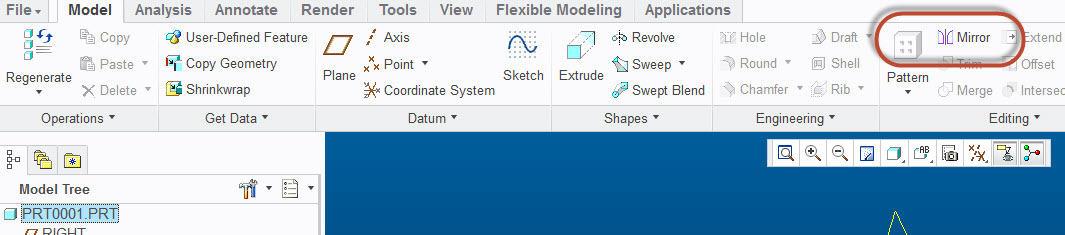
    Mirror.jpg


    3 replies

    17-Peridot
    April 2, 2014

    You can do a "save-as mirror" And you still have the mirror feature.

    1-Visitor
    April 4, 2014

    Thanks for suggestion...but its not matching my requirement...

    21-Topaz II
    April 4, 2014

    It used to be that you'd lick the model name at the top of the model tree, then click the mirror icon. I'm not sure where the mirror icon is in Creo and I'm in WF4 these days. I'm sure a command search for mirror would find it.

    17-Peridot
    April 4, 2014

    If you look at the file created using save-as, the last feature would be a mirror geometry feature.

    Mahesh_Sharma
    22-Sapphire I
    April 4, 2014

    Hi Ananth,

    I think you would like to mirror the solid features in part, Select part name in Model Tree > Select Mirror in Editing group (By default it will remain inactive and will activate once feature or part is selected) > Select Mirror plane > Ok

    Mirror.jpg


    17-Peridot
    April 4, 2014

    Unfortunately, this does not suppress or hide the original features. It simply adds the mirrored geometry.

    The Save-As version can be fully independent and uses a Mirrored-Merge feature which cannot be initiated in the active part. This is done by re-creating the full feature set and then doing a single mirror-merge function on the part similar to what you are suggesting. The only downside is that you cannot move the "insert here" bar above this feature in the model tree.

    mirror_model.PNG

    17-Peridot
    April 4, 2014

    Of course, the next question is... if you already have the drawing for the first part, how do you have that drawing go with the save-as part so you don't have to start over