
1-Visitor
February 4, 2016
Question

Adding a Cascading Menu to the Ribbon with Creo Parametric Toolkit

  • February 4, 2016
  • 2 replies
  • 5100 views

I'm migrating several Creo Parametric Toolkit (aka Pro/Toolkit) and JLink applications to Creo Parametric 3.0. Each of these tools was originally written to populate the old File/Edit/View menubars. The C programs currently use ProMenubarMenuAdd and its related functions, all of which are deprecated in favor of the ribbon UI.

One program in particular may not fit into the ribbon. It creates a run-time menu with deep cascading submenus, similar to what this picture illustrates:
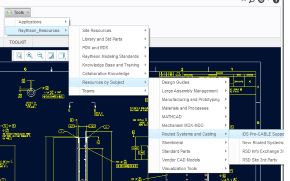
Deep Menus.jpg

The contents of these menus are defined in a text file that the site administrator can edit as needed, which I believe was the most appropriate design decision (and, no, I am not the original author of this code : ) ).

Does anyone know a way make a ribbon button do this? The only way I can think of is to define dashboard that dynamically populates a MenuBar UI component with a series of MenuPanes, CascadeButtons and Pushbuttons, all constructed at run-time. That's way more work that I can justify right now.

And, no, I don't think a pop-up menu is a feasible option here.

Did I miss something?  Is there a straightforward way to do this in the ribbon?

Thanks -

|+|  M a r k  |+|


This thread is inactive and closed by the PTC Community Management Team. If you would like to provide a reply and re-open this thread, please notify the moderator and reference the thread. You may also use "Start a topic" button to ask a new question. Please be sure to include what version of the PTC product you are using so another community member knowledgeable about your version may be able to assist.

2 replies

12-Amethyst
February 4, 2016

Mark,

You might consider using the input text file to generate hyperlinks within an HTML file. You could then create a new tab in the navigator pane to display the generated file. Similar to the screen shot below.

Just a thought...

Mike

15-Moonstone
February 16, 2016

hi Mark,

I don't know if you already had a solution for this.

In Creo you got the ribbon bar. So you need to create a ribbon definition file and place it inside the text directory of your application. The std. name is toolkitribbonui.rbn.

So you can create your std. ribbon and write it out from Creo with Import / Export --> Auxiliary Application file ... (don't know have the german UI activated at the moment, but it should something with auxilary application inside ^^).

Inside the ribbon you can get drop down menus on the title bars of the groups.

Br,

Eike

1-Visitor
February 17, 2016

Eike -

Thank you for replying to my post. I don't have any problems creating ribbon groups and buttons, in fact, I just migrated several Pro/Toolkit and JLink applications to the ribbon UI. The problem I have is duplicating the multi-level "cascading" menus I showed in my original post (I probably should have used a different term than "cascading menus". The ribbon UI does support a pull-down called a "Cascade", but it can only be one level deep and cannot be populated by an application).

I don't think the ribbon UI will support the menus I need. Rather, I think it's necessary to create .res files for a dialog or dashboard.

Inside the ribbon you can get drop down menus on the title bars of the groups.

That drop-down is called the "overflow" menu for the ribbon tab group:

Overflow.png

And, you're right, Creo users can create and populate overflow menus. I'm very glad that this is possible because some tools are used less often than others.

That won't help with this problem, though. Overflow menus still contain menu buttons. I can't put a cascading menu inside there.

|+|  M a r k  |+|

1-Visitor
February 26, 2016

Hello Mark,

that's right! The one level only cascading, is a general limitation of the User Interface. It is not related to Pro/TOOLKIT.

Thanks,

Gunter