3-Newcomer
June 28, 2024
Solved

How to use custom symbols

  • June 28, 2024
  • 2 replies
  • 2468 views

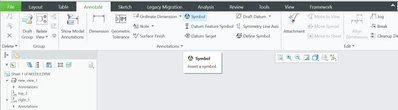
Hello everyone, I cannot for the life of me find a way to use custom symbols I created. I created a symbol using "define symbol", but when I go to use it in "symbol", it is not there. At my last company, I was able to select "custom symbol", but it's not giving me that option here. Thank you in advance. 
YS_11267351_0-1719612443232.png


Best answer by MartinHanak

@YS_11267351 wrote:

Hello, thanks for replying. 


Q1: I'm using Creo 11

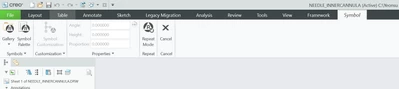
Q2: It goes to the below screen. Symbol customization is only for customizing existing symbols :(, not putting new symbols I created/customized.

YS_11267351_0-1719851124802.png


Hi,

I uploaded Creo11 short video. HIH,

2 replies

tbraxton
22-Sapphire II
22-Sapphire II
June 29, 2024

Legacy Migration tab shows in your screenshot, this would imply you are on Creo 9 +: About Creating, Redefining, and Inserting Symbols (ptc.com)

3-Newcomer
July 1, 2024

Hello, thanks for replying. My legacy migration tab still shows the same symbol option (no dropdown or additional buttons for custom symbols :(. Do you think I need to customize my top bar?


YS_11267351_0-1719851018640.png


24-Ruby III
July 1, 2024

Hi,

Q1: What Creo version do you use?

Q2: What does happen when you click Symbol button?

3-Newcomer
July 1, 2024

Hello, thanks for replying. 


Q1: I'm using Creo 11

Q2: It goes to the below screen. Symbol customization is only for customizing existing symbols :(, not putting new symbols I created/customized.

YS_11267351_0-1719851124802.png


24-Ruby III
July 1, 2024

@YS_11267351 wrote:

Hello, thanks for replying. 


Q1: I'm using Creo 11

Q2: It goes to the below screen. Symbol customization is only for customizing existing symbols :(, not putting new symbols I created/customized.

YS_11267351_0-1719851124802.png


Hi,

I uploaded Creo11 short video. HIH,