14-Alexandrite
November 30, 2021
Solved

Prehighlight selection issue

  • November 30, 2021
  • 1 reply
  • 1685 views

Struggling to keep option pre-selected on closing and reopening. Any ideas please. What file is this stored in when loading?
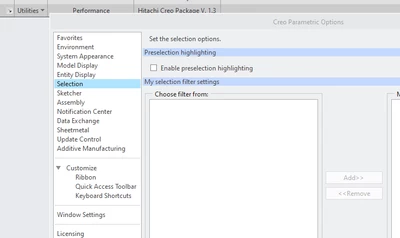

 

RH_10122575_0-1638266575577.png


Best answer by tbraxton

Add the following option to your config.pro file. Assign the value to yes if you want it on when launching Creo.


prehighlight to yes/no


If you are unfamiliar with config.pro files see this link.

https://www.ptc.com/en/support/article/CS103179 

1 reply

tbraxton
22-Sapphire II
tbraxton22-Sapphire IIAnswer
22-Sapphire II
November 30, 2021

Add the following option to your config.pro file. Assign the value to yes if you want it on when launching Creo.


prehighlight to yes/no


If you are unfamiliar with config.pro files see this link.

https://www.ptc.com/en/support/article/CS103179 

14-Alexandrite
December 6, 2021

I tried this but does not stay selected on restart. Any ideas what might be stopping this.


tbraxton
22-Sapphire II
22-Sapphire II
December 6, 2021

Verify that the config option is set to the desired value in the current session. 


You can query this using the configuration editor with the filter set to current session as shown here. If the config option is not set correctly then it is not being loaded when Creo is started or is overridden by another config. If it is not set, then you can read in a test config.pro manually to load the option for testing.


tbraxton_0-1638797454721.png


Do you know if there is a config.sup file that is read when starting Creo? If so this could be preventing the config option being set to the desired vlaue.