
17-Peridot
July 26, 2013
Question

How do you manage springs

  • July 26, 2013
  • 5 replies
  • 13939 views

I need some tips for good model management. This is a challenge I know I can work around, but I would like to know how you take on this challenge.


Also please confirm if you actually use your technique in production or if this is a what you consider your best take on the subject.


I am working on a model and drawing for the ISIS I orb. It has a half dozen springs in the assembly and several levels of subassembly.


I have all the springs modeled as free-length (suppressed in the model) and as-used length (separate model).


The cross section on the drawing and in the model looks -perfect-...(!)
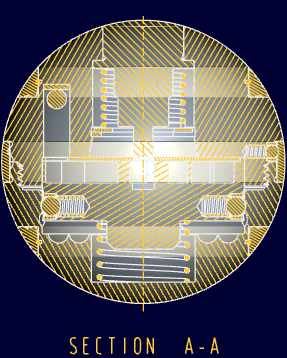
 

isis_section.PNG


... and then I embark on the exploded view realizing I want to swap out the sprung springs for the unsprung springs.


My first instinct is to add the unsprung springs to the drawing so I can delete the suppressed components in the model (1) PDM BOM accuracy consideration) (2) file export consideration)


My second instinct is to manipulate the two versions of the springs on layers (...never like layers in Pro|E; better in Creo)


But there are inklings that says we can make this challenge work more fluently.

  • What comes to mind is use of family tables for the springs but this would mean extra parts in the model (doesn't solve BOM/PDM issue)
  • Combined states should be able to solve this dilemma but the master rep would have both lengths shown.
  • Flexible components cannot change length from one view to another; not much help.
  • I could take meds for my OCD and get on with life.

There are two situations also under consideration but are less obvious to a solution but worth considering.

  • The assembly model exploded view -should- swap out the sprung springs with unsprung springs when viewing the exploded view. This is a candidate for view states.
  • Also, detent springs actually have 3 states; unsprung (for part drawings), installed (for subassembly drawings), and actuated (for top level drawing).


Besides the coil springs, there are also 3 other components that have a sprung and unsprung state. The total is 10 flexy components in a ~33 component assembly.


How would you tackle this challenge if your employer was a stickler for accuracy?


This thread is inactive and closed by the PTC Community Management Team. If you would like to provide a reply and re-open this thread, please notify the moderator and reference the thread. You may also use "Start a topic" button to ask a new question. Please be sure to include what version of the PTC product you are using so another community member knowledgeable about your version may be able to assist.

5 replies

Patriot_1776
22-Sapphire II
July 26, 2013

Check you personal e-mail.

12-Amethyst
July 26, 2013

Hi Tom.

If I understand you correctly then this is a candidate for Family Tables.

You would have a high level FT of your assembly with an instance for the Exploded and Non-exploded states.

This allows you to have each sping state (in your case separate models but could be FT themselves) and you have each high level instance in your drawing and only report your BoM on one of those and therefore be correct.

Seems relatively straightforward but probably means I am missing something.

Oh yes forgot to say have used this technique serveral times over the years.

Regards. Brent

17-Peridot
July 26, 2013

Family tables huh. Interesting thought. Haven't used them in the past but this sounds correct.

What will the master model present? Will it include all versions or only that which you specify?

12-Amethyst
July 27, 2013

Hi Tom.

You can approach this a couple of ways. It is possible to use the Generic (the top level of the Family Table) as the master and have only one instance for the model you want to use for your exploded view. Or you can have the Generic the same as that but have an Instance for each state you want in the drawing. No right answer. The big thing with FT is to do all the manipulation in the Generic. Easy mistake is to do work in an Instance then when you go back into the model some stuff is not how you thought it would be. Do the work in the Generic solves this. When you are ready good tip is to use the check box for verify instances before saving. People who work with FT will be familiar with this but not intuitive for learners.

Lets go with the first method of using the Generic as your master. This means you have your tree just like you do now with the compressed springs and everything in place. Anything else is suppressed if there are extra models such as your uncompressed springs. Make a Family table and add an Instance (call it Exploded if you like) BUT do not add anything yet. Save your model. Now suppress the compressed springs and resume the uncompressed ones. Open the FT dialogue and add these uncompressed parts (tree or model window). Verify the instance. Open the Instance and check that it has the parts you want and if not go back to the Generic model to fix it. Not sure if you make your explode in the instance or the Generic with the uncompressed parts, you will have to try that out. Save the Generic should lock in all the info. Same process for another state.

If you are making a new drawing then add the Generic first with any views you want (assuming you want to use the Exploded Instance for a BoM Table). Then Add the Exploded Instance to the drawing and make sure this model is set. Add your exploded view and do the BoM Table/Balloons. You can set either model to be what use at that time in your drawing but it is easy to get mixed up so best to do everything you want on one model at one time.

I think I would use a FT for the springs themselves rather than extra parts as this would mean only one "part" to manage. Management of the top level FT takes a little more effort in the FT dialogue box but easy enough when you get the the hang of it.

Hope this helps enough as I am away from ProE/Creo at the moment until Monday our time. Also hope that this is not to condescending for you.

Regards, Brent

14-Alexandrite
July 29, 2013

To add to some confusion and complexity for you, you can looks at using the look up instance function if your assembly model had parameters that would drive the spring height.

If you search help center for "lookup instance" you should find this. If you want more specifics I would be more than willing to help.

To Replace Family Table–Driven Components

You can automatically replace family table–driven components according to design criteria by using the lookup_inst function. With this function, you can search a component family table to find an instance that fits the values of the search parameters. If the lookup function does not find a match, it returns the name of the generic.

The format for lookup_inst is:

lookup_inst ("generic_name", match_mode, param_name_1, match_value_1, param_name_2, match_value_2,...)

where

  • generic name—Name of the generic model with a prt or asm extension
  • match_mode—One of the following values:
    • –1 (find closest instance with param values less than or equal to supplied values)
    • 0 (find instance with param values that match supplied values exactly)
    • 1 (find closest instance with param values greater than or equal to supplied values)
  • param_name_1—Family table parameter name
  • match_value_1—Value to match against

Here is the example.

Example: Replacing Family Table-Driven Components

Given an assembly that consists of a block and a peg, assemble the instance that matches the diameter of the hole in the block.

inst_name = declared string parameter initialized to generic part name

generic_name = peg.prt. This part contains a number of instances based on diameter dimension (d) and length dimension (d1).

Family instance names of peg.prt include:

2 x 4 - d0 = 2, d1 = 4
2 x 5 - d0 = 2, d1 = 5
2 x 6 - d0 = 2, d1 = 6
3 x 4 - d0 = 3, d1 = 4
3 x 5 ............
3 x 6 ............

Add a relation to the control in which peg.prt is added to an assembly controlled by dimensions of a feature in block.prt. The relation is:

inst_name = lookup_inst ("peg.prt", 0 , "d2", d6:0, "d1", d5:0 +1)

In this way, the instance of peg.prt being assembled to blockpeg.asm is controlled, based on the dimensions of the hole in block.prt.

The Pro/PROGRAM listing would look like this:

INPUT
END INPUT
RELATIONS
INST_NAME = LOOKUP_INST ("PEG.PRT", 0, "D2", D6:0, "D1", D5:0 + 1)
END RELATIONS
ADD PART BLOCK
INTERNAL COMPONENT ID 1
END ADD
ADD PART (INST_NAME)
INTERNAL COMPONENT ID 2
PARENTS = 1 (#1)
END ADD
MASSPROP
END MASSPROP

17-Peridot
July 29, 2013

Hey Andrew, that is excellent It may not be relevant in my quest but I do understand how this can be useful.

1-Visitor
July 29, 2013

Just adding this in late, but how about using Interchange Assembly and Pro/Program?

17-Peridot
July 29, 2013

There is no such thing as late in this discussion. It is an exploratory discussion to ferret out the best way to achieve a real world operation.

I have never used Pro|Program and I know nothing about Interchange Assembly. Please expand on your thought.

1-Visitor
July 30, 2013

Tom,

I think you really should use flexible parts for springs.

You only have one spring (can even be a family table part) and tie one driving dimension to a distance in the assembly to achieve different lengths. I think Creo solves this by switching the spring to an internal family table spring transparent to the user.

If the distance in the assembly changes, the spring will adapt. In mechanism you have to regenerate.

In short, one model per spring, compressed length through flexible parts. No need to clutter your database with springs of compressed length.

In really large assemblies performance may suffer.

Reinhard

edit

The same applies to O-rings where I make inner diameter and cord diameter flexible. I do not model the deflection of the ring.

- Flexible components cannot change length from one view to another; not much help.

please elaborate

- The assembly model exploded view -should- swap out the sprung springs with unsprung springs when viewing the exploded view. This is a candidate for view states.

dont know about that

- Also, detent springs actually have 3 states; unsprung (for part drawings), installed (for subassembly drawings), and actuated (for top level drawing).

--unsprung (for part drawings) will be shown as modelled

--installed (for subassembly drawings) will be shown as built in

--actuated (for top level drawing) will be shown as built in

17-Peridot
August 2, 2013

OUCH OUCH OUCH ! ! !

SERIOUSLY ? REGEN ?

We need the little puke smiley so we get a green dot up there.

Q: "How many time to you have to regenerate to turn off the stupid little yellow light?"

A: "WAY TO MANY!"

So a flexible spring with 20 turns x 2 is some serious overhead in a 3-instance family table assembly.

Lesson: Move the flexible spring to the end of the tree and move the "insert here" above it while working on the assembly.

Regeneration was an absolute nightmare and time sink.

I was dealing with huge corruption issues on the assembly file. I replaced one of the springs and the squishable o-ring and the family table just went on a wild tangent. None of the states were accurate; zero positions for mechanism constraints became arbitrary; Regen warnings were off the charts.

I ended up deleting the family table and removed all flexible models and unconstrained everything (~20 parts). I started over! All new constraints, all new flexible components; all new family table - 2 hours!

Good news: No errors in regen and all the instances were now stable and reliable. Uuuugh!

...and I haven't even got to the drawing yet!

Next, my assembly drawing has 3 instances and the generic assembly. Although my assembly way perfectly happy now (green light), the drawing has all model instances displaying yellow lights. Regen, regen, regen... more regens! and finally... whoohoo! green light ...though very short lived.

I had to set up an exploded view in model, of course, more yellow lights. I had to create some view states... more yellow lights. Yellow lights and "model has not changed..." huh? More regens!

And when it does regen, those springs are 100+ regeneration features. x3 ...x2. Easily an hour of regen time in 2 days work. Lesson: learn to manage your regen times.

So what did this teach me?

Allow for extra time to manage dynamic assemblies. Lots of extra time. in a 20 hour project, easily 25% of the time was managing the various dynamic aspects. Okay, fine. I can compensate for this as long as I know to consider this.

Again, I am not a novice at this. I have been using Creo nearly every day since it came out. I can make some pretty nice little mechanism widgets; flexible components are fairly straight forward; and even family tables are fairly basic. And I have 2 projects (1 personal that started this thread, and now a client model) and the work on the personal project really helped me manage the client project more effectively. But the whole system is highly sensitive.

So what about the fallback option?

Yes, the extra model concept. Could I have done this faster with multiple models? A spring for each; an assembly for each; 3 separate assemblies; no mechanism constraints?

Honestly, right now it is a trade-off.

The reason I say this is that during dynamic development requirements, the integrated system is extremely touchy. For a family table to "break" from replacing components in the assembly is not acceptable. Having mechanism constraints move their zero translation position is unacceptable. Having flexible components loose their "distance" values is also unacceptable. Does any of this sound familiar to any of you?

Okay, so I am venting... And I know the best teacher is experience, and I am not yet experienced in all aspects of using these very powerful features, but again, I am not a novice. It really shouldn't be this hard to create a sustainable dynamic model.

Back to regens... what is up with all these yellow lights? We need a button that says "regen all levels". This is most frustrating in drawings.

And... anyone else having PDF generation quit and then succeed the next time? This is getting to be prominent issue. Almost like it times out.

Patriot_1776
22-Sapphire II
August 14, 2013

Wow! Sorry to hear that. I only had one or 2 springs in my assembly, and a fairly small one, so I noticed no issues with that, thanks for the heads up!

The parts for my design just came in, and I just got back from my trip, so I won't be on here much, but I'll try and help where I can.

I TOTALLY agree on the regen issue, it's been a pet peeve since I started on Pro/E.

We cancelled our trip to Snohomish since my friend was having major back issues, but I'm kind of glad we didn't make it, as I think if so I'd have worn out my tire somewhere in WY on the way back with those extra 800+ miles on it.....

Best of luck!

17-Peridot
August 14, 2013

Hope you had fun anyway, Frank. Some beautiful country here out west. I'd really like to tour the region on my recumbent trike.