

How to set up and configure Schedulers
- Create a new Thing using the Scheduler Thing Template.
- The Scheduler Thing will fire a ScheduledEvent Event when the configured schedule is fired. The event is automatically present and does not need to be added manually.
Configuration
- The Scheduler Configuration is quite straightforward and allows for an exact setup of schedule based on units of time, e.g. seconds, minutes, hours, days of week etc. It can be accessed via the Thing's Entity Configuration
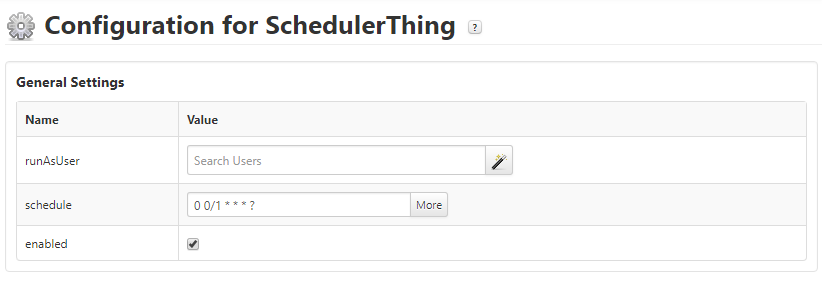
- Configuration allows for
- Changing the runAsUser context - in which the Events will be handled. The user will need visibility and permission on e.g. executing Services or depending Things, which are required to run the Service triggered by the Event.
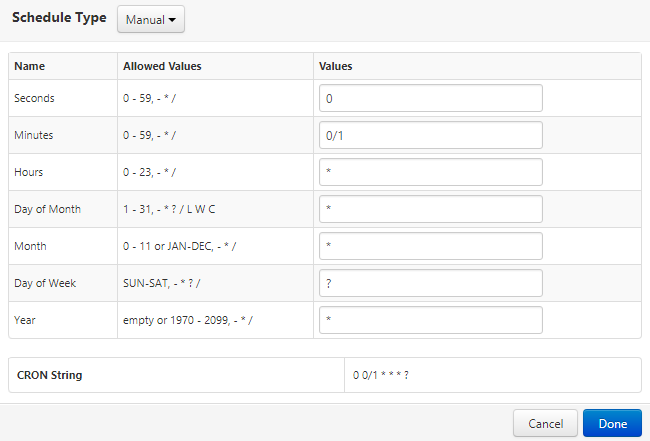
- Changing the Schedule - in which time the Events will be fired (by default every minute). The schedule is displayed in CRON String notation and can be changed and viewed in detail by clicking on "More". The CRON String will be generated automatically based on the inputs.
- Schedules can be configured in Manual mode - allowing for full configuration of each and every time based attribute.
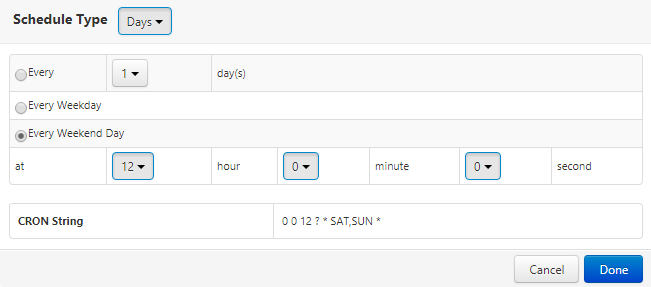
- Schedules can be configured for a specific time Type - allowing for configuration only based on seconds, minutes, hours, days, weeks, months or years.
- Below screenshots show schedules running every minute and every Saturday / Sunday at 12:00 ("Every Weekend Day").
Services
- Scheduler Things inherit two Services by default from the Thing Template
- DisableScheduler
- EnableScheduler
- These will activate / de-activate the Scheduler and allow / disallow firing Events once a scheduled time is reached
- If a Scheduler is currenty enabled or disabled can be seen in its properites
