1-Visitor
September 29, 2022
Solved

Run app without administrator permissions

  • September 29, 2022
  • 2 replies
  • 4962 views

Hello Everyone,


We have applied a policy that has removed our administrator permissions.
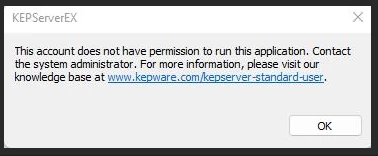


AI_10435848_0-1664437020693.png


Its possible to execute the application without admin rights?


Thanks a lot!



Best answer by TimbalerDelBruc

I've found the solution :


  • For new installations non-admin users need to be given read and write permissions to KEPServerEX application data folder (default: C:\ProgramData\Kepware\KEPServerEX 6\).
    • Without these permissions they will not be able to launch the Administration or Configuration utilities, nor the runtime service in interactive mode
  • For upgrade installations the installer does not alter permissions 
    • by default any standard windows user will continue to be able to use the application
    • the user should refer to the documentation on setting up Active Directory permissions to lock down access to the Application Data folder


regards,


2 replies

24-Ruby III
September 29, 2022

Hi,

please ask PTC Support.

TimbalerDelBruc1-VisitorAuthorAnswer
1-Visitor
September 29, 2022

I've found the solution :


  • For new installations non-admin users need to be given read and write permissions to KEPServerEX application data folder (default: C:\ProgramData\Kepware\KEPServerEX 6\).
    • Without these permissions they will not be able to launch the Administration or Configuration utilities, nor the runtime service in interactive mode
  • For upgrade installations the installer does not alter permissions 
    • by default any standard windows user will continue to be able to use the application
    • the user should refer to the documentation on setting up Active Directory permissions to lock down access to the Application Data folder


regards,