3-Newcomer
February 6, 2025
Solved

Trying to add AutomationDirect CLICK C0-11DD2E-D PLC

  • February 6, 2025
  • 1 reply
  • 809 views

Hello,

I'm attempting to add a AutmationDirect CLICK PLC

to our Kepware environment, but not seeing this option for the Automation Direct drivers


Anyone ever configure one of these before?


Thanks in advance

Best answer by rajskumar

Hello, Thank you for contacting us.

It seems it supports the Modbus TCP/IP protocol. To connect this PLC using Modbus TCP/IP to Kepware, you need to follow the steps below:
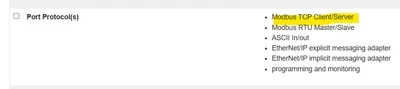
rajskumar_1-1738846893997.png


In Kepware, 

  • Right click on Connectivity and Add New Channel of Modbus TCP/IP Ethernet and change name as per requirement
  • Right click on Channel and Add New Device and change name and IP as per requirement(Modbus default port is 502 but you can confirm with device vendor)
    • Refer this article for ID details in Kepware
  • Add tags based on how it is defined in device
    • Refer driver manual for Modbus Addressing here  

    •  
      rajskumar_4-1738846955361.png


Before start , please check if you can Powershell Test-NetConnect to the device on the port KEPServerEX is trying to use.
 
Powershell has a built in commandlet that can help prove or disprove TCP socket connectivity
Command Syntax: Test-NetConnection [host] -Port [port number]
Example: Test-NetConnection 255.255.255.255 -Port 502

1 reply

rajskumar16-PearlAnswer
16-Pearl
February 6, 2025

Hello, Thank you for contacting us.

It seems it supports the Modbus TCP/IP protocol. To connect this PLC using Modbus TCP/IP to Kepware, you need to follow the steps below:

rajskumar_1-1738846893997.png


In Kepware, 

  • Right click on Connectivity and Add New Channel of Modbus TCP/IP Ethernet and change name as per requirement
  • Right click on Channel and Add New Device and change name and IP as per requirement(Modbus default port is 502 but you can confirm with device vendor)
    • Refer this article for ID details in Kepware
  • Add tags based on how it is defined in device
    • Refer driver manual for Modbus Addressing here  
    •  
      rajskumar_4-1738846955361.png


Before start , please check if you can Powershell Test-NetConnect to the device on the port KEPServerEX is trying to use.
 
Powershell has a built in commandlet that can help prove or disprove TCP socket connectivity
Command Syntax: Test-NetConnection [host] -Port [port number]
Example: Test-NetConnection 255.255.255.255 -Port 502

3-Newcomer
February 6, 2025

Awesome, thanks for this info