

Question
Direct interface to export BOM to Excel
Target group:
All users who process BOM data in Microsoft Excel.
Advantages:
- Flexible export from Creo Parametric to Microsoft Excel
- Visual Basic macros in Excel are not required anymore
Usage:
 Following options are available:
- export with usage of VBA macros
- usage of direct interface (recommended)
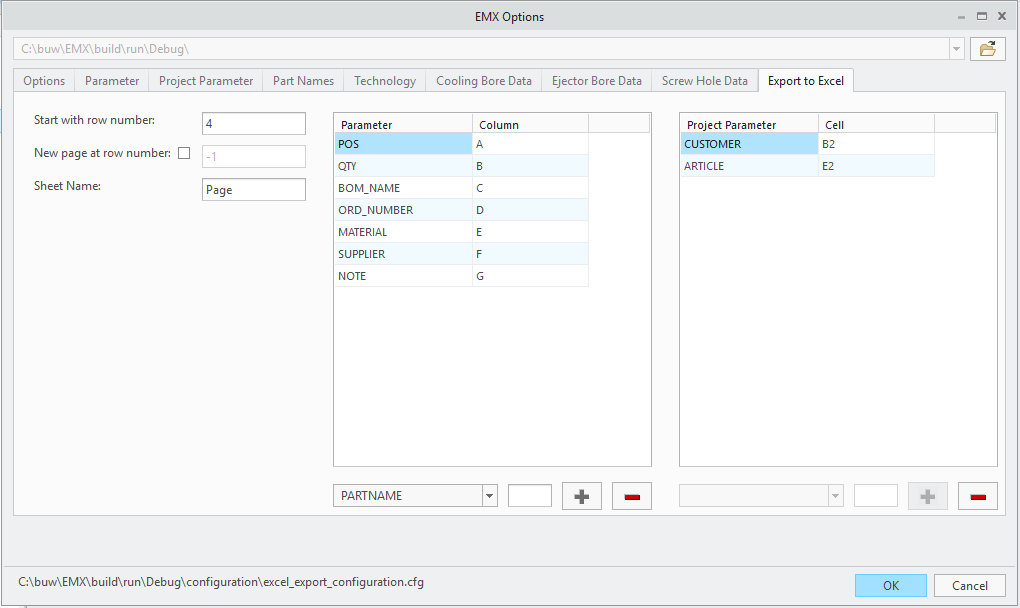 Settings can be adjusted in EMX Options dialog:
- Row number to start with
- Page break at row number
- Name of sheet
- Assignment of EMX parameter to Excel column
- Assignment of EMX project parameter to Excel table cell
Result in Excel
Availablity:
Since Expert Moldbase Extension 12.0.0.0, 11.0.2.1, 10.0 M031.