
1-Visitor
August 10, 2023
Solved

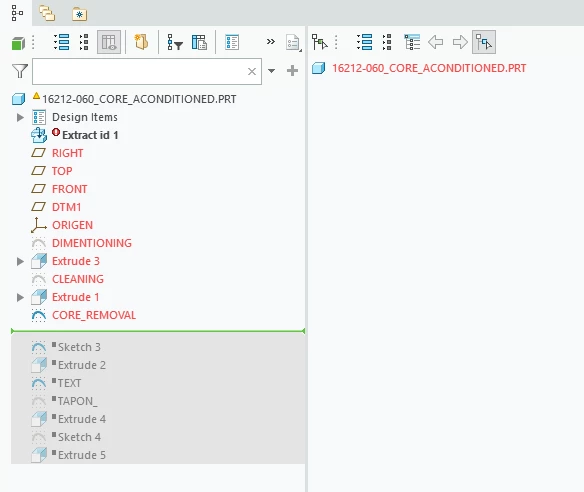
Extract id 1 "turns red"

  • August 10, 2023
  • 2 replies
  • 1680 views

When working a 3d.prt  generated in MANUFACTURING-MOLD CAVITY (CREO V 9.0) for mill it, frequently turns "RED" the file pointing to:  Extract id 1 REGENERATION FAILED.

Q: Why this happen and how to avoid it?

Thanks in advance.

ELIScreenshot 2023-08-10 113625.png
 

Best answer by KenFarley

Not familiar with the mold design tools since we don't have them, but that looks like the kind of error you get if the part is created directly from another type of file, but that "parent" file is not currently in memory. Thus Creo has no idea how to create the "Extract id 1" feature. If you look in the text area at the bottom of your main graphics window, there are often messages there telling you what is wrong. Maybe those messages will give you more detail as to what is the trouble?

2 replies

KenFarley21-Topaz IIAnswer
21-Topaz II
August 10, 2023

Not familiar with the mold design tools since we don't have them, but that looks like the kind of error you get if the part is created directly from another type of file, but that "parent" file is not currently in memory. Thus Creo has no idea how to create the "Extract id 1" feature. If you look in the text area at the bottom of your main graphics window, there are often messages there telling you what is wrong. Maybe those messages will give you more detail as to what is the trouble?

1-Visitor
August 10, 2023

I SHALL TRY IT

THKS