1-Visitor
May 4, 2016
Solved

Module Works was Right!!

  • May 4, 2016
  • 2 replies
  • 3835 views

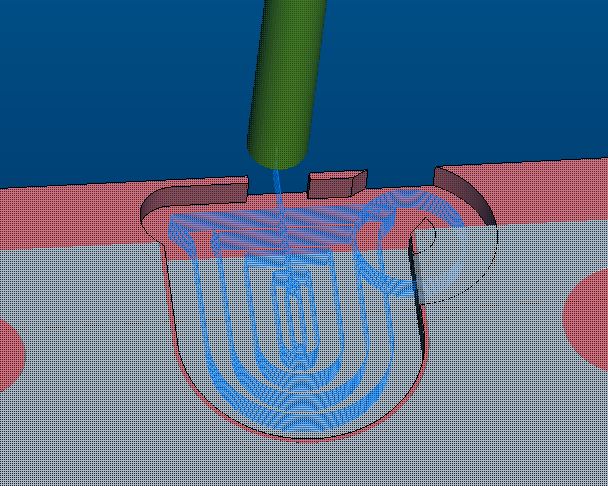
I had a part with 4 of the same cuts in it so I programmed the first 1 then Mirrored it to the second third and 4th location then ran play path and everything cut fine. I then ran Module works and it showed the cut cutting outside of the windowed cut so I turned in a case about module work showing gouges or collisions where play path didn't. I started a support case#13023191 where Module Works gouges and play path doesn't
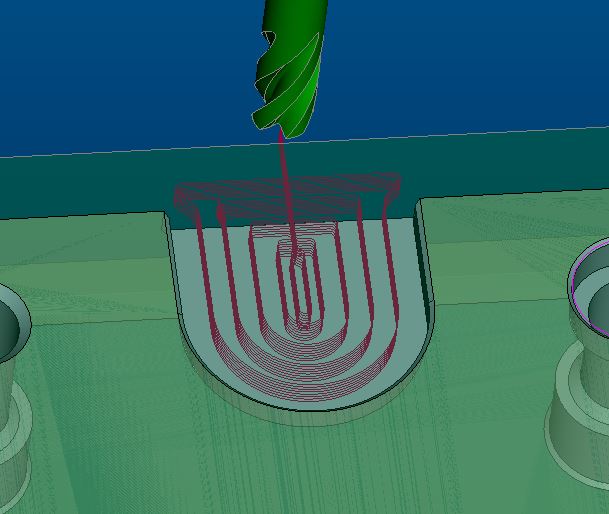
play_path-looks okay.JPG

ModuleWorks Image

module works is not okay.JPG

Actual part cut image

part cut .JPG

I wasn't sure which to trust. So now the issue goes to why is play path not showing the proper tool path?


This thread is inactive and closed by the PTC Community Management Team. If you would like to provide a reply and re-open this thread, please notify the moderator and reference the thread. You may also use "Start a topic" button to ask a new question. Please be sure to include what version of the PTC product you are using so another community member knowledgeable about your version may be able to assist.
Best answer by James62

Yeah, it's a rule of thumb in Creo, avoid mirrors at all costs. Only things that work with a mirror are sketches and curves, and i'd avoid doing that anyway. I always just use paste special.

Why on earth would Creo 3.0 not show the wrong paths in play path i have no idea, seems like a bug.

2 replies

1-Visitor
May 4, 2016

Damn. What version of Creo did that?

1-Visitor
May 5, 2016

James,

It is Creo3.0 M090. I suspect it is the way I programmed it. with just 1 window or volume and programmed cut then mirrored everything. My fix was to go back in and just mirror the window or volume and not the cut then it worked fine. It still is a software bug I believe. You should be able to do it the original way I did it without error.

James621-VisitorAnswer
1-Visitor
May 5, 2016

Yeah, it's a rule of thumb in Creo, avoid mirrors at all costs. Only things that work with a mirror are sketches and curves, and i'd avoid doing that anyway. I always just use paste special.

Why on earth would Creo 3.0 not show the wrong paths in play path i have no idea, seems like a bug.

10-Marble
May 12, 2016

For mirrored NC sequences, it seems that toolpath displayed in Toolpath player and toolpath generated into the CL file are diffrerent. We had similar problem few moths ago.

1-Visitor
May 12, 2016

Yes they are different I believe it's a software issue. If you  are allowed to mirror the sequence it should follow the original sequence.