
1-Visitor
October 19, 2015
Solved

ptc creo 3 - ramp angle

  • October 19, 2015
  • 5 replies
  • 6377 views

dear friends;

we are using creo 3 for cam programming , in roughing program although I mentioned ramp angle as 5 degree /less than 90 , cutter directly plunging on the material with out taking any ramp, does any one know the reason ? I am using volume and window .
Best answer by RaphMORIN

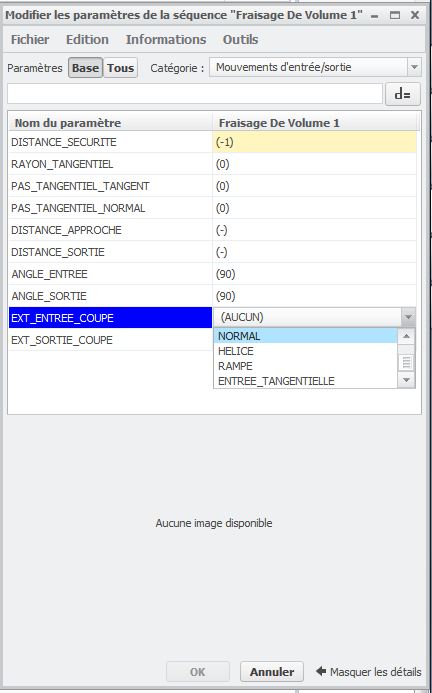
Hello, if you're using the new volume milling sequence you must specify a ramp entry. With the old volume sequence (Creo 2 and before) we didn't have to specify this, as soon as we were defining a ramp angle, the approach movement was a ramp.

5 replies

1-Visitor
October 19, 2015

if you use this site file and then change the ramp angle from 90 to 3 degrees it should work. If you want a helical entry change the "helical_diameter" to whatever diameter you want. If you want ramp then change that to "0"

RaphMORIN16-PearlAnswer
16-Pearl
October 19, 2015

Hello, if you're using the new volume milling sequence you must specify a ramp entry. With the old volume sequence (Creo 2 and before) we didn't have to specify this, as soon as we were defining a ramp angle, the approach movement was a ramp.

1-Visitor
November 2, 2015

Hello Sreemesh,

did you try the suggestions? Did they help?

Please consider marking posts as correct, if they help you solving issues (only one allowed per thread, so you have to decide, if multiple posts are helpful)

Thanks,

Gunter

1-Visitor
November 23, 2015

it is not solved

1-Visitor
December 17, 2016

This is a correct solution thank you.

1-Visitor
January 24, 2017

ramp angle.png

refer the above image and change it the tool will move according to the entry which you are going to select