
15-Moonstone
January 13, 2021
Solved

Error "Conversion failed. Could not start Mathcad conversion process".

  • January 13, 2021
  • 2 replies
  • 7492 views

Issue:

  • Error "Conversion failed. Could not start Mathcad conversion process" while converting legacy Mathcad worksheets in Mathcad Prime

OR

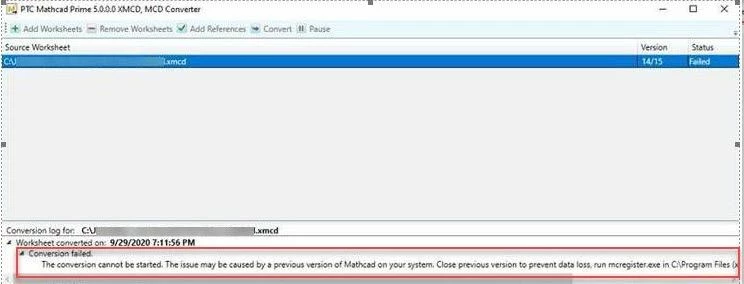
  • Mathcad Prime with parallel installed Mathcad 15.0 does not convert .xmcd files to .mcdx with error message:
    Mathcad conversion process could not be started.
 

conv.jpg


Resolution:

There are two options to resolve this issue:


Option I:

  • Find Mathcad Prime shortcut on desktop > right mouse click > Properties
  • Select Compatibility tab
  • Under Privilege Level section check option check Run this program as an administrator
  • Apply > OK

Option II:

  • Click Start > Programs > Administrative Tools > Component Services
  • Under Component Services, select Computers > My Computer > DCOM Config
  • Select Mathcad, right-click, then select Properties
  • Select the Security tab
  • Click #Edit under #Access Permissions
  • Select the System User and allow Remote Access rights
Best answer by GerardLardner

They did help, and remarkably quickly.


I don't know if this is universal or just my PC, but the AlfaSoft tech guy in Sweden checked to confirm that the Mathcad 8.0 Installation Assistant did indeed not run on my PC and that nothing obvious was blocking it. He then tried Mathcad Prime 9.0 and that did run, did install Mathcad Converter and... it works!


Could it be that there is an incompatibility between the Mathcad 8.0 Installation Assistant and Windows 11? I don't know. I just know that the problem was solved by upgrading me to Prime 9.0.

2 replies

1-Visitor
January 14, 2022

Hi,

I'm getting the same error. I'm trying to convert some Mathcad 15 files and use them in Prime 7.0.0.0 (trail license). 


Above solutions didn't work. Any idea how to convert them otherwise?


Cheers,

Ali

24-Ruby III
January 14, 2022

 Hi Ali,


Read this article - "[Knowledge Hub] How to use the "XMCD, MCD Converter" application tool to convert worksheets which were created in earlier versions of Mathcad to Mathcad Prime?": https://www.ptc.com/en/support/article/CS22570 

1-Visitor
January 15, 2022

Thank you. I managed to convert the files.

10-Marble
March 10, 2023

Hi, I have a similar problem. Conversion fails every time. I have tried the steps above but with no success.


At first the message was that .NET 3.5 could not be found; it is installed; later it said "Conversion failed. Could not start Mathcad conversion process". The exceptions log file notes


Exception data:
System.Exception: E_FAIL_MATHCAD_COM_WAS_NOT_STARTED ---> System.InvalidCastException: Unable to cast COM object of type 'System.__ComObject' to interface type 'mcautomation.Application'. This operation failed because the QueryInterface call on the COM component for the interface with IID '{0F8C5F99-AE35-11D1-B19D-0060971E663A}' failed due to the following error: No such interface supported (Exception from HRESULT: 0x80004002 (E_NOINTERFACE)).
at ConverterLoader.XmcdToMcdxConverter.StartMathcad15ComServer()
--- End of inner exception stack trace ---
at ConverterLoader.XmcdToMcdxConverter.StartMathcad15ComServer()
at ConverterLoader.XmcdToMcdxConverter.TryConvertWorksheet(String originalFileName, String destinationFileName)
at ConverterLoader.XmcdToMcdxConverter.ConvertWorksheet(String originalFileName, String destinationFileName, String mathcadVersion)


The PC is a Dell Latitude 5540, Windows 11 Professional, Mathcad Prime 8, lots of engineering thermodynamics and music software installed.


Can you help?

24-Ruby III
March 11, 2023
24-Ruby III
March 13, 2023

If you bought a license through a vendor, then they should also help you with technical support (help with the opening of a new case, including):