Solved
[API: VBA] How do I get the output from Mathcad worksheet?
Hi All,
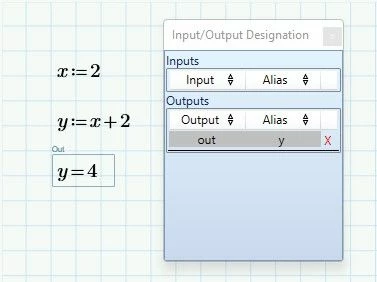
I would like to obtain a value of a variable from my worksheet. Let say my worksheet has x:=1 and y:=x+1=2. What function can I use to get the y value? I was trying with Worksheet.OutputGetRealValue(&As)("y") but I got an error instead. The following is my code:
Sub test01()

 Dim WS As Ptc_MathcadPrime_Automation.Worksheet
 Dim App As Ptc_MathcadPrime_Automation.Application
 Set App = New Ptc_MathcadPrime_Automation.Application

 FileName = Application.GetOpenFilename(MultiSelect:=False)

 Dim conNum As Integer
 i = 22
 conNum = Cells(i, 7)


 Do While Cells(i, 1).Value <> ""


 '' inputs
 Set WS = App.Open(FileName)
 Call WS.SetRealValue("#", Cells(i, 7), "")
 Call WS.SetStringValue("M1", Cells(i, 2))
 'Call WS.SetStringValue("M2", Cells(i, 4))
 Call WS.SetStringValue("M3", Cells(i, 3))
 Call WS.SetStringValue("M4", Cells(i, 1))
 Call WS.SetRealValue("D2", 3, "")
 Call WS.SetRealValue("D3", 3, "")
 Call WS.SetRealValue("D4", 3, "")
 Call WS.SetRealValue("D1", 3, "")
 Call WS.SetRealValue("P1", Cells(i, 5), "kip")
 'Call WS.SetRealValue("P2", 10, "kip")
 Call WS.SetRealValue("P1", Cells(i, 6), "kip")
 Call WS.SetRealValue("T1", Cells(i, 8), "in") '' need to be added

 '' check all checks
 WS.ResumeCalculation

 If WS.OutputGetStringValue("check1") <> "OK" Then

 Debug.Print ("check1:= not ok")

 End If

 Do While WS.OutputGetStringValue("check2") <> "OK"

 N = WS.OutputGetRealValue("D2")
 D2 = CDbl(WS.OutputGetRealValue("D2"))
 Call WS.SetRealValue("D2", D2 + 1, "")
I would like to manipulate D2 value, how do I do that?
Also, is it correct how I use OutputGetStringValue function? the "check2" in my worksheet is "check2="OK""
Thank you very much!!