cancel
Showing results for 
Search instead for 
Did you mean: 
cancel
Showing results for 
Search instead for 
Did you mean: 

Community Tip - Want the oppurtunity to discuss enhancements to PTC products? Join a working group! X

Translate the entire conversation x

Bogus Units of Measure

BB_14100646
10-Marble

Bogus Units of Measure

I'm using MathCAD Prime 9.0.0.0. MathCAD is always forcing Units of Measure. Usually it'll choose appropriately based on the data going into it. However, sometimes it's wrong or uses weird units and won't allow me to override. A work around is I can not use units at all or I can put in a 2nd equation without units, but I shouldn't have to do that. One of the advantages to MathCAD is I can use multiple units in the same equation and MathCAD knows the difference. In this case...

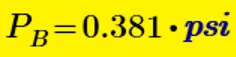
I want...

BB_14100646_0-1764791293270.png

...but I get...

BB_14100646_1-1764791335672.png

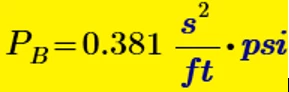
I want...

BB_14100646_2-1764791381264.png

...but I get...

BB_14100646_3-1764791423548.png


Thanks,

      Brent

ACCEPTED SOLUTION

Accepted Solutions

Change lb to lbf.


rgunwaldsen_0-1764793086946.png


View solution in original post

3 REPLIES 3

Change lb to lbf.


rgunwaldsen_0-1764793086946.png


Perfect! Thank you!!

What you've defined g as is the density of water.  The lb is a unit of mass in Mathcad USCS, not weight (force).   Here is the corrected specific weight of water, which automatically corrects the problem with PB.


2025 12 03 A.png


Stuart

Announcements

Top Tags