
1-Visitor
October 7, 2014
Question

Can´t open Mathcad. Only Error message appears.

  • October 7, 2014
  • 2 replies
  • 5122 views

Hello.

I just got the Mathcad15 from my school with the license code for the Student-Edition.

I installed everything and it also said that it was installed correctly and it is all finished.

Now I wanted to open it and it gives me following message:
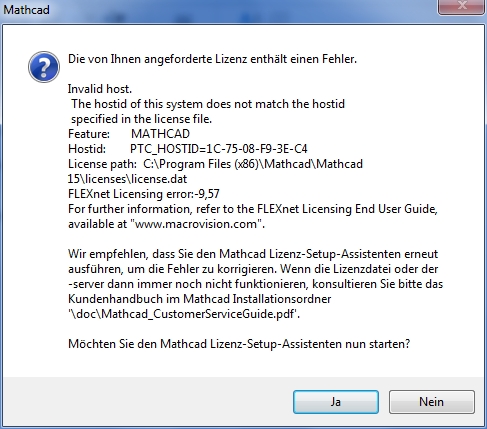
http://www.youscreen.de/askzgqzf11.jpg

The first line translated means that my requested license has a failure.

The last ones mean that i can press "Yes" to restart the license-setup-assistent and try open Mathcad again after that. That didn´t help.

Can somebody please help me?

Sorry for my bad english, I´m from Austria 😉

Kind regards

2 replies

25-Diamond I
October 7, 2014

Bei der Installation muss der Produktcode, den dir deine Schule gegeben hat, eingegeben werden und du erhältst automatisch online eine Lizenzdatei auf deinem Rechner generiert (license.dat), welche an die MAC-Adresse einer Netzwerkkarte in deinem Rechner gebunden ist.

Bei jedem Start von Mathcad muss daher im Rechner diese Netzwerkkarte vorhanden und aktiviert sein.

Die MAC-Adresse, welche in der Fehlermeldung angegeben wird (HostID) lässt sich auf die chinesische Firma Compal Electronics in der Nähe von Shanghai zurück verfolgen. Diese Firma fertigt Noteooks für eine Reihe von namhaften Herstellern wie u.a. Acer, Lenovo, Dell, HP, Toshiba.

Die Lizenz wurde also vermutlich für ein Notebook einer dieser Firmen erstellt.

Entweder du versuchst also, die gleiche Lizenz auf einem anderen Rechner zu verwenden, was gegen die Lizenzbestimmungen wäre, oder du hast die betreffende Netzwerkkarte entfernt oder deaktiviert. Auch ein an die USB-Schnittstelle angesteckter UMTS Stick verhält sich dem System gegenüber wie eine Netzwerkkarte - das wär übrigens auch eine (semi)legale Möglichkeit, das Programm auf zwei Rechnern (aber eben nicht gleichzeitig) nutzen zu können.

Schau also nach, ob eine Netzwerkkarte mit der betreffenden MAC in deinem Rechner vorhanden ist (offenbar ja nicht). Aktiviere WLAN, so dieses zum Zeitpunkt der Installation aktiv war. Wenn während der Installation ein UMTS Stick angesteckt war, steck ihn wieder an und versuche dann MC zu starten.

Wenn du die Lizenzdatei einfach auf einen anderen Rechner kopiert hast - Schäm dich.

Wenn alle Stricke reißen müsstest du dich an den Support von PTC wenden - die sind u.a. auch dafür zuständig, dir eine neue Lizenzdatei zu schicken, wenn du dir einen neuen Rechner zulegst und das Programm auf diesen transferieren möchtest. Erfahrungsgemäß gestaltet sich der Dialog mit dem PTC Support leider eher etwas schwierig und mühsam.

Gehe ich recht in der Annahme, dass du eine berufsbildende Schule besuchst? Auch dort gilt seit Jänner dieses Jahres die Regelung, dass die Schüler das Programm für den symbolischen Preis von Euro 10,- für ein Jahr quasi mieten können. Bei den Produktcodes, die deine Schule offenbar noch verteilt, scheint es sich um Restbestände zu handeln.

Sorry for my bad english, I´m from Austria 😉

1) No problem

2) Thats not necessarily a causality

3) Your profile says Switzerland!?

1-Visitor
October 8, 2014

From Google translate:

When installing the product code that you gave your school must be entered and you will automatically receive an online license file on your computer generated (license.dat), which is bound to the MAC address of a network card in your computer.

Each time you start Mathcad therefore this network card must be installed and activated on the computer.

The MAC address that is specified in the error message (hostID) can be traced back to the Chinese company Compal Electronics near Shanghai. This company manufactures Noteooks for a number of well-known manufacturers such as, inter alia, Acer, Lenovo, Dell, HP, Toshiba.

The license was presumably created for a notebook of this company.

So either you're trying to use the same license on another computer, which would be against the license terms or you've got the network card in question removed or disabled. Also an infected to the USB interface UMTS stick behaves against the system as a network card - which incidentally would be a (semi) legal way the program on two computers (but not simultaneously) to use.

Then see to see if a network card with the relevant MAC is present in your computer (obviously yes not). Activate Wi-Fi, so this was active at the time of installation. When a UMTS stick was infected during installation, plug it back in and then try to run MC.

If you have the license file just copied to another computer - Shame on you.

If all else fails you'd have you contact Support from PTC - which include also responsible for send you a new license file if you zulegst you a new computer and want to transfer the program to this. Experience has shown that designed the dialogue with the PTC Support unfortunately rather bit difficult and tedious.

Am I right in assuming that you attend a vocational school? Also there is valid since January of this year the provision that the student's program for the symbolic price of 10, - can be rented for one year or less. The product codes that your school apparently still distributed, it seems to be to remainders.

24-Ruby III
October 8, 2014