12-Amethyst
February 22, 2018
Solved

Computing some parts of a function only the first time it is called? For optimization.

  • February 22, 2018
  • 2 replies
  • 4630 views

Dear friends,


This could be a little academic question 🙂


for optimization purposes, would it be possible to compute some precalculations inside a function only the first time it is called? As an example, the attached generalized interpolation function works fine, but to me it is a pity that the vector "vs" get recalculated anytime it is called.  To produce the plot, vs will be calculated hundred of times, all the times identical.  Let say that I "know" that vx and vy will remain the same.
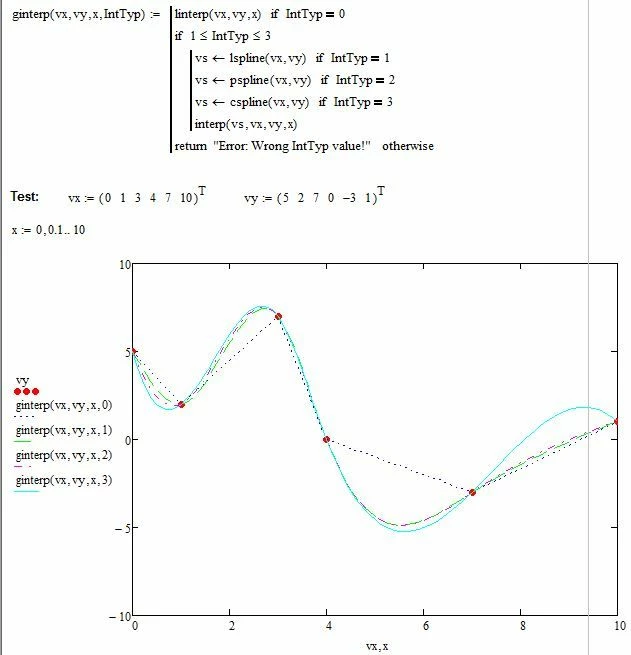
x.JPG


I am perfectly aware that I could compute vs "outside" the function, making it a "global variable". But I would like to incapsulate this in the function itself.  In good old times 🙂 of FORTRAN programming, there was, I believe to remember, a trick based on a DATA statement that preloaded a variable at compile time.  At the first execution of a subroutine one could check if the value was the preloaded one, the subroutine knew it was being called for the first time and could perform any required precalculations and store the results in its own private memory. 


Thanks a lot for your insights and hints!

Regards,

Claudio
Best answer by LucMeekes

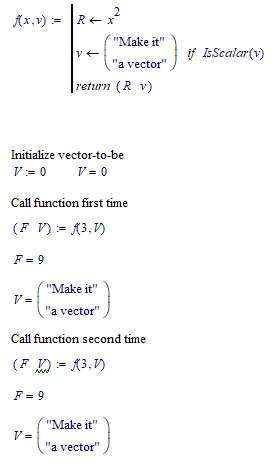
There's one way to change a worksheet variable inside a function, such that it retains its value after calling the function: it must be (a) result of the function. The function f does that exactly:

LM_20180222_FirstCall1.png

So how do we know the vector is only created once? Add some diagnostics:

LM_20180222_FirstCall2.png

Success!
Luc


2 replies

23-Emerald I
February 22, 2018

In your example, vs is only calculated once (and only if you're asking for a spline.)  And the form and values of vs will depend on which type of spline you select.  If you compute vs "outside the function it can be used inside the function without being a global variable; the requirement is "above and/or left of" the function.

12-Amethyst
February 22, 2018

Hi Fred,

thanks for your answer and interest.  Are we sure it is computed only 1 time? I thought it would be computed 100 times for lspline, 100 times for pspline, 100 times for cspline.  Because of the plot and x=0,0.1 ...10


And it is just an example.  Imagine that I later use the function repeatedly.   So anyway you think, as I do, that the only way is to bring the evaluation out of the function.


Regards

Claudio


23-Emerald I
February 22, 2018

My apologies, you are correct.  The only way I know to only compute vs once is to do it separately.  There is a possible short circuit:

Capture.PNG


LucMeekes23-Emerald IVAnswer
23-Emerald IV
February 22, 2018

There's one way to change a worksheet variable inside a function, such that it retains its value after calling the function: it must be (a) result of the function. The function f does that exactly:

LM_20180222_FirstCall1.png

So how do we know the vector is only created once? Add some diagnostics:

LM_20180222_FirstCall2.png

Success!
Luc


12-Amethyst
February 23, 2018

Hi Luc, and thanks for the answer and interest in my "academic" 🙂 question.

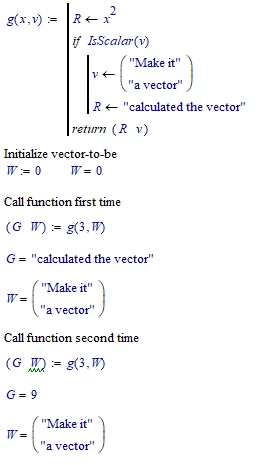
Yes I understand, even if I never thought of that. This would mean to add an additional argument (e.g. "firstcall") to the function, then before calling it for the first time letting "firstcall=1" and then call the function. Inside the function one can do whatever processing is required and then set "firstcall=0" and get it back.

It works, but unfortunately I cannot use this for "precomputation" of anything, because what is computed inside a function "stays inside it" and is forever lost after exiting.  Or am I making a think-error?

See the attached example:

 firstcall.JPG

Thanks again and regards

Claudio