
7-Bedrock
July 15, 2022
Question

Creating DLL for ShellExecute

  • July 15, 2022
  • 1 reply
  • 2396 views

Good afternoon,


As titled, I am crafting a general purpose ShellExecute that will run inside Prime.  I have it working.  But there is an issue with a null pointer. 


My approach was to pass strings.  These are strings that define the EXE, and the command line. 


An example would be like this:


ShellExecute ("Notepad.exe", "c:\\data\\test.txt", "Null")


The problem is that I had an issue with a null pointer being passed, so I had to create three MCAD strings like this:


LRESULT ShellExecute_MCAD(MCSTRING* pMCS_Empty, MCSTRING* pMCS_Process_EXE, MCSTRING* pMCS_Process_CMD)


here is the Visual Studio cpp file.  I can also attach it if needed.


// dllmain.cpp : Defines the entry point for the DLL application.
#include "pch.h"
#include "MCADINCL.H"


LRESULT ShellExecute_MCAD(MCSTRING* pMCS_Empty, MCSTRING* pMCS_Process_EXE, MCSTRING* pMCS_Process_CMD)
{
 // Routine performs a MCAD shell execute

 HINSTANCE L_Result = 0;
 wchar_t LpA_Process_EXE[MAX_PATH];
 wchar_t LpA_Process_CMD[MAX_PATH];
 wchar_t LpA_Empty[MAX_PATH];

 char pA_Process_EXE[MAX_PATH] = "";
 char pA_Process_CMD[MAX_PATH] = "";
 char pA_Empty[MAX_PATH] = "";

 // Define char arrays for process name and file name for process
 strcpy_s(pA_Process_EXE, pMCS_Process_EXE->str);
 strcpy_s(pA_Process_CMD, pMCS_Process_CMD->str);
 //strcpy_s(pA_Empty, pMCS_Empty->str);

 // Derived from https://cplusplus.com/forum/beginner/23378/
 std::copy(pA_Process_EXE, pA_Process_EXE + lstrlenA(pA_Process_EXE) + 1, LpA_Process_EXE);
 std::copy(pA_Process_CMD, pA_Process_CMD + lstrlenA(pA_Process_CMD) + 1, LpA_Process_CMD);
 std::copy(pA_Empty, pA_Empty + lstrlenA(pA_Empty) + 1, LpA_Empty);

 //MessageBox(NULL, LpA_Process_EXE, (LPCWSTR)L"MCAD ShellExecute EXE", MB_ICONINFORMATION);
 //MessageBox(NULL, LpA_Process_CMD, (LPCWSTR)L"MCAD ShellExecute CMD", MB_ICONINFORMATION);
 //MessageBox(NULL, LpA_Empty, (LPCWSTR)L"MCAD ShellExecute Empty", MB_ICONINFORMATION);
 //MessageBox(NULL, (LPCWSTR)L"Preparing a test of ShellExecute", (LPCWSTR)L"MCAD ShellExecute", MB_ICONINFORMATION);

 L_Result = ShellExecute(NULL, TEXT("open"), LpA_Process_EXE, LpA_Process_CMD, NULL, SW_SHOWNORMAL);


 // Return normal
 return 0;

}


// fill out a FUNCTIONINFO structure with the information needed for registering the function with Mathcad
FUNCTIONINFO FI_ShellExecute_MCAD =
{
 // Name by which mathcad will recognize the function
 "ShellExecute",

 // description of "shell" parameters to be used by the Insert Function dialog box
 "S_Process_EXE, S_Process_CMD",

 // description of the function for the Insert Function dialog box 
 "Routine runs performs ShellExecute with the command line",

 // pointer to the executible code i.e. code that should be executed when a user types in "multiply(a,M)="
 (LPCFUNCTION)ShellExecute_MCAD,

 // ShellExecute(S, S) returns a string
 STRING,

 // ShellExecute(S, S) takes on two string arguments
 3,

 // The first is the executable name, the second is the command line 
 {STRING, STRING, STRING}
};


BOOL APIENTRY DllMain( HMODULE hModule,
 DWORD ul_reason_for_call,
 LPVOID lpReserved
 )
{
 switch (ul_reason_for_call)
 {
 case DLL_PROCESS_ATTACH:
 CreateUserFunction(hModule, &FI_ShellExecute_MCAD);
 case DLL_THREAD_ATTACH:
 case DLL_THREAD_DETACH:
 case DLL_PROCESS_DETACH:
 break;
 }
 return TRUE;
}


// table of error messages if your function never returns an error

const char* myErrorMessageTable[NUMBER_OF_ERRORS] =
{ "interrupted",
 "insufficient memory",
 "must be real"
};


#undef INTERRUPTED 
#undef INSUFFICIENT_MEMORY
#undef MUST_BE_REAL 
#undef NUMBER_OF_ERRORS 


When I run this, the only way this works is to place a sacrificial string at the end of the call.  Here is a screenshot:
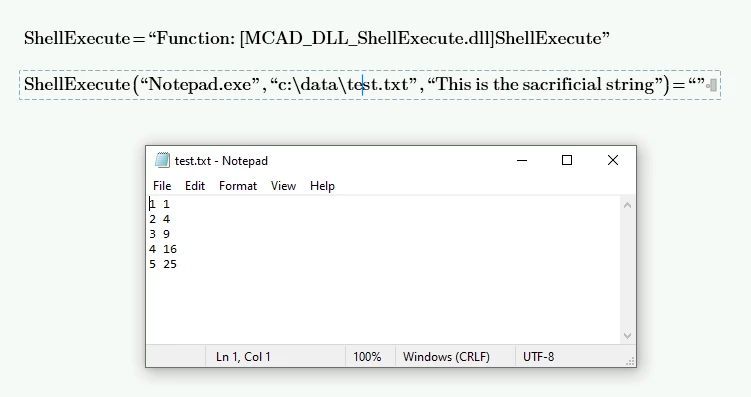
 

MCAD Posting Shell Execute.png


Can anyone provide guidance as to why this is happening.


Thank you.


Regards, 

1 reply

23-Emerald IV
July 16, 2022

"Can anyone provide guidance as to why this is happening."

Potentially...

I've understood that the LRESULT 'function' takes as first argument a specification of the function result.

In your case that would be a string. The next arguments to LRESULT define the parameters to the function, you'd like two parameters, both strings.

Then it should look like:

LRESULT ShellExecute_MCAD(LPMCSTRING pMCS_empty, LPCMCSTRING pMCS_Process_EXE, LPCMCSTRING pMCS_Process_CMD)


Note the difference between LPMCSTRING (for the return value) and LPCMCSTRING for the arguments.


The the FUNCTIONINFO 'function' would not specify 3, but 2 arguments with { STRING, STRING } instead of {STRING, STRING, STRING } on the following line.

I see that your function uses a variable L_Result, that is not used elsewhere. I should think that your function might return an indication of the success or failure of the shell command execution, in the form of an integer value; in that case you'd want to return a scalar instead of a string to Mathcad.


Hope this helps.


Success!
Luc


7-Bedrock
July 19, 2022

here is the updated MathCAD include file

#ifndef _MCADINCL_H_
#define _MCADINCL_H_

#include <windows.h>
#include <iostream>
#include <math.h>
#include <string.h>
#include <time.h>
#include <ShellApi.h>
#include <tchar.h>

#define INTERRUPTED 1
#define INSUFFICIENT_MEMORY 2
#define MUST_BE_REAL 3
#define NUMBER_OF_ERRORS 3 

#ifdef __cplusplus
extern "C"
{
#endif // __cplusplus
 
// complex scalar type
typedef struct tagCOMPLEXSCALAR {
 double real;
 double imag;
} COMPLEXSCALAR;
 
// this is the complex scalar type received from mathcad
typedef const COMPLEXSCALAR * const LPCCOMPLEXSCALAR; 
// this is the complex scalar type that should be returned to mathcad
typedef COMPLEXSCALAR * const LPCOMPLEXSCALAR;
 

// complex array type
typedef struct tagCOMPLEXARRAY {
 unsigned int rows;
 unsigned int cols;
 double **hReal; // hReal[cols][rows], == NULL when the real part is zero 
 double **hImag; // hImag[cols][rows], == NULL when the imaginary part is zero
} COMPLEXARRAY;
 
// readonly complex array type
typedef struct tagReadOnlyCOMPLEXARRAY {
 const unsigned int rows;
 const unsigned int cols;
 const double *const *const hReal; // hReal[cols][rows], == NULL when the real part is zero 
 const double *const *const hImag; // hImag[cols][rows], == NULL when the imaginary part is zero
} ReadOnlyCOMPLEXARRAY;
 
// this is the complex array type received from mathcad
typedef const ReadOnlyCOMPLEXARRAY * const LPCCOMPLEXARRAY; 

// this is the complex array type that should be returned to mathcad
typedef COMPLEXARRAY * const LPCOMPLEXARRAY;


typedef struct tagMCSTRING {
	char *str;
}MCSTRING;

typedef const MCSTRING * const LPCMCSTRING;
typedef MCSTRING * const LPMCSTRING;


// types to be used in declaration of the function's arguments and of the return value
#define COMPLEX_SCALAR 1
#define COMPLEX_ARRAY 2
#define STRING			8


//
// File name variables. These are passed as const char *pointers if the string doesn't look like it has a path in it then the current working directory will be prepended to the string 
// before it is passed to the user function 

// your function will be passed a const char * pointer
#define INFILE			13

// an OUTFILE is like an INFILE except it allows you to put your function on the left side of a := like the WRITEPRN() builtin
#define OUTFILE			14

// use this structure to create a function
#define MAX_ARGS 10

typedef LRESULT (* LPCFUNCTION ) ( void * const, const void * const, ... ); 

typedef struct tagFUNCTIONINFO {
 const char * lpstrName;
 const char * lpstrParameters; 
 const char * lpstrDescription;
 LPCFUNCTION lpfnMyCFunction;
 long unsigned int returnType;
 unsigned int nArgs;
 long unsigned int argType[MAX_ARGS];
} FUNCTIONINFO;

const void * CreateUserFunction( HINSTANCE, FUNCTIONINFO * );
 
BOOL CreateUserErrorMessageTable( HINSTANCE, 
 unsigned int nErrorMessages,
 const char * ErrorMessageTable[] );
 
// memory management routines
char * MathcadAllocate( unsigned int size );
void MathcadFree( char * address );


// array allocation -- should be used to allocate return array
BOOL MathcadArrayAllocate( COMPLEXARRAY * const, 
 unsigned int rows, 
 unsigned int cols,
 BOOL allocateReal, 
 BOOL allocateImag );

// should be used to free (in case of an error), Mathcad allocated return array
void MathcadArrayFree( COMPLEXARRAY * const );
 
 
// this routine can be used to find out whether the user has attempted to interrupt Mathcad this routine slows down the execution -- so use judiciously
BOOL isUserInterrupted( void );
 
#ifdef __cplusplus
}
#endif // __cplusplus
 
#endif // _MCADINCL_H_ 
7-Bedrock
July 19, 2022

Here are some compilation notes.

  • Compile x64
  • Must include the mcadincl.h file with the updated headers
  • Add the Mcaduser.lib as shown in the project tree

MCAD ShellExecute VS Compile.png


Here are some notes on the DLL placement:


MCAD ShellExecute DLL Placement.png


Here is a simple example.  You highlight the function line and hit F9 to execute the content.  Since the shell is not topmost and is modeless, it will create multiple instances.  There may be a way to redirect the content to the same instance using mutex.  

MCAD ShellExecute Example.png