
10-Marble
December 29, 2023
Solved

Custom Function - ignoring matrix variable...?

  • December 29, 2023
  • 1 reply
  • 2353 views

I have a MathCAD Prime 7.0 worksheet and I created three custom functions, which are very similar.


The each seem to process variables somewhat correctly, but only one of the three will process a matrix/range variable even though I've tried using the same arguments for all three.


Any idea why the two later functions are treating the matrix/range variable as a constant?


Thanks!
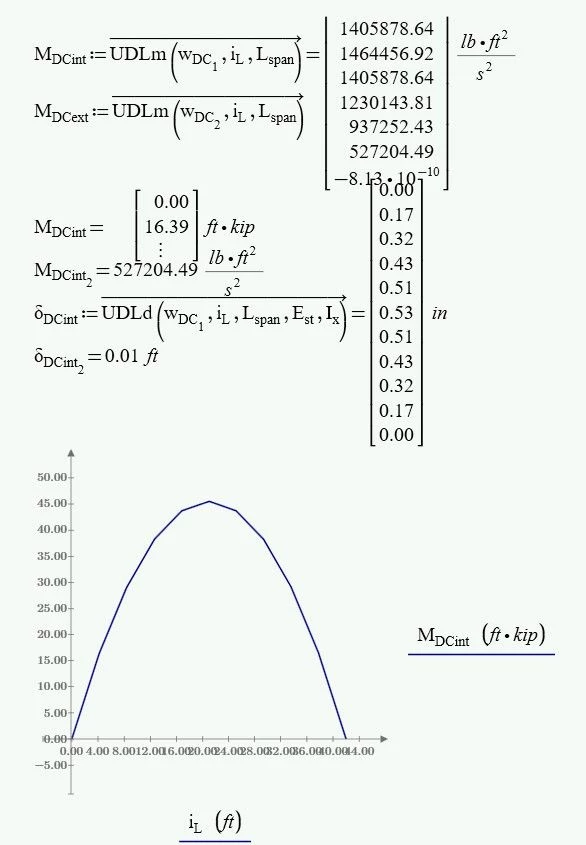
 

Best answer by terryhendicott

Vectorize the equations.  

Capture.JPG

1 reply

21-Topaz II
December 29, 2023

Vectorize the equations.  

Capture.JPG

justhumm10-MarbleAuthor
10-Marble
December 29, 2023

Thanks @terryhendicott !


I'm just getting back into working with MathCAD after a few years hiatus...


Just for my own knowledge...why was the one function working okay without vectorization and the others weren't?

25-Diamond I
December 29, 2023

On contrary to UDLv, your function UDLm calculates the product x*(L-x) and if x is a vector, then this is the product of two vectors and Prime correctly returns the dot (scalar) product and thats a scalar and not a vector. So all you see in your second plot is a single point.

Generally, when you define a function expecting all scalar arguments (as all you functions do) and you want to call it with a vector as an argument, you should apply vectorization.


But I see no reason for the vector i-L anyway. You just use it for plotting and you get a rather rough, inexact plot using just 11 points for the parabola.

Why not define a more dense range and use it for the plot?

Werner_E_0-1703888116616.png