
14-Alexandrite
January 3, 2021
Solved

Display more values for a range in the resulting matrix

  • January 3, 2021
  • 1 reply
  • 1626 views

Hello,


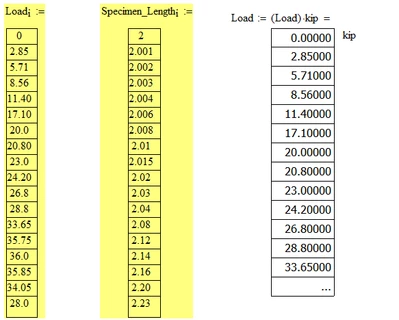
How can i make the displayed values in the resulting matrix show all the input values, and also show all the resulting calculation to show all the results. if you look at the number of input rows for load is more than calculated value for Load( matrix on right). it shows few dots. I have uploaded mathcad15 sheet. Even the following caluclations in the same sheet have the same issue. I could expand them to show all values.


Thanks,

Sam
SFares_0-1609709029294.png


Best answer by LucMeekes

Most probably by separating the assignment and the evaluation. So instead of:

Load := (Load) * kip =

you write:

Load := (Load) * kip

Load =


Success!
Luc

1 reply

LucMeekes23-Emerald IVAnswer
23-Emerald IV
January 3, 2021

Most probably by separating the assignment and the evaluation. So instead of:

Load := (Load) * kip =

you write:

Load := (Load) * kip

Load =


Success!
Luc

SFares14-AlexandriteAuthor
14-Alexandrite
January 3, 2021

Thank you Luc!


I never knew that made a difference in the evaluation display.


Regards,

Sam

23-Emerald IV
January 4, 2021

You don't want to know all the havoc that combining an assignment and evaluation in one expression can create.


Success!
Luc