Best answer by Werner_E

OK, here's the file.

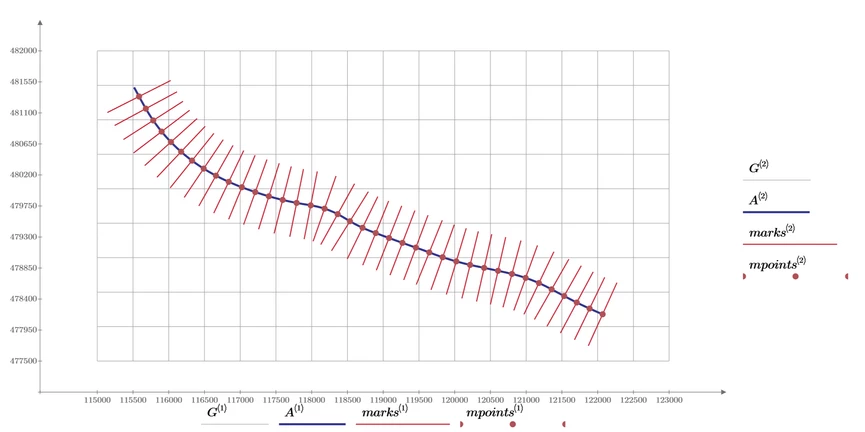
I added grid lines so its easier to manually scale the plot for equal scale in x and y-direction.

The picture shows a grid of 500x500, markers every 200 along the length of the path and the markers lengths are 1000.

Werner_E_1-1730648053719.png


I adjusted the program to deliver more accurate results (the old version would increase the points until the distance exceeds a multiple of, lets say 200 in our example and so often the value was about 2,5 too large.
The way the adjustment was made is rather bold and crude and  is tailored to this specific set of data only.
Could be sure done better but I ran out of coffee 😉
The direction of the markers also could be done better, not only considering the previous point but also the next one to have a better approximation of the slope and its normal.
Additionally I could not be bothered to apply Lucs routines to place text in the plot.
I provided the link to his functions in a recent reply here, though, in case you are about to give it a try yourself.


Prime 9 file attached

2 replies

25-Diamond I
November 3, 2024

@YA_10963798 wrote:

Hi there, 

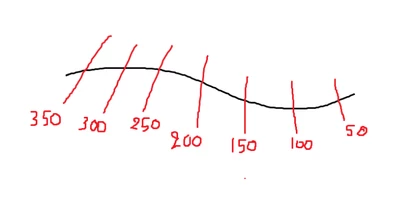
I need to draw vertical lines along the alignment ( the red lines along the black line) a line each 50 m 
YA_10963798_1-1730625008114.png


'vertical' ??

In the sense of parallel to the ordinate axis ("y"-axis)? Similar to grid lines?

Your sketch does not look that way, though!?

And why are the smaller values to the right?

You would have to specify at which abscissa value the first line should be.
Your vector A^<1> is running from 115515.997 to 122069.455. If the units A^<1> are meant to be meter this means about 131 vertical lines.

You could use the vertical markers which Prime offers (I don't know if their number is limited) but you would have to manually set up each one separately. Or you could write a small program to create a data structure which shows as a couple of vertical lines.
You could use one of the grid functions which are posted here from time to time. You would not only have to provide the limits of the x limits for these functions but also the y limits the lines should run from and to.


Or does 'vertical' mean perpendicular to the graphed black line? Again your sketch does not look that way - at least not at the left side.


Are the 50m 100m etc x-axis values (values of A1^<1>) or something else? If the latter, you would have to state which meter value would correspond to which value in A^<1>.

At the top of the sheet you say "intervals" should be 50, so that may be the number of lines you want to draw.

But in your question you write you want "a line each 50 meter".

Where does

Werner_E_3-1730635757821.png

stem from? Because I also can calculate a different value

Werner_E_1-1730634716206.png

At least that's what I get when I use the Excel data file which you posted in earlier threads.


So there are a lot of questions open - at least for me.

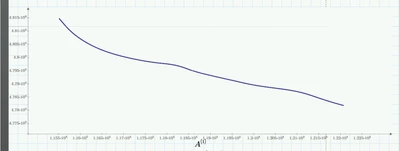
As an example here is a plot with 51 vertical lines, making up 50 intervals of 131,069 length.

Absolutely not sure if this is it what you are looking for.

Werner_E_2-1730635681371.png


14-Alexandrite
November 3, 2024

Hi Werner, 

Yes, I shoudn't use the word vertical ...the lines should be lying on the alignment line ...and the number of the lines can be calculated by dividing the alignment length (7548m) by 50 m so there will be 151 line should be drawn. and Is it possible for the plot to write down the distance like in the first one 0+00 in the second 50 m , third 100 like my paint 

YA_10963798_0-1730637520807.png

Are they x or y points I think they are both right >> because we are taking A as reference to draw them 

14-Alexandrite
November 3, 2024

yes exactly it should be straightend line ... 

Yes small marker will be enough ... its length can be 45 m .... I don't know how that will look like ...but if it doesn't look good a small line will be okay 

YA_10963798_0-1730639713901.png

I think it will be better if we start from the left although I draw it the opposite ..It should start from A 1 

thanks in advance


23-Emerald V
November 3, 2024

Provided you don't mind a lack of numbers and the vertical lines stretching across the full y-range of A, here's one possibility.


2024 11 03 A.png2024 11 03 B.png


Adjusting the y-range to some fixed proportion and centreing on the line should be straightforward.


Alternatively, do you want the metreage markers to be normal to the line?


Stuart


Hah!  Just seen that Werner's already made similar points.


Also, have you upgraded to Mathcad Prime 10 yet?

25-Diamond I
November 3, 2024

Also, have you upgraded to Mathcad Prime 10 yet?


I could open the file with P9, so the answer possibly is 'no, not yet'.


@YA_10963798 

Note that in Stuarts function the argument 'intervals' means the length of an interval, the horizontal distance of two vertical lines.

In my function the argument "intvls" means the number of intervals (which better is chosen as an integer) and so intvls+1 vertical lines are drawn.