
1-Visitor
November 1, 2015
Solved

Equation Sheet

  • November 1, 2015
  • 5 replies
  • 6592 views

Hello

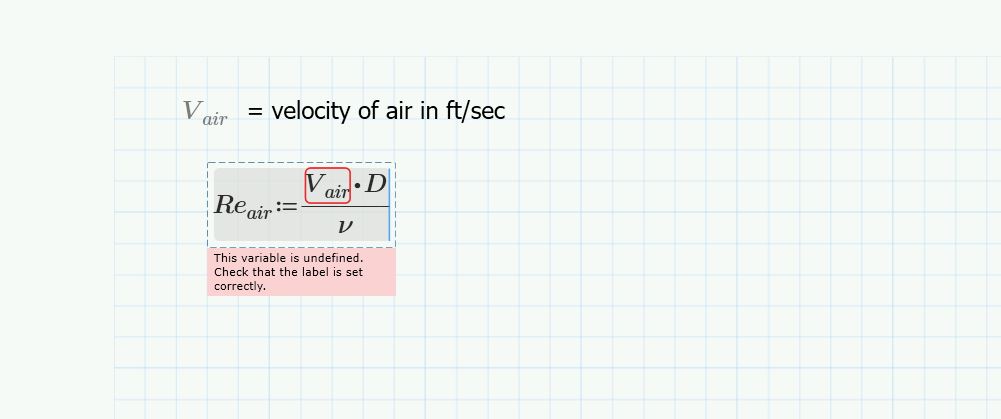
I need to make an equation sheet of all these formulas I am using for a project for my Professor.  Mathcad is so nice to do this procedure. However, Mathcad 3.1 Prime wants to calculate it.  I don't need it to calculate it. I just need to show a list of formulas without calculations and without having a variable undefined. if someone could help me with I would be greatly appreciated.  You can see in the picture below to see what I am talking about. formulas.JPG
Best answer by Fred_Kohlhepp

Use "cntrl =" instead of "shift :"

The constraint (Boolean) equals will not evaluate and will not complain about undefined terms.

5 replies

1-Visitor
November 2, 2015

One solution would be to define all your variables in the non-printed region to the right (use "draft view" instead of "page view").

23-Emerald I
November 2, 2015

Use "cntrl =" instead of "shift :"

The constraint (Boolean) equals will not evaluate and will not complain about undefined terms.

1-Visitor
June 8, 2023

8 years later, and you saved me time 🙂

Thank you sir!

23-Emerald V
November 2, 2015

Robert Payne wrote:

Hello

I need to make an equation sheet of all these formulas I am using for a project for my Professor.  Mathcad is so nice to do this procedure. However, Mathcad 3.1 Prime wants to calculate it.  I don't need it to calculate it. I just need to show a list of formulas without calculations and without having a variable undefined. if someone could help me with I would be greatly appreciated.  You can see in the picture below to see what I am talking about.

Either of Mark's or Fred's methods will work.   I'd probably go for Fred's method as it's less work.  Another option is to define your equations as normal, but *first* turn off auto-calculation.   This gives you an advantage in that you can just copy & paste them from the formula sheet to your working sheets without modification.   They do have a greyed-out appearance, but this might not matter for just an equation list.

Stuart

23-Emerald I
November 2, 2015

Note that velocity does not have to be in ft/sec, the equation for Reynold's Number results in a unitless quantity.  Inputing the three variables in any combination of valid units (since Mathcad auto converts units will result in the same value:

Entering an incorrect unit will prompt Mathcad to supply a correction

rpayne1-VisitorAuthor
1-Visitor
November 7, 2015

Thank You. That works very well. I am not sure what the other person said about page view I couldn't find anything like that. 

I am having a lot of problems with the Temperature and dollar amount.  I read that mathcad only does absolute temperatures ( R, K).  I tried using the few examples in a post to define Fahrenheit and I ended up with errors not sure what I was doing wrong. I am learned that the best time to learn something new is when you are trying to complete a project.

Thank you for your help.

23-Emerald V
November 9, 2015

Robert Payne wrote:

I am having a lot of problems with the Temperature and dollar amount.  I tried using the few examples in a post to define Fahrenheit and I ended up with errors not sure what I was doing wrong

Can you describe the problem you are having in more detail? 

  I read that mathcad only does absolute temperatures ( R, K).  .

Mathcad has delta degrees centigrade and fahrenheit as well as absolute rankine, kelvin (and centigrade and fahrenheit).

I am learned that the best time to learn something new is when you are trying to complete a project.

Well, of course.  That goes without saying ... and the nearer you get to the deadline the better it is.   

Stuart

rpayne1-VisitorAuthor
1-Visitor
November 13, 2015

This is the problem I am having. It says this must be a scalar or matrix.  Also, when I click on the F for temperature it says it is function. What does that mean in Mathcad language? Thank you for your tips. I am really adapting to Mathcad.  I can see how it is be

can benefit me.

temperature problem.JPG