1-Visitor
January 22, 2015
Solved

Error in solving equation

  • January 22, 2015
  • 3 replies
  • 4150 views

Hello everyone

I need to find the value of a variable (Dev) per iteration, assigning an initial value, but I get error and truth do not know why.
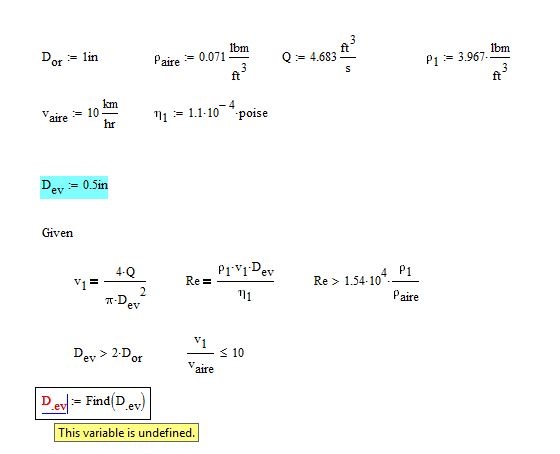
FIGURA.png

Hope you can help

Best answer by Werner_E

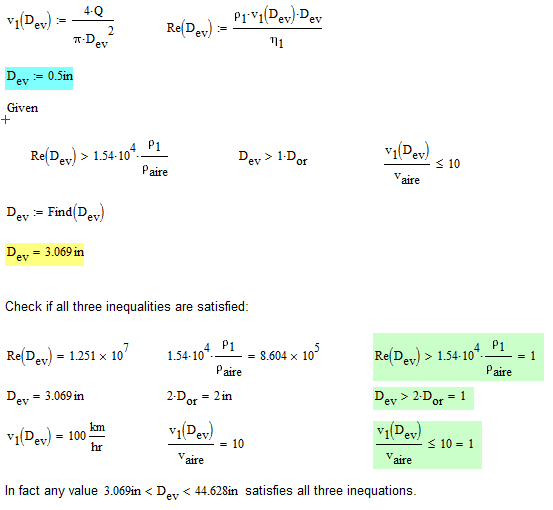
You could do as I already wrote and solve for all three unknowns, but I thought it would be a better idea to turn Re and v.1 into functions of D.ev which they obviously are.

Now there are only three inequalities for D.ev left and not a single equations. So you have a range of valid values for D.ev and Find will give you the smallest one (3.069 in). If you chose different(higher) guess values you get different results.

In your second solve block there is a unit mismatch.
1.png

3 replies

25-Diamond I
January 22, 2015

Attach your file, not just a picture.

It looks to me that v.1 and Re are unknown, too, and so you will have to search for all three unknowns and provide guesses for all of them. But you only have two equations!??

BPP1-VisitorAuthor
1-Visitor
January 22, 2015

Sorry, This is the file

Werner_E25-Diamond IAnswer
25-Diamond I
January 22, 2015

You could do as I already wrote and solve for all three unknowns, but I thought it would be a better idea to turn Re and v.1 into functions of D.ev which they obviously are.

Now there are only three inequalities for D.ev left and not a single equations. So you have a range of valid values for D.ev and Find will give you the smallest one (3.069 in). If you chose different(higher) guess values you get different results.

In your second solve block there is a unit mismatch.

1.png

BPP1-VisitorAuthor
1-Visitor
January 22, 2015

Thanks Werner. One last question, as I can do to calculate "Dev" for each value in the case of multiple input values.

FIGURA1.png

Thanks in advance

25-Diamond I
January 22, 2015

It may work if you vectorize ALL calculations dealing with those vectors.

The other (and in my opinion better) way is to make v1, Re functions of Q, p1, etc and turn the solve block into a function of all those variables you like to change. Then call that function with your vectors as arguments.

BPP1-VisitorAuthor
1-Visitor
January 22, 2015

Vectorized functions not work, but the second way, worked perfectly.

Again, many thanks werner

BPP1-VisitorAuthor
1-Visitor
January 26, 2015

Hello everyone

Like the startup problem, trying to solve an equation me an error occurs, I hope you can help me.

Attached worksheet with the problem

25-Diamond I
January 26, 2015

Right click on the error and chose "Trace Error" and then "First" to get more information why the solve block failed.

1.png

In your case you typed "e^S" instead of "e^S(P.1)".

BPP1-VisitorAuthor
1-Visitor
January 26, 2015

I did not know the tool you used (Trace error), thank you very much Werner
