
1-Visitor
October 15, 2014
Solved

Find function error: Undefined variable

  • October 15, 2014
  • 2 replies
  • 6448 views

Hello all,

I'm trying to us the find fuction to solve an exponetal equation. I think my problem with the first Find(A.c) is that the value its solving for is around 10^-17 and it wants to say it's zero but can't becaure the value isn't zero. The second Find(T.f) I think is simular, I still get an error if I set a value for A.co. Ihave aslo tried to do this problem with out units and I get the same error.

If anyone has any sugestions that would be great.
Best answer by Werner_E

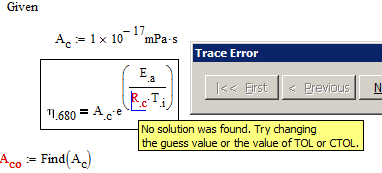
The "undefined variable" error is the only error a solve block will ever yield - no matter what the real cause for failing may be. If you right click the error and chose "Trace error" you (sometimes) see whats really going on - no solution was found because you are working at the limits of the tolerance settings.

1.png

In your case you are dealing with rather big and also some very small numbers and especially when you work with units this very often throws a solve block off the track.

I wonder why you would use a solve block anyway, given that you can solve those equations directly very easy by hand (and if not you can use the symbolics solve - see at the top).

You may also use the symbolic solver for your specific task.

See attchment.

2 replies

Werner_E25-Diamond IAnswer
25-Diamond I
October 15, 2014

The "undefined variable" error is the only error a solve block will ever yield - no matter what the real cause for failing may be. If you right click the error and chose "Trace error" you (sometimes) see whats really going on - no solution was found because you are working at the limits of the tolerance settings.

1.png

In your case you are dealing with rather big and also some very small numbers and especially when you work with units this very often throws a solve block off the track.

I wonder why you would use a solve block anyway, given that you can solve those equations directly very easy by hand (and if not you can use the symbolics solve - see at the top).

You may also use the symbolic solver for your specific task.

See attchment.

kcotton1-VisitorAuthor
1-Visitor
October 15, 2014

Thanks, for the help. I was using the solve block encase I needed to solve for a diferent variable in the equation later.

1-Visitor
October 15, 2014

Kendall Cotton wrote:

Thanks, for the help. I was using the solve block encase I needed to solve for a diferent variable in the equation later.

Have a look at the way I have set my sheets up. They may work for you.

You constructed your solve blocks in a way to solve for one variable only.

1-Visitor
October 15, 2014

Try solving symbolically. I have stripped the units for ease of understanding.

1-Visitor
October 15, 2014

Similar approach but included units. I have used the symbolic Find function while Werner has used the Symbolic Solve function.

At least you variation .

25-Diamond I
October 15, 2014

Mike Armstrong wrote:

Similar approach but included units. I have used the symbolic Find function while Werner has used the Symbolic Solve function.

At least you variation .

Best to solve this kind of equations without any "Find" or "solve" but using direct assigments - the equations are easy enough. And with real tough, complicated equations, Mathcad's symbolics unfortunately ever so often tends to fail