4-Participant
November 13, 2024
Solved

Find maximum value in matrix when previous columns are negative

  • November 13, 2024
  • 3 replies
  • 1728 views

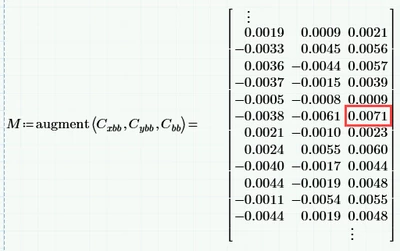
I have a matrix with three columns. I want to have an if-like statement that searches column 1 and 2 and if both are negative, the result is the maximum of column 3. In this example the result would be 0.0071.

Working in Prime 7.


RN_9436324_0-1731462063857.png


Best answer by Werner_E

I am missing your worksheet with some demo data to play with!


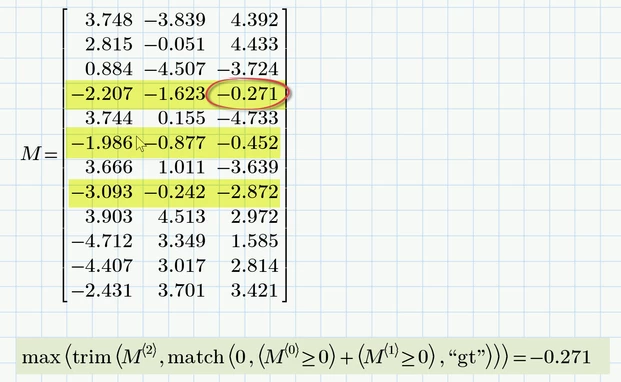
As i understand it from your description you want ignore all rows where at least one of the two values in the first two columns are not negative and then choose the maximum value in third column of the remaining ones, correct?

Sure could be achieved in many ways, here is one of them - a one-liner 😉
Werner_E_0-1731470073349.png

The method will fail on two occasions:

1) if there is not a single line containing two negative values in the first two columns
in this case the trim command will fail because it would be forced to delete all rows and create an empty matrix (which unfortunately does not exsist.

2) if ALL rows contain only negative numbers in the first two columns.
In this case the match command would fail because it would have to return an empty vector (which again unfortunately does not exist in Prime).


I suspect that the first case would not be likely in your application and its also not clear what you would expect as a result in this case. An error may make sense anyway in this case.

Both cases may be trapped if necessary, e.g. by providing user-defined replacement functions for trim and match or other means.

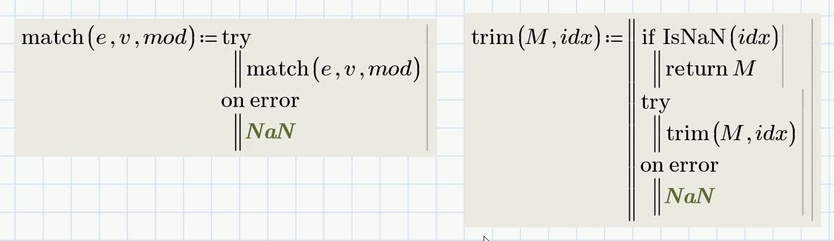
For example you could use these functions to replace the built-ins:
Werner_E_0-1731518097283.png

Now the expression given above will return NaN in case not a single row with two negative values in the first two columns could be found and in case all values in the first two columns are negative the correct value is returned.


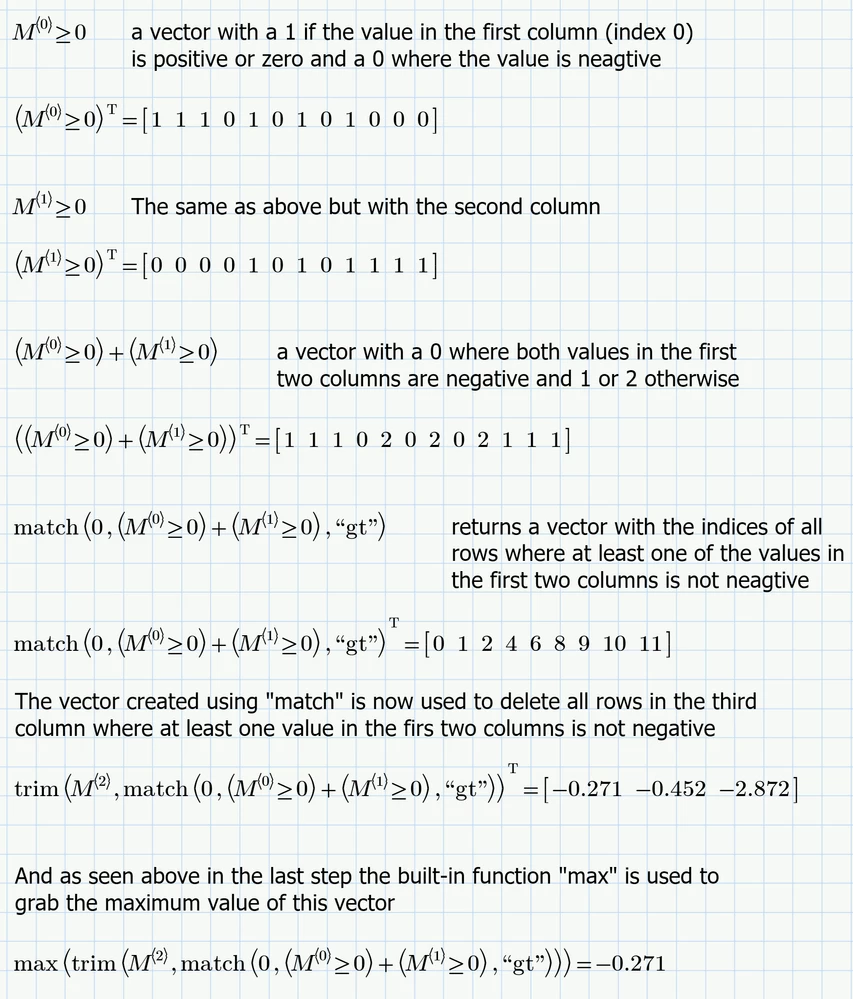
Here a detailed explanation (I am assuming that ORIGIN=0 as per default)
Werner_E_2-1731470517539.png


Attached file is in Prime 10 format
 

3 replies

ttokoro
21-Topaz I
21-Topaz I
November 13, 2024

image.pngimage.pngimage.png

t.t.
Werner_E25-Diamond IAnswer
25-Diamond I
November 13, 2024

I am missing your worksheet with some demo data to play with!


As i understand it from your description you want ignore all rows where at least one of the two values in the first two columns are not negative and then choose the maximum value in third column of the remaining ones, correct?

Sure could be achieved in many ways, here is one of them - a one-liner 😉

Werner_E_0-1731470073349.png

The method will fail on two occasions:

1) if there is not a single line containing two negative values in the first two columns
in this case the trim command will fail because it would be forced to delete all rows and create an empty matrix (which unfortunately does not exsist.

2) if ALL rows contain only negative numbers in the first two columns.
In this case the match command would fail because it would have to return an empty vector (which again unfortunately does not exist in Prime).


I suspect that the first case would not be likely in your application and its also not clear what you would expect as a result in this case. An error may make sense anyway in this case.

Both cases may be trapped if necessary, e.g. by providing user-defined replacement functions for trim and match or other means.

For example you could use these functions to replace the built-ins:

Werner_E_0-1731518097283.png

Now the expression given above will return NaN in case not a single row with two negative values in the first two columns could be found and in case all values in the first two columns are negative the correct value is returned.


Here a detailed explanation (I am assuming that ORIGIN=0 as per default)

Werner_E_2-1731470517539.png


Attached file is in Prime 10 format


25-Diamond I
November 13, 2024

And here is a function using a more conventional approach which does the job as well.

Its written as being ORIGIN aware so it could be used unchanged also in worksheets with different settings of ORIGIN.

Werner_E_0-1731471201265.png


EDIT: Additionally added a Prime6Express version of the sheet which you should be able to open in Prime 7. Let the sheet recalculate (F5 or F9) to get rid of the error messages.


23-Emerald V
November 13, 2024

I was going to post a solution to this problem that I developed in Mathcad Prime 10 that I thought should have worked in Mathcad Prime 7.   Only Tetsuro had posted a solution at that time.  Then I remembered that I have Mathcad Express 7 on another laptop.  By the time I'd copied out the solution, Werner had posted his first solution ... which was all but identical to mine.   "Hmm", I thought, "If everybody's thinking the same, somebody's not thinking".  But it was late, so I slept on it.


Anyway, to cut a short story long, I thought a pure Express solution might be useful, so here it is.  


As is often the case with Mathcad Express solutions to a problem, it involves a dependency chain of functions that perform tasks that would normally be the provenance of a local variable.   Nevertheless the desired functionality can usually be wrapped up into a single function that presents the user with a white box (as any good function should). 


For this particular problem, the main Express function is filter, which allows the user to supply a predicate (Boolean function) that returns true if certain conditions are met.


I wasn't sure from the given example whether the "maximum" value was the maximum value of the whole 3rd column or the maximum value within the doube-negative rows, so I provide solutions for both cases. 


Assuming that the "maximum" refers to the whole column, the minimal solution is right at the end and has no dependencies on anything that goes before it.


2024 11 13 I.png


2024 11 13 J.png


2024 11 13 K.png


Stuart

25-Diamond I
November 13, 2024

So he really pulls out his big bear gun to skin an innocent cat ...... 😄


23-Emerald V
November 13, 2024

@Werner_E wrote:

So he really pulls out his big bear gun to skin an innocent cat ...... ‌‌


😄


You never know with cats ... they're not as easy to deal with as, say, wily coyotes with a penchant for Acme Products.  😎


Besides, just like the light at the end of the tunnel usually turns out to be an express goods train, what looks like an ordinary moggy 🐈 from a distance often turns out to be an enraged tiger 🐅 out for blood, on closer inspection. 😱


Stuart


It's strange how often I've thought, "Wow, that looks hard! 🤔", only to solve the problem in seconds flat without any effort. 🤓  Yet, conversely, thinking, "Hah!  Easy meat! 😺", can turn into a marathon effort of Herculean proportions, leaving me wishing I'd never encountered the damn problem. 😠
