10-Marble
October 26, 2016
Solved

Help turning nested vector to single vector

  • October 26, 2016
  • 1 reply
  • 2199 views

Hi all,

I have had a look through previous posts on here and couldn't find anything that would do the job so thought I would ask.  I am trying to turn a vector of nested vectors (can each be different sizes) into one single vector, as per the attached Mathcad sheet.

I'm sure this is possible but so far the answer is managing to elude me!

Thanks for much

Best answer by StuartBruff

Mike Bennett wrote:

Hi all,

I have had a look through previous posts on here and couldn't find anything that would do the job so thought I would ask.  I am trying to turn a vector of nested vectors (can each be different sizes) into one single vector, as per the attached Mathcad sheet.

I'm sure this is possible but so far the answer is managing to elude me!

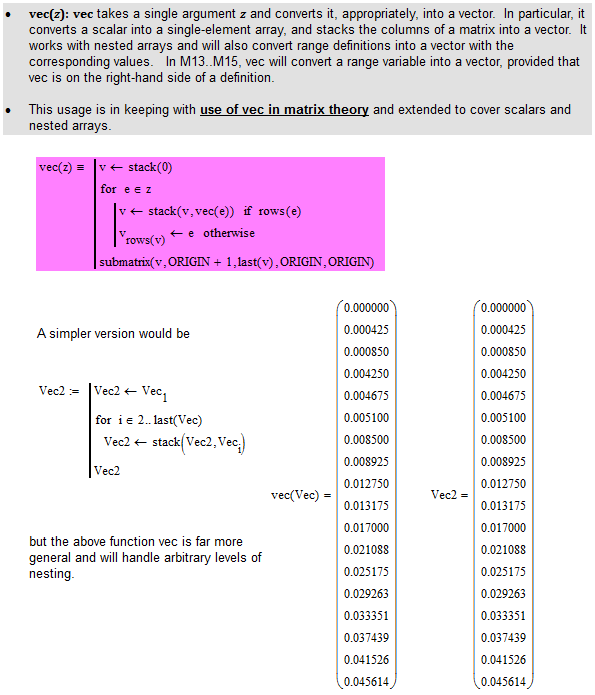
You need to initialize Vec2 in your example and stack subsequent nested vectors to Vec2.  You should probably use last(..) rather than rows(...) - although they're equivalent for ORIGIN = 1.

Alternatively, use my function vec ...

Stuart

1 reply

23-Emerald V
October 26, 2016

Mike Bennett wrote:

Hi all,

I have had a look through previous posts on here and couldn't find anything that would do the job so thought I would ask.  I am trying to turn a vector of nested vectors (can each be different sizes) into one single vector, as per the attached Mathcad sheet.

I'm sure this is possible but so far the answer is managing to elude me!

You need to initialize Vec2 in your example and stack subsequent nested vectors to Vec2.  You should probably use last(..) rather than rows(...) - although they're equivalent for ORIGIN = 1.

Alternatively, use my function vec ...

Stuart

10-Marble
October 26, 2016

Stuart,

Thank you for getting back to me and for doing it so quickly!  That has worked perfectly and done exactly what I wanted.  I am now kicking myself after reading the simple method you posted as this is kind of what I was aiming for, but just not quite there.  You have now saved me from pulling the remainder of my hair out.

Thanks also for the tip on using 'last' instead of 'row', I can see the advantage of your suggestion.

Best regards,

Mike

23-Emerald V
October 26, 2016

No worries, Mike.

Here's another couple of ways to approach the problem.

The first method (vec3) allows for there being only one element (nested or otherwise) in Vec.  It sets local variable v3 to zero and then uses the "for each" like capability of Mathcad's for loop to iterate over each (top-level) element of Vec.  During the loop, vec3 checks if v3 already has data when stacking each nested vector (note: this wouldn't be necessary if Mathcad had a proper Empty Array).

The second method (vec4) initializes local variable v4 to the first element of Vec, and then uses a while loop to iterate over Vec.  Note that whilst vec3 automatically handles the case where Vec is a scalar, vec4 has to have an explicit check for this condition.

Stuart