
21-Topaz II
December 29, 2021
Question

How do I draw a given distribution on a moving plane orthogonal to the axis of a tube?

  • December 29, 2021
  • 5 replies
  • 5190 views

Hi!,
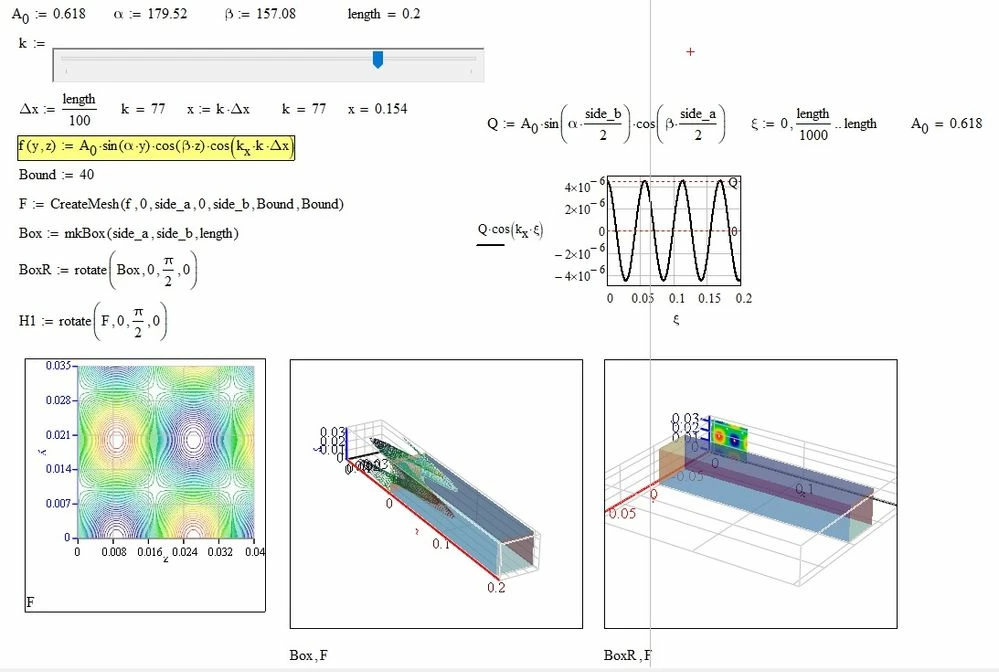
Basically I have to draw the surface distribution given by the function f (y, z) on the plane of the tube section whose position on the axis is changed by moving the cursor of the slider. The fact is that unexplained phenomena occur when the cursor is moved, such as enlargement or shrinkage of the tube. Is anyone able to put order into that program?

I solved a similar problem for a community member about ten years ago or more, without the use of createmesh but only with programming. I can not find it anymore.
Tube.jpg

5 replies

23-Emerald V
December 29, 2021

@-MFra- wrote:

Hi!,
Basically I have to draw the surface distribution given by the function f (y, z) on the plane of the tube section whose position on the axis is changed by moving the cursor of the slider. The fact is that unexplained phenomena occur when the cursor is moved, such as enlargement or shrinkage of the tube. Is anyone able to put order into that program?

I solved a similar problem for a community member about ten years ago or more, without the use of createmesh but only with programming. I can not find it anymore.

Tube.jpg


I think the problem is caused by the variation in the z-axis values of F when using create mesh. It can range from 0 to ÂąA and this affects the scaling of the z-axis.  One solution is to scale the z-axis to match the width(height?) of the box.   I've added a few functions to the collapsed region to facilitate this.


2021 12 29 g.png


You might need to play around with the values to ensure that they don't mess up the other axes ...


Stuart

25-Diamond I
December 29, 2021

Not sure what effect you actually would like to achieve, but if its just the tube's length which is of interest, you could simply disable auto scaling the z-axis

Werner_E_0-1640815647136.png

Unfortunately you have to type in the value manually and can't use the variable "length" here. At least not with the 3Dplot component provided by Mathcad out of the box.


23-Emerald V
December 29, 2021

@Werner_E wrote:

Not sure what effect you actually would like to achieve, but if its just the tube's length which is of interest, you could simply disable auto scaling the z-axis

Werner_E_0-1640815647136.png

Unfortunately you have to type in the value manually and can't use the variable "length" here. At least not with the 3Dplot component provided by Mathcad out of the box.


That's a possibility.  I'd forgotten about z-axis limits ...


These values seem OK:


2021 12 29 l.png


Another option occurred to me.  AFAIA (and I stand ready to be corrected), a contour plot is projected onto the backplane.  What would be nice is if the "contour" could be displayed at the kth position (x).  By suitable scaling and translation of F, and setting it to a colormap-filled surface plot, this seems to be possible:


2021 12 29 m.png


Stuart

23-Emerald V
December 30, 2021
-MFra-21-Topaz IIAuthor
21-Topaz II
December 30, 2021

Thanks to all for the answers.

To be clearer, I would like the right 3D graphic of the StuartBruff animation to work like the one on the left as well. The difference from the left one is that there has been a rotation of 90 degrees in the positive direction around the y axis so that the tube has an edge coinciding with the x-axis. In the photo on the right, I don't know why it's shifted to the left.

The study of the system was first done by considering the axis of the tube parallel to the x-axis and therefore the distribution is f (y, z), then considering the axis of the tube the z-axis and therefore the distribution is f (x, y) in practice obtained with the rotation of the previous image.

(I usually color the axes as follows: x in black, y in blue, z in red.)

23-Emerald V
December 30, 2021

@-MFra- wrote:

Thanks to all for the answers.

To be clearer, I would like the right 3D graphic of the StuartBruff animation to work like the one on the left as well. The difference from the left one is that there has been a rotation of 90 degrees in the positive direction around the y axis so that the tube has an edge coinciding with the x-axis. In the photo on the right, I don't know why it's shifted to the left.


See attached (also video in accompanying message) - is this what you're after?


Stuart

23-Emerald V
December 31, 2021

@Werner_E wrote:

An option could be to move the tube in opposite direction instead of the contour plot. But then the scale on the red z-axis would show changing, wrong values.


And adding to the misery, the backplane moves too. â˜šī¸

-MFra-21-Topaz IIAuthor
21-Topaz II
December 30, 2021

I take this opportunity to wish everyone, despite the known difficulties due to the pandemic, a happy new year.

-MFra-21-Topaz IIAuthor
21-Topaz II
January 6, 2022

So far, no solution has been found to the problem.