
1-Visitor
June 13, 2018
Solved

How to use the PTC MathCad to derive the trig. equation

  • June 13, 2018
  • 1 reply
  • 7084 views

Dear all,


Sorry for this simple question , I am just a new user in this software.

I would be grateful if someone can help me to know how to derive the trigonometric equations without getting a solution as in the attached thread. In other words, instead of driving the trigonometric equations as per attached, the software does this for me. Thanks in advance
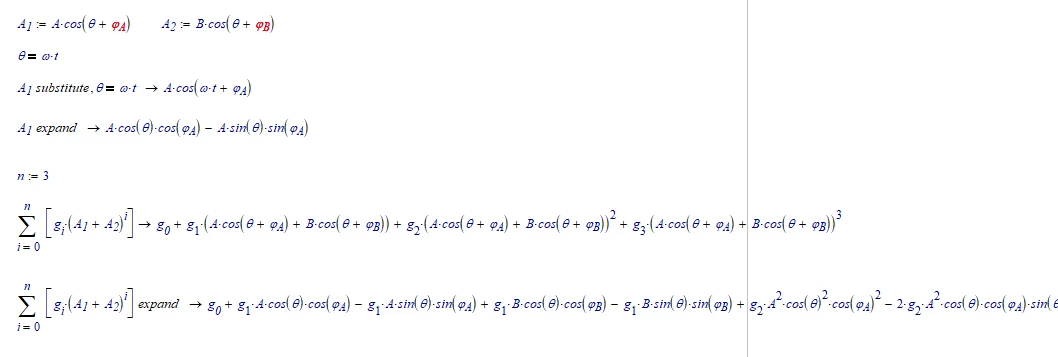
Best answer by LucMeekes

You mean like this?

LM_20180613_trig.png


Note that the last equation runs more than 5 pages to the right!


Success!
Luc

1 reply

23-Emerald I
June 13, 2018

It's not clear what you're asking for.  Your first two jpg's have no equations, the last only has three; there's no discussion about the series.  You can do this:

Capture.PNG

Azam1-VisitorAuthor
1-Visitor
June 13, 2018

Firstly, Thanks for your reply,


I have a polynomial equation as in 1.jpG. I just want to use the PTC MathCad to do the whole steps as in 3.jpg rather than doing it by myself. Does this software do like this or not? Thanks inadvance 

25-Diamond I
June 13, 2018

@Azam wrote:

Yeah, I got this as well. Any advice??

forum.JPG


That depends on what your intention is. Why would you do this.

If your goal is just to SEE the result (Luc already posted that is 5 page widths long and what would the benefit of being able to look at it be?!), I guess there is no solution.

Mathcad simply refuses to display results which are longer than ... (don't know what the limit depends on).

But as Mathcad writes you still can assign it a function an use it for further calculations.

Prime, BTW, will show the very same effect, too.

B.png