4-Participant
January 22, 2024
Solved

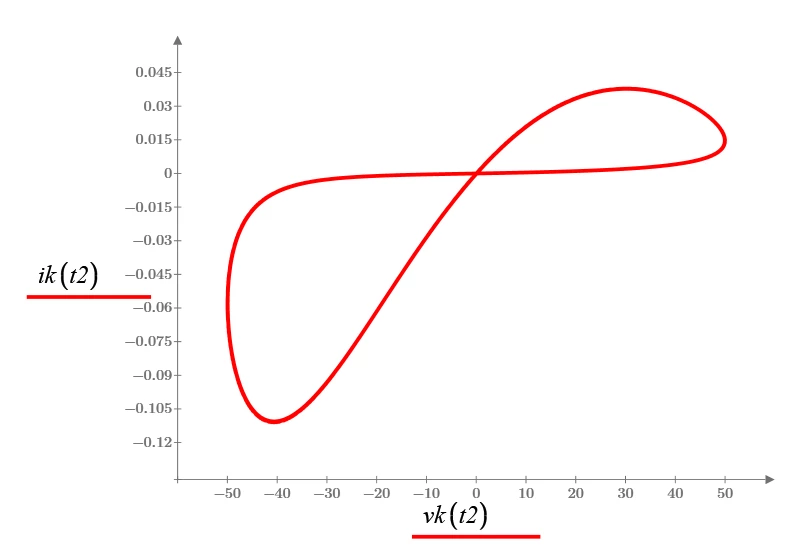
I am getting multiple overlapped plot while plotting for vk(t) vs ik(t)

  • January 22, 2024
  • 2 replies
  • 1587 views

Dear All,


I was trying to plot vk(t) vs ik(t). I am supposed to get only single plot for vk(t) vs ik(t).

I am getting multiple overlapped plot while plotting for vk(t) vs ik(t).

The mathcad code is attached below.

My interest is, I need to only one plot for vk(t) vs ik(t).

Could anyone rectify this problem. (I am using Mathcad 15 software)

Thanks in advance

Best answer by ttokoro


Increase the numberof t2.

image.pngimage.png

2 replies

ttokoro
21-Topaz I
ttokoro21-Topaz IAnswer
21-Topaz I
January 22, 2024


Increase the numberof t2.

image.pngimage.png

t.t.
vveeran4-ParticipantAuthor
4-Participant
January 22, 2024

@ttokoro Thanks a lot for your instant reply

25-Diamond I
January 22, 2024

Sometimes (not always) its a good idea to use Mathcads Quickplot feature and let it chose the step width automatically:

Werner_E_0-1705932399418.png

tt is not defined anywhere.


Is there a reason for the strange stepwith 1/w you defined and why you don't start the parameter at zero?

Werner_E_1-1705932971532.png

Your sine vk has a period of somewhat lower than 10, so when you run t from 0 to L1 (approx. 200) then you are looping through your "8"-curve 20 times.

Your range t2 starts from approx 150 so the curve still is looped through 5 times. This and the fact that you had chosen a large stepwidth and because Mathcad connects the points calculated by straight lines created the effect you saw.


ani.gif

vveeran4-ParticipantAuthor
4-Participant
January 23, 2024

Thanks for your valuable comments.

And your plot vk(tt) and ik(tt). It is defined anywhere in the prograrm, does mathcad will consider tt as automatically.

I have used 1/w to mention the frequency.