
1-Visitor
February 8, 2019
Solved

Intersections Calculate 2 circles / Analysis / Math

  • February 8, 2019
  • 3 replies
  • 14112 views

Hey,

I am from Germany and need some help. I am new with MathCad.


I want to calculate the insections of 2 cycles.


My Problems:


The plot of 2 variables in 1 diagram doesnt work. I tried it on the x-Axis with f(x,y) and on the y axis with x,y. No cycle is shown.


Then next problem is to subtract f(x,y) - g(x,y). Whats the Syntax? Can somebody tell me?


Is it possible to write a litte programm which calculates me the intersections or tell me the solution?

My program:


m11:=0
m12:=0
r1=8

m21:=7
m22:=8
r2:=3.25


f(x,y):=(x-m11)^2 + (y-m12)^2 - r1^2
g(x,y):=(x-m21)^2 + (y-m22)^2 - r2^2


h(x,y):=f(x,y)-g(x,y)


Thank you.


Greetings MM
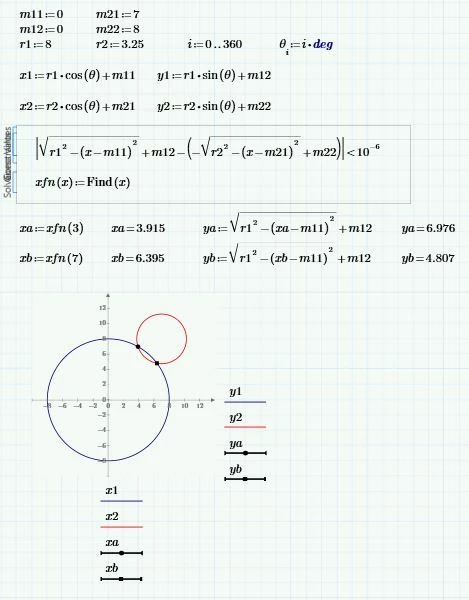
Best answer by AlanStevens

Here is one way (done in Prime 2, so there is no point in providing the worksheet!)


circles.JPG


Alan

3 replies

19-Tanzanite
February 8, 2019

Here is one way (done in Prime 2, so there is no point in providing the worksheet!)


circles.JPG


Alan

25-Diamond I
February 8, 2019

First of all: Don't just post pictures, post the Mathcad or Prime worksheet!


Its not clear if you just want to plot two circles or if you want to calculate the points of intersection.


What you defined with f(x,y):=... ist NOT a circle! Its a surface in 3D, a paraboloid. To plot it you would have to use Primes mediocre 3D-plot capabilities.


The circle you probably have in mind has the equation f(x,y)=0 and is the intersection of the paraboloid with the xy-plane.


To plot the circle you cant use the equation you created, because Prime unfortunately does not support implicit plots. You may solve f(x,y)=0 for y and plot each of the two solutions in one plot (upper and lower half of the circle) or you define the whole circle using a parameter representation.


To calculate the points of intersection of f(x,y)=0 with g(x,y)=0 you may either use the symbolic solve command or a numeric solve block.


See if the attached worksheet helps.

Marc26101-VisitorAuthor
1-Visitor
February 8, 2019

Thanks so much for your solutions,

i will try to understand the sheets, but this will take me some time.


@Werner_E i think you are from germany, it will be nice if you can give me some tipps in german in further times 🙂


To understand this calculation its better to plot the circles and then to calculate it 🙂


So i will post the worksheet here, but i think its not correct.


Greetings

Marc 🙂


25-Diamond I
February 10, 2019

Reply to your PM below:

According to you handwritten notes in a former answer it looks like not the larger circle is your cylinder but your cylinder rather is a radius of that circle and the smaller circle is not the lever but rather the path of its end.

It looks to me like your are only interested in the upper left one of the two points of intersection, right? The one with the lower x-coordinate.

As the lever and the cylinder are connected, the cylinder must have a minimal length of about 7,38. Otherwise the two circles will not intersect.

So I wonder why you are talking of a range from 4 to 8?

See if the attachment is of help


---- snipp --------------------------------

ich versuche es hier mal auf deutsch, da englisch nicht so meine Sprache ist 🙂


Ich brauche im Endeffekt eine Tabelle, wo ich abhängig vom Hub des Zylinders (Zylinder ist der unter Kreis (0/0)einen den Winkel des Hebels errechnen kann (Hebel ist der obere Kreis), vllt kann man das auf dem Foto mit meinen händsichen Berechnungen erkennen.


Wenn ich den x Wert zum Hebel kenne, welcher constant ist (in dem Beispiel der Wert x = 7), dann kann ich mir den Winkel errechnen, dadruch, dass ich die 7 minus meinem x wert der koorinate nehme. dann bekomme ich eine seite des dreieckes, der Hebel ist immer konstant (3,25= Hypotenuse).


Ich denke auf dem Bild kann man die Problemstellung erkennen, ansonsten kann ich gerne eine Skizze machen.


Der Zylinder hat eine Länge von, sagen wir mal 8, dies ist der Radius = 8, ausgefahren. Fahre ich den Zylinder ein, dann hat er z.B. eine Länge von 4. somit brauch ich am besten eine Tabelle, die die Winkel von 4,01, 4,02.... bis 8,00 ausspuckt.

Marc26101-VisitorAuthor
1-Visitor
February 11, 2019

Hey, thanks for your new version, it is getting more complicated, but this is what i need. The r_start is 1108 and the r_end is 1548. The calculation of the lever angle begins at r_start (zylinder lenght) = 1108, (in my CAD-Modell the angle then is approximately 14.6 degrees. I have to confess, that i dont fully grasp this sheet, i thought that the calculation is easier. 😞


yes the larger cycle is the Zylinder, i posted a sketch with the real values. the values of 4+4 and 3.25 are values which makes it for me easy to check my calculation and to ensure my way is the correct one.


Yes you are right i am only interestet in the left (lower x) intersection and the x-value of it. The max value of zylinder is 1108mm+440mm.


Marc

25-Diamond I
February 14, 2019

@Marc2610 wrote:

Hey,

so, i got the solution for my problem.

Now i have to implement a table where the values from 0 to 440 are shown.


@Werner_E can you tell me, what you did on top of the sheet kreis(xm,ym,r):=.......  ?


I think I explained that shortly in an answer above or in my PM.

"kreis" is a function which takes the coordinates of the venter of a circle and its radius as arguments and returns a 2-column matrix containing the coordinates of 96 points of that circle. This structure is only used for plotting. You can see in the plots that I place the first column at the abscissa (x-coordinates) and the second column at the ordinate (y-coordinates).

The first pair is [NaN NaN] which was chosen for two reasons:

1) Its easier to program if we can already start with a two column matrix

2) Its possible to stack multiple matrices representing different circles and plot them with one command (but all in the same color).

So again - "kreis" is only used at the first page of the sheet as its the easiest way for me to plot one or more circles.

For the calculation of the points of intersection or the table you were looking for its not needed at all.