1-Visitor
September 25, 2023
Solved

Issues with units when using the solve function - MATHCAD 8.0.0.0

  • September 25, 2023
  • 4 replies
  • 4061 views

Hello

i am having issues with units when i use the solve function. I have never had this problem before but it seems like whenever i use the solve function, some of the standard SI units are deleted in the process (the unit isnt bold blue anymore, which is what indicates that it is a unit).


This is very frustrating because i need to copy the whole solved equation down and solve it again with a standard = then it comes out in the right unit, but i have never had to do this before, and in most cases i also need to define the units again in the copied solution...


i attached a png of one of the times this has happened - and now it is happening in all my new files


Best answer by Werner_E

The problem you describe was quite often moaned about here in the forum. Auto-labeling in Prime is known to be faulty, especially when used with symbolic calculations.

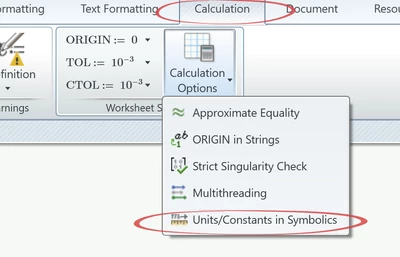
It often helps (and it does in your case, too - at least it did for me in Prime 9) if you turn on "Units/Constants in Symbolics" in the calculation options:

Werner_E_0-1695644692787.png

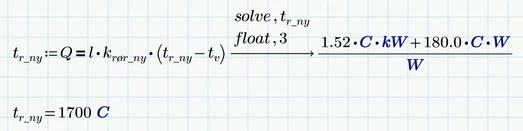
Now you don't have to resort to copy & paste but rather can assign the result of the symbolic "solve" to a variable:

Werner_E_1-1695644803895.png

But even though the aforementioned option is turned on, the symbolic is not unit aware. It does not know anything about units. It does not know that kW = 10^3 W, etc. and so it can't simplify the result to coulomb. The symbolics treats kW, C and W as three different unknown variables.


A word of caution about the usage of "float"! This does not only affect the displayed result but affects the accuracy of the whole calculation. It must be used therefor with great care!


A better option seems to me to use numeric methods rather than symbolic ones when you are just looking for a numeric result - especially if you use units. You may either use a solve block with "find" (looks ugly) or the "root" function.

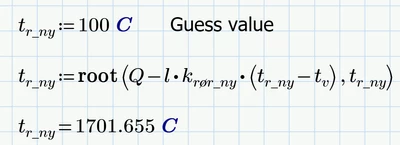
The root function needs that you either provide a guess value

Werner_E_2-1695645184935.png

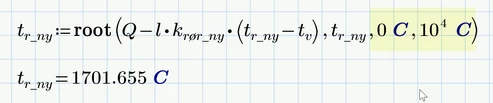
or a range for the variable looked for

Werner_E_3-1695645274275.png

If you need to round down or up the result you can additionally use the functions round, ceil, trunc or floor - whatever is appropriate.


Hop this helps.


EDIT: If you meant °C (degree celsius) instead of C (coulomb) as ttokoro suspects, than you have to pick that from the units drop down, you can't simply type it.


4 replies

1-Visitor
September 25, 2023

TR_10796227_0-1695639162276.png


19-Tanzanite
September 25, 2023

Cornel_0-1695643745320.png


But I am not sure why the results are different:

Cornel_0-1695644022249.png


Cornel_1-1695644039881.png

24-Ruby III
September 25, 2023

Hi,

please upload .mcdx file.

1-Visitor
September 25, 2023

I also tried in a new file with JUST that last equation. Having the same problem

TR_10796227_0-1695642139852.png


21-Topaz II
September 25, 2023

Hi,

Have you set this option:

Capture.JPG

19-Tanzanite
September 25, 2023

Cornel_0-1695644381827.png


ttokoro
21-Topaz I
21-Topaz I
September 25, 2023

Check your unit degree C. You are using Coulomb instead of it.

t.t.
Werner_E25-Diamond IAnswer
25-Diamond I
September 25, 2023

The problem you describe was quite often moaned about here in the forum. Auto-labeling in Prime is known to be faulty, especially when used with symbolic calculations.

It often helps (and it does in your case, too - at least it did for me in Prime 9) if you turn on "Units/Constants in Symbolics" in the calculation options:

Werner_E_0-1695644692787.png

Now you don't have to resort to copy & paste but rather can assign the result of the symbolic "solve" to a variable:

Werner_E_1-1695644803895.png

But even though the aforementioned option is turned on, the symbolic is not unit aware. It does not know anything about units. It does not know that kW = 10^3 W, etc. and so it can't simplify the result to coulomb. The symbolics treats kW, C and W as three different unknown variables.


A word of caution about the usage of "float"! This does not only affect the displayed result but affects the accuracy of the whole calculation. It must be used therefor with great care!


A better option seems to me to use numeric methods rather than symbolic ones when you are just looking for a numeric result - especially if you use units. You may either use a solve block with "find" (looks ugly) or the "root" function.

The root function needs that you either provide a guess value

Werner_E_2-1695645184935.png

or a range for the variable looked for

Werner_E_3-1695645274275.png

If you need to round down or up the result you can additionally use the functions round, ceil, trunc or floor - whatever is appropriate.


Hop this helps.


EDIT: If you meant °C (degree celsius) instead of C (coulomb) as ttokoro suspects, than you have to pick that from the units drop down, you can't simply type it.


1-Visitor
September 26, 2023

This was a combination. I somehow deselected the Units/Constants in Symbolics AND my temperatures i degrees C was set to Coloumb. So after changing this and using Kelvin (K) this made my solution perfect, thank you very much. 


Also the t := (equation) --- solve, t --> 

and after 

t = (answer)

worked out way better and was more appealing to my eyes. 


Thanks again!