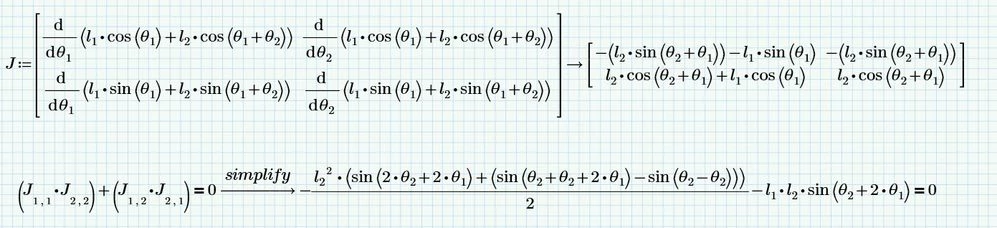
Why do add and not subtract. Furthermore it looks like you ran into Prime infamous auto-label trap and will have to manually label all variables the same.
Is there any reason you are not using the built-in "Jacob" function?
First of all you have to correct you error and change the plus sign to a minus to calculate the determinant the correct way.
You may also use the matrix determinant operator |J| or ||J|| to do the job.
If you still do not get the simplified result shown in my previous answer you have to look at the labels of all of your variables theta1 and theta2 and change them manually so all are the same - either all "variable" or all "-" (which means "automatic"). The symbolic engine does not like variables which are labeled differently and treats them as different variable which seems to be the reason why in your pic theta2-theta2 is not simplified to zero, etc.
As already written above using the "Jacob" function (and the determinant operator) would be the most natural way but as I have notice it seems to be broken in the new symbolic engine. So if you are using Prime 7 you have no option to switch back to the legacy symbolic engine and if the bug is not already fixed in P7 you can't use the "Jacob" function.
BTW, in future threads I would advice that you clearly state the problem you experience and the question you have and that you also always attach your worksheet as well.
OK, I further looked at the problems with Prime and I still consider it a bug in the new symbolics but there is an easy workaround.
The reason for the bug seems to be that the new symbolic engine is not always able to determine correctly the number of arguments in use. So the workaround is to just use the optional third argument of the "Jacob" function and tell Prime the number of independent variables in use.
There is a further problem in Prime when we try to solve for theta2. Primes new symbolic seems to not like vector indexed variables to solve for. Substituting the vector element for a "normal" variable seems to cure this problem.
It's not as obvious as you make it out to be that you are using P7 - after all you haven't revealed which version you're working with until now and also did never attach a worksheet.However, I had suspected P7.
and of course we can't go down to Prime 6!it is unacceptable
The workaround I referred to was not to do go down (or rather up) to Prime 6 and the legacy symbolic but I was talking about providing the optional third argument to the "Jacob" function as shown in the screenshot and my attached sheet. This works OK in Prime 6 with the new symbolic engine and I would expect that it also works in Prime 7 - you have to check for yourself.