Best answer by Fred_Kohlhepp

It's not clear to me what you're trying to do.  Your time steps seem grossly spaced.  I don't have "real" Mathcad, only Prime Express, so I cannot program.  


I tried to implement what you did, printed the results as pdf.  (If you type the math expressions in "real" Mathcad they should work.)  You can't take a logarithm of zero, so the first element in each time vector was made very small.


See if this helps.

2 replies

23-Emerald I
September 24, 2020

It's not clear to me what you're trying to do.  Your time steps seem grossly spaced.  I don't have "real" Mathcad, only Prime Express, so I cannot program.  


I tried to implement what you did, printed the results as pdf.  (If you type the math expressions in "real" Mathcad they should work.)  You can't take a logarithm of zero, so the first element in each time vector was made very small.


See if this helps.

15-Moonstone
September 26, 2020

Thank  

SPRstructur_0-1601088324565.png

However I tried to do manual calculation It maybe corrected answer for comparing


Thank you

SPRstructur_0-1601089149494.png


25-Diamond I
September 26, 2020

This is what Fred suggested

Werner_E_0-1601109496066.png

You typed something different (especially you typed just index "i" instead of "i-1"twice.

Here is the sheet and screenshot with the results when you correct this:

Werner_E_1-1601109923729.png


23-Emerald IV
September 24, 2020

As Fred indicated: It's not clear what you are trying to accomplish.

And I'm also limited wrt Prime: only Prime Express, so no programming.

Some observations:

1. By default arrays are indexed starting at 0, not at 1. That is why there is a leading 0 in the ti array (middle, bottom of the page). So all your ti(t) program does is replace the first value of t (1 day) with a value of 1 hour, and precede that element with a new element with a value of 0.

There is a global variable ORIGIN that sets the index of the first element. You can set it to either 0 or 1, but you can also use it in your program. Instead of  "for i e 1..nn-1" you could write "for i e ORIGIN..nn-1" if you meant to start at the beginning of the array.

2. Do you have more sophisticated plans with the function tj(t)? Otherwise it's better to just write tj:=t.

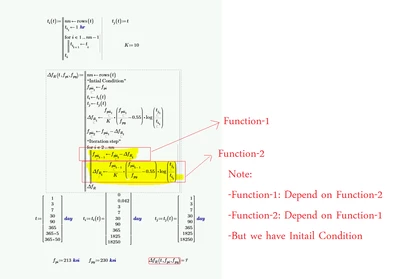
3. In the calculation of the initial value for DeltafR, you are taking the logarithm of the ratio of tj1 and ti1. Now tj1=3 days and ti1 is 0.042 days. Was this intended?

4. Now the error message says that you are indexing an array out of bounds. That is due to two reasons:

a.In the for loop you are assigning a new value to fppi[i-1. In the first pass, i-1=1 so you are assigning a value to fppi[1, to be equal to fppi[1-DeltafR[2. Now DeltafR[2 doesn't exist yet. I bet you meant to do:

fppi[i <- fppi[i-1  - DeltafR[i-1

b. the fact that you are indexing the ti array up to its length, because nn=rows(t). When indexing starts at 0, you can only index to rows()-1. There is a standard function for the last index of an array: last().


See if the attached helps. Especially if it delivers the right answer, when it delivers one... (I can't run it, but I can edit the program)


Success!
Luc

15-Moonstone
September 26, 2020

LucMeekes

it still error with my mathcad

SPRstructur_0-1601088980927.png


25-Diamond I
September 26, 2020

What you see when you just open the sheet is the last result before Luc saved the sheet. The error you see is because Luc uses the limited Prime express which does not allow to run programs (read the error message!)

You simply would have to recalculate the whole sheet (Ctrl-F9).

Here is what I see when I do after I corrected an index error (highlighted in yellow in the picture).

As I, too, don't really understand what you are trying to achieve I can't say if you get the results you expect.
I am also confused by the function t.i as it simply replaces/overwrites the first element of a vector by 1hr. Is this really what you want to be done?

Anyway I attach Lucs Prime 6 worksheet with the corrected index and a screenshot:

Werner_E_1-1601107574414.png