11-Garnet
June 13, 2024
Solved

Math equation solve issue

  • June 13, 2024
  • 4 replies
  • 6801 views

i Mathcad experts,

I have some questions about Mathcad function. I don’t have any useful idea to solve my issues.

I have one equation, and I can draw the curve of this equation.

And then I try to solve the peak value of curve (fig.1) by using the method in EX2.
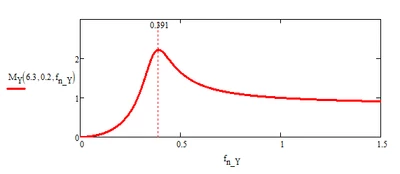
Jason_power_2-1718286163860.png

Below are my questions.

1.Any method I can solve this equation to get the fn_Y2, please see EX1?

2.How do I use solve function to get the fn_Y2, if I have different inputs Q2 at the same time (please see EX3).  I can do this when I only have one input, please see EX2.

3.If the issue 2 can be solved, and then I would try to input the fn_Y2 to get the peak value . Also I would like to draw the relationship of Q and peak value, please see the fig.2 (this fig is from TI’s datasheet), could you please give me some suggestions.
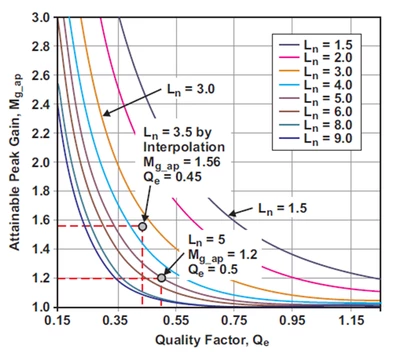
Untitled.png

Best answer by Werner_E

Prime is not able to solve your equation symbolically.


But as you had shown yourself it can provide solution(s) if you provide numeric values for the other two variables

Werner_E_0-1718289381025.png

You may also use the "assume" modifier to limit the solution to the only positive, real one

Werner_E_1-1718289438415.png


But you are just looking for numeric results (depending on Q and L(ambda), so I would suggest that you use Mathcads numeric methods. Either a solve block with "find" or one of the two ways to use the "root" function.

Here is the latter, assuming the solution is within the range from 10^-10 to 10:

Werner_E_2-1718291661678.png

You can turn this calculation into a function of lambda and Q

Werner_E_3-1718291717960.png

So it can be used to get the result for any of these values

Werner_E_4-1718291767640.png

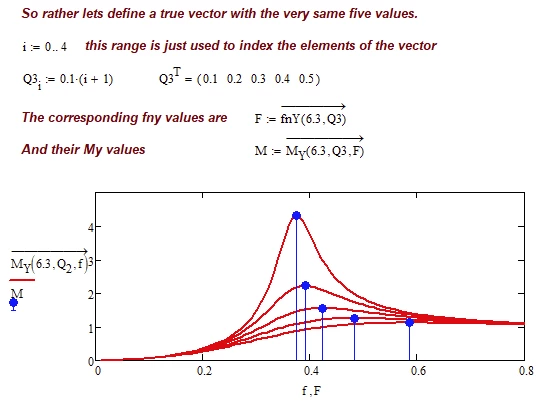
From here its not difficult to plot either the My function for various Q-values and their peaks

Werner_E_5-1718291850936.png

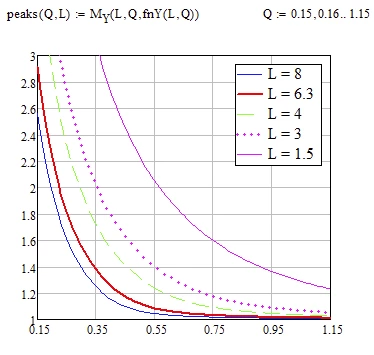
or the plot you seem to be looking for

Werner_E_6-1718291918994.png

Mathcad 15 sheet attached


4 replies

19-Tanzanite
June 13, 2024

I am not sure why do you want to differentiate with respect to fn_Y2, and not fn_Y.

Its too complicated to solve for fn_Y...also having these 2 as parameters

Cornel_1-1718287407017.png

Cornel_2-1718287414887.png


Cornel_0-1718287373921.png


But you can do something like this:

Cornel_3-1718287459021.png


as you already did in fact here:

Cornel_0-1718288299767.png


Its based on a manual way to do this what you want as you did...

Cornel_2-1718289947122.png


Cornel_1-1718289938776.png

Here...someone will need to find a way on how to choose maximum value as we can see for example at Q4 index is 3 and at Q6 index is 5, so index is changing:

Cornel_3-1718290257767.png


Cornel_4-1718290296490.png


And then how to iterate Q parameter from 0.1, 0.2,...1, then for each Q value to find the maximum, and then to plot, these in a more automatical way...Maybe one could find how to do it...

25-Diamond I
June 13, 2024

@Cornel wrote:

I am not sure why do you want to differentiate with respect to fn_Y2, and not fn_Y.


Above that expression he already had defined a value for f.n_Y and so Mathcads symbolics would refuse to solve for this variable. So he had chosen a different name to be used for the variable Mathcad should solve for.

Werner_E25-Diamond IAnswer
25-Diamond I
June 13, 2024

Prime is not able to solve your equation symbolically.


But as you had shown yourself it can provide solution(s) if you provide numeric values for the other two variables

Werner_E_0-1718289381025.png

You may also use the "assume" modifier to limit the solution to the only positive, real one

Werner_E_1-1718289438415.png


But you are just looking for numeric results (depending on Q and L(ambda), so I would suggest that you use Mathcads numeric methods. Either a solve block with "find" or one of the two ways to use the "root" function.

Here is the latter, assuming the solution is within the range from 10^-10 to 10:

Werner_E_2-1718291661678.png

You can turn this calculation into a function of lambda and Q

Werner_E_3-1718291717960.png

So it can be used to get the result for any of these values

Werner_E_4-1718291767640.png

From here its not difficult to plot either the My function for various Q-values and their peaks

Werner_E_5-1718291850936.png

or the plot you seem to be looking for

Werner_E_6-1718291918994.png

Mathcad 15 sheet attached


J_power11-GarnetAuthor
11-Garnet
June 16, 2024

Thanks for your response.

May I know why you use Vector in M function and F function?


J_power11-GarnetAuthor
11-Garnet
June 17, 2024

it is more clear to me, thanks.

25-Diamond I
June 13, 2024

I played around and added a 3D plot with the L (lambda), Q an max My values, showing the curve corresponding to L=6.3 in red

Werner_E_0-1718301154560.png


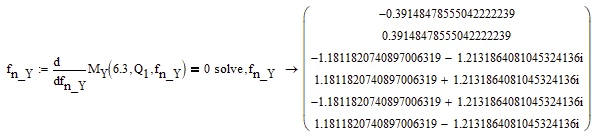
I also added a way to use the symbolics to get the necessary fnY-values, but I won't suggest using it:

Werner_E_1-1718301227251.png


J_power11-GarnetAuthor
11-Garnet
June 16, 2024

What's the function of this equation?

J_power_0-1718529379364.png


25-Diamond I
June 16, 2024

@J_power wrote:

What's the function of this equation?

J_power_0-1718529379364.png


This expression does the very same (or something similar) as the function f.positive in my last reply (posting a worksheet with Lucs approach).

F is the result of calling the function "temp" which uses the symbolics to return a vector with six elements.

In case of your example just one of these six values is real and positive and this is the one to pick. I won't bet that its always the first or always the second one (even this may be the case here).

Furthermore sometimes because of round-off errors even the real solutions are returned with a very tiny imaginary part.


1)  |Im(F)|<^10^.10 returns a 6-element vector with a 1 where F is a real value (Imaginary part 0 or very small) and a zero if F is non.real.


2) F is multiplied b the vector created in the first step, so all non-real values are set to zero


3) this new vector is sorted using the "sort" function. That way the largest (positive ?) value comes last in the vector returned


4) "reverse" changes the order of the vector elements so that that positive value is the first element


5) This first element is now chosen using the matrix index ORIGIN


And, no, this sure is not the most elegant or intuitive way to achieve this task 😉


After all I think its best to avoid the symbolics altogether and just use Mathcads numeric facilities.

23-Emerald IV
June 13, 2024

The question is to find the peak values in:

LucMeekes_1-1718309499282.png

an example of which is:

LucMeekes_2-1718309518852.png

That means solving:

LucMeekes_3-1718309646691.png

Which gives a huge result. You can just select the one result, that is real and positive:

LucMeekes_0-1718309453682.png

And use it to calculate the peak value with:

LucMeekes_4-1718309742298.png

Which you can plot over values of lambda and Q:

LucMeekes_5-1718309795639.png

And of course you can pick the Peak value for any set of lambda and Q values:

LucMeekes_6-1718309956760.png

Success!
Luc

J_power11-GarnetAuthor
11-Garnet
June 16, 2024

Hi,

Thanks for your response.

May I know how to use positive in the equation.

I try to do the same thing as you, but Mathcad can't be shown.


23-Emerald IV
June 16, 2024

Sure. I see from Werner's results that Mathcad 15 provides the positive as second element of the result array. So, define 

positive := ORIGIN+1

and use that to index the f() function.


Success!

Luc