5-Regular Member
May 27, 2025
Solved

MathCAD Prime 9.0 "instabiities"

  • May 27, 2025
  • 3 replies
  • 4519 views

Dear all, I’m experimenting since a while, with MathCAD Prime 9.0 and a specific spreadsheet, what I’d classify as “numerical instabilities”.

I’ll explain better.


I’m dealing with a complex spreadsheet; this last:

  1. Reads from an Excel file the input data
  2. Recalls (include command) a spreadsheet defining a function of 6 variables  

To be noticed that the above points have not created any trouble in previous spreadsheets

      3. Involves recursive formulas with matrix multiplications and inversion

     4. Involves the solution of a transcendental equation deriving from the determinant of a matrix; this last             matrix is obtained at the end of the recursive process (hinted before

    5. Is calculated using the options:

  •  Calculation/Calculation Options/ Multithreading;
  • TOL & CTOL @ 10-7

The spreadsheet, in itself, is not that big (around 350 Kb).


Many different issues are highlighted.

First, with plotting (preliminary to roots search).

The plotting of the transcendental equation did not work. I created instead two vectors (see Fig.1 in the attached report). It worked once (and I could see the range where the first root is); but re-opening the worksheet the vectors were recalculated and ended in errors (see Fig.1 in the attached report)


Second, with root search.

The MathCAD find and root algorithms are not working at all. I could find (chrome-extension://efaidnbmnnnibpcajpcglclefindmkaj/https://www.msme.us/2012-1-2.pdf) an algorithm “intermittently” working….I mean, the algorithm converges to a solution (reasonably close to the expected one). BUT re-opening the spreadsheet, the root is often recalculated (!); and, sometimes, a solution is not even found (!). In this last case, I re-launch the calculation changing the range for root search (1 Hz in Fig.2 of the attached report ) or simply re-writing the values (in this case 300Hz or 1Hz – Fig.2)


Third, with “contradictory” reports:

See Fig.3 of the attached report

In the Fig.3, on the left hand side, you can notice that the function e0707 is reporting an error (when calculated with Sol1_mR value); but the same calculation gives a result, on the right hand side…on the right hand side, instead, the function e0708 reports an issue….

But BEFORE (in the spreadsheet), the same functions are calculated without any problem (?!?) – see Fig.4 in the attached report.


Is anyone ever experienced this kind of issues with MathCAD (Prime 9.0 variant in particular)?

Some suggestions to alleviate these issues and/or explanations of what is happening?


Personally, I feel the issues are a mix of inexperience with some algorithms (and not “lean” spreadsheet, maybe…) and real tough calculations.


Obviously I’m available for any further question.


I’ll try to attach to attach also the spreadsheet and the needed files if really necessary…


Many thanks and best regards
Best answer by Werner_E

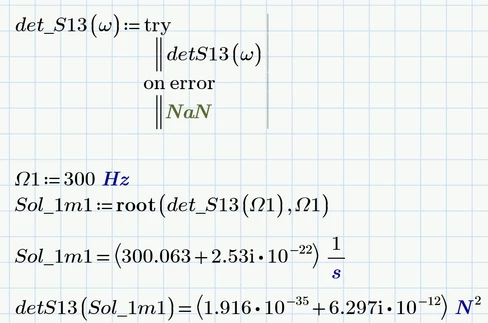
I still don't know which frequency results in a wrong matrix S13 and is responsible for the failing of the root function.

But we can wrap the function in a try...on error.. envelope and now the first variant of the root function works OK and even with a higher accuracy than your manually derived value. But it needs much more time to find the solution compared to the solve block.

Werner_E_0-1748377443509.png


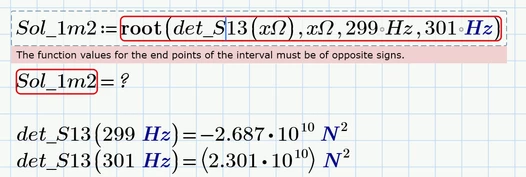
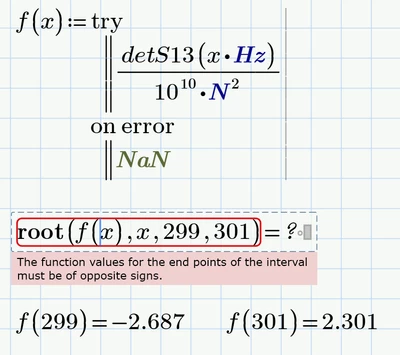
I don't understand why the second variant of the root function still fails.

It claims that the function values at the end points of the interval provided (299 Hz ... 301 Hz) are not of opposite sign which clearly is not the case.

Werner_E_1-1748377638527.png

I also tried to make the function completely unitless, but to no avail

Werner_E_2-1748378045935.png


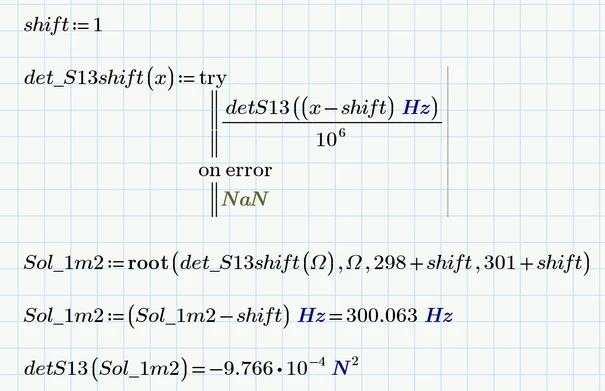
It gets even more crazy - scaling the function, making only the argument unit-less and shifting it horizontally does the job. It does not matter in which direction the function is shifted (+1. -1).

I have no explanation for this weird behaviour!

Werner_E_3-1748378852089.png


3 replies

23-Emerald IV
May 27, 2025

A picture may paint a thousand words. A Prime worksheet delivers ALL information.

If possible, attach the worksheet(s) and the Excel sheets needed.


Success!
L:uc

5-Regular Member
May 27, 2025

Good afternoon, I made a test with Werner_E and it seems to work: here attached the spreadsheet and the needed (include + input) files.


Thanks and best regards


25-Diamond I
May 27, 2025

Ad Fig. 1
Its can't be seen how your function "S13" is defined, so nothing can be said about the error you experience. Is S13 really creating a square matrix based on a single frequency? What is the result of, lets say, S13(55 Hz)=...


Ad Fig. 2
Seems to be based on the same problem with function S13, but we have not enough information to say anything further


Ad Fig 3

Problem may be that you try to numerically evaluate (the equal sign at the end) a function definition. Delete the equal sign in the definition of function C7b and see if it works. Example:

Werner_E_0-1748342451742.png

Error message would be the same, no matter if a variable x is defined above or not. The error message is misleading as x is the formal function argument and it does not matter if a variable with the same name is defined or not.

As we don't see the definition of the function e0708 nor the error message thrown, nothing can be said according the error when calling this function.


Ad Fig. 4

Kind of "Yesterday the vase was still intact and standing on the ledge and today it is lying on the floor in pieces."
Obviously something has happened. We can't know what it may have been, but sure something is different now compared to the last time when the file worked OK. An automatic Windows update changing the behaviour of Prime cannot be ruled out completely, but in my opinion it is highly unlikely.  An (intentional or not) change to the Excel input sheets or in the Prime sheet seems much more likely to me.
A small change can have a big effect (such as the unintentional addition of an equals sign after a function definition, as described in #3).


Generally when debugging a worksheet you should concentrate just on the first error in the sheet as subsequent errors may be just due to it. Just go further down in the sheet after you fixed the first error.


I fully agree with Luc that whenever possible you would have to provide the worksheet and the necessary Excel sheet(s) for more help.


5-Regular Member
May 27, 2025

Good afternoon Werner_E, i'll try to attach the files BUT I can give you already some partial answers


  S13 matrix definition:

Please have a look to S13matrix.jpg

You can see that:

1) it is recursively defined (it depends from a S12 matrix. The recursion goes back until a matrix S0 which is, by definition, a 4x4 null matrix) 

2) it depends from 4 matrices (F11, F12, F21, F22) that are submatrix of the matrix function called (include) by the spreadsheet. The original variables (6) are fixed (from data recovered by Excel) except for the frequency (omega small). On the matrices F I have very few doubts because used tenths of times and correlated successfully with data retrieved in literature.....


You can also see a calculation check (highlighted in pale blue) for the root Sol1_mR. 


Ad Fig 3

Problem may be that you try to numerically evaluate (the equal sign at the end) a function definition. Delete the equal sign in the definition of function C7b and see if it works. Example:

FB_10795922_0-1748348014006.png


Just after having finished the post I simply wrote again C7b(Sol1_mR) , and "miracle": now all is ok...(see attached .jpg)...and no, apparently the = after the definition is not disturbing.... 


I've tried to attach all the file..hope it works...


Thanks & Best Regards


25-Diamond I
May 27, 2025

I was talking about the equal sign after the DEFINITION of the function, not the one after the definition of the variable D7 using a function CALL!

Werner_E_0-1748356429233.png

In your new screenshot this equal sign is not present anymore and so it works OK

Werner_E_1-1748356484907.png


Do I understand correctly that the rest of the worksheet is now OK, too?

Would be glad to hear that because even the calculation of one single matrix S13 took quite long, calculation of 601 similar matrices and their determinant for the vector X would take shear endless.

At the moment I stopped calculation and closed the worksheet and would try to open it again only if you state that there still are problems.


25-Diamond I
May 27, 2025

OK, I had a closer look at your sheet now and was able to speed up the calculation of S13 by a factor larger than 600.

All that has to be done is to avoid that S13 calculates S12 twice and that S12 calculates S11 twice, ...etc.

You may use a two line program (first lines calculates S12 which is then used in the actual calculation in the second line.

Or you may decide to use an inline assignment to a local variable XX:

Werner_E_0-1748372432821.png


Using recursion we could get rid of all the function S1  to S13 and replace them for a function Snn which, additional to the frequency argument has an argument referring to the number of stage (1 .. 13).

Werner_E_1-1748372590807.png


Now that calculation speed is increased it sure makes more fun to do the plotting or play around with the root function.

While looking at the plot I wondered why the max value did not show up in plot and found that there seems to be some kind of discrepancy for the position around 247 Hz. You may want to further investigate where this stems from and if there are other outliers.

Werner_E_2-1748372879429.png


According the root-finding I don't know why both flavors of the root function fail

Werner_E_3-1748372971971.png

Not sure if an effect similar to that at 247 Hz might be the cause. The implemented algorithm tries different values of omega (not necessarily near 300 Hz) and the error message may indicate that there is at least one frequency for which S13 is returning a matrix with wrong units. I tried a few values but got a correct result every time. I may be needed to look in more detail in the defining functions but thats something I leave up to you 😉

The solve block with find also fails, but with the error "No solution found". The reason is that the magnitude of the function values is so large that tiny arguments changes effect large changes in function values and so Prime could not find a solution within the tolerance.

One way out can be to simply decrease the function values by dividing them by a large number (at least 10^4).

Werner_E_4-1748373402520.png

As you can see the solve block works OK now, but the last line shows that the result is a bit less accurate than the one you got by your calculation on the left side.

Prime 9 sheet with all the changes is attached


Werner_E25-Diamond IAnswer
25-Diamond I
May 27, 2025

I still don't know which frequency results in a wrong matrix S13 and is responsible for the failing of the root function.

But we can wrap the function in a try...on error.. envelope and now the first variant of the root function works OK and even with a higher accuracy than your manually derived value. But it needs much more time to find the solution compared to the solve block.

Werner_E_0-1748377443509.png


I don't understand why the second variant of the root function still fails.

It claims that the function values at the end points of the interval provided (299 Hz ... 301 Hz) are not of opposite sign which clearly is not the case.

Werner_E_1-1748377638527.png

I also tried to make the function completely unitless, but to no avail

Werner_E_2-1748378045935.png


It gets even more crazy - scaling the function, making only the argument unit-less and shifting it horizontally does the job. It does not matter in which direction the function is shifted (+1. -1).

I have no explanation for this weird behaviour!

Werner_E_3-1748378852089.png


5-Regular Member
May 28, 2025

Dear WERNER_E,


again many thanks for all your indications: indeed I'm making a jump in MathCAD use!


About the problem you're hinting of: me also trying to find roots of the transcendental equation coming out from the recursive method I suspected

that the function is oscillating around the root with really small amplitudes...or oscillations are purely numerical: I must confess I've not all my ideas clear in my head but with transcendental equations coming from this kind of methods we can go very near to  maximum number of digits allowed by MathCAD...