
10-Marble
September 19, 2025
Question

Mathcad 14: "Failed to launch server application"

  • September 19, 2025
  • 1 reply
  • 598 views

Mathcad 14. File attached.


I am trying to fill out this area which I believe launches excel and I get the following error:
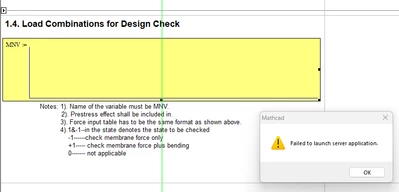
 

netoprax_0-1758311656294.png


I was looking at the forums and some people suggested using Excel 32 bit instead of 64 bt

but I already have 32 bit

 

netoprax_1-1758311716086.png


before I go through the hurdle of asking IT to reinstall this software (which might not even solve the problem) what can I try?


thanks,


1 reply

25-Diamond I
September 19, 2025

@netoprax wrote:

Mathcad 14. File attached.

It seems you forgot to do that.


I was looking at the forums and some people suggested using Excel 32 bit instead of 64 bt

but I already have 32 bit


netoprax_1-1758311716086.png


You screenshot doesn't really show if its really 32-bit M$O.


I remember some threads in the past claiming that Mathcad has problems with Office 365. But I think there also were answers stating that Office 365 would work OK for them.

I also remember the tip that it may help to manually fire up Excel, wait until its up and only then double click the embedded component (but then this may have been an old hint at the times computers were much slower than nowadays and maybe its just trying to avoid some kind of timeout).

Sorry, I think I can't be of much help with this...


24-Ruby III
September 21, 2025

Some issues should have been solved in version Mathcad 15 M050:


"2874037 Fixes issue where specific indefinite integral cannot be computed.
2974950 Fixes issue with exporting matrix with large number of rows to Excel using WRITEEXCEL function
2875902 Fixes “Recursive Definition” error issue while performing inverse Laplace transform
5586155 Fixes specific issue where calculation occurs but not all of the result is displayed
6381616 Fixes Win 10 issue with Mathcad hang when editing excel component
5820779 Fixes issue with incorrect PDF output when checking in content with Models and Viewables in Windchill PDMLink.
6827716 Fixes issue with Mathcad filename on print to PDF

6843642 Fixes issue with Mathcad crash while double-clicking axis placeholder after activating and closing title window
6912651 Fixes issue with Mathcad crash on Undo when deleting an area region
6966440 Fixes Win 10 issue with read only warning message display
7015927 Fixes hang when editing the excel component in a worksheet having web control submit button in Windows 10".


25-Diamond I
September 21, 2025

As @netoprax  is using Mathcad 14, also the bug fixes in other releases of Mathcad 15 may be of interest.

We also don't know which release of MC he  uses.

Here is what I could find when looking for 'Excel' - doesn't look like the problem reported is related to the  bug fixes:

------------------------------------------------------------------------------------------------------------------------------------

Mathcad 15 F000

Microsoft Excel 2007 Support
Various components that previously supported only Microsoft Excel 2003 .xls format can now handle Microsoft Excel 2007 .xlsx and .xlsm format.
- New READEXCEL and WRITEEXCEL functions to read and write data to and from Excel 2007 file format
- New READCSV and WRITECSV functions for access to data files in comma-separated value format


1743813 Fixes a problem related to the export of data tables containing integers and strings from Mathcad to Excel
1773587 Fixes a performance problem related to embedding a Mathcad object in an Excel file
1779509 Fixes a problem related to delete and insert elements on a matrix that is copied from Excel


M005
2014092 Resolves a problem with opening a file containing an Excel component that cannot be loaded


M010
1990321, 1990338, 1990387, 1990725 Addresses a problem with missing information in the setup license agreement of the Excel add-in
2007304 Fixes a problem with assigning data to a variable using an Excel component and an existing Excel 2007 file
2035612 Fixes a problem with adding a row to a matrix that was pasted from Excel 2007

------------------------------------------------------------------------------------------------------------------------------------


Find attached the release notes for MC15 M050

Release notes for MC14 up to the latest release M035 were posted by @VladimirN    here.