1-Visitor
June 4, 2014
Solved

Mathcad 15.0 Surface Plots - Extra "Depth" on Z-axis for data that does not exist

  • June 4, 2014
  • 3 replies
  • 7025 views

Hello,

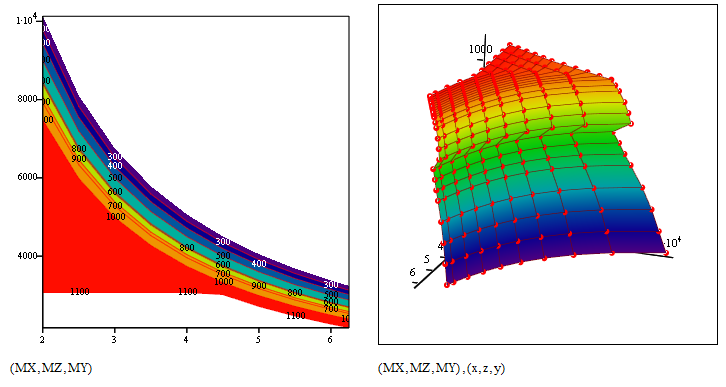
I've got a surface plot of some X, Y, Z data that is correct. However, when I add contour lines (or do the 2D contour plot), there are extra contours that do not exist in my data. My Z axis should only have data from 200 to 1100, but in the picture, you can see data well below 200 into the negative values, and some data that exists above 1100. It appears mathcad is trying to interpolate data that isn't there to fill whitespace. When I fill the backplane, it only tints the contours that don't exist with the shade of the backplane fill.

Any fixes, or is this a glitch in 15?

Thanks
Best answer by Werner_E

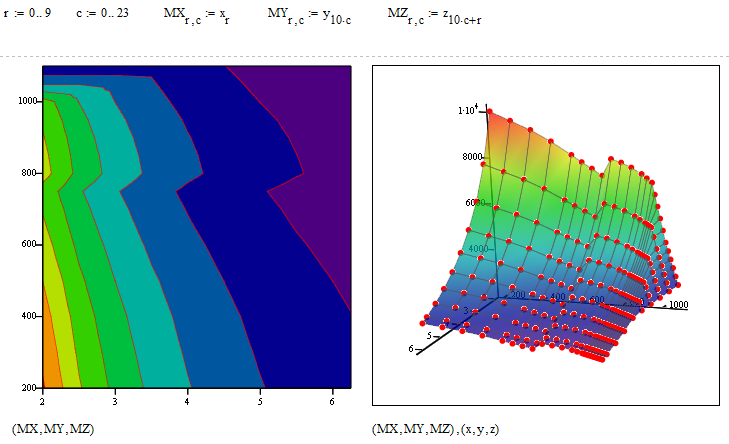
I have created the correct data to form a 2D surface for you. Notice that I renamed the vectors so that z is the dependent one!

First we show it in x,y,z order, load rating in z-direction and we see that now that scatterplot of the points perfectly fits:

1.png

But you can change the order. Here is the same order you used in your sheet (height is height 😉

2.png

You may get a smoother result if you use some sort of spline interpolation of your data but at least now we see the correct surface. BTW, what is Excel showing? Does it create the correct surface?

3 replies

23-Emerald I
June 4, 2014

You'll get a far better response if you post the sheet rather than a picture.

1-Visitor
June 4, 2014
25-Diamond I
June 4, 2014

Its not a glitch in Mathcad.

The main problem is that you are not provide a surface and IMHO Mathcad should even refuse to do a surface or contourplot of that data.

You provide a simple list of points in 3D space. So all you could ask Mathcad for is to plot those points and maybe connect them in the order defined by your vector - this is done using a scatter plot.

You may create your own interpolation routine to get a surface, but as it looks to me some of your points are lying one on top of the other (at least close). So an interpolation routine, providing for any given pair of z and x value a height y, would be ambiguous.

BTW, Is there any deeper reason for naming abscissa, ordinate and aplicate z,x,y rather than x,y,z as usual?

Facit: The surface you see when you plot your data points is not the surface you want to be plotted. Its Mathcad's interpretation of your data and its a surface which comes close to your points and is also defined outside the region given by your points. I am not sure how exactly Mathcad interpretes your data, but by looking at the last plot in the attached sheet and turning around the plot you see that not all points are lying in the surface created by Mathcad. I embdedded the data of your excel sheet so the file is selfcontained which is more convenient here.

Its unusual that you create your data in Excel and try to use Mathcad for plotting (I know, missing 3D capability). Usually people are going the opposite way and calculate their data in Mathcad. How is the data you use derived? Any chance of being able to provide the three matrices which Mathcad needs to plot a surface? Or at least - can you privide a table with heights (y-values) for every gridpoint in a rectangular(!) z,x-area?

04.06.png

1-Visitor
June 4, 2014

Thank you for replying.

I performed a bunch of iterations of the same calculation in excel that vary three parameters (the X, Y, and Z in the plots). I thought I might be able to develop a better contour plot in mathcad, given Excel's plotting is so bad. My mathcad is hack at best, and calling myself a novice user is generous. Thanks for embedding the table, its easier than the help file made it out to be. The plot is set up already with height Y as a function of X and Z

The axes are labled differently because when I was fooling around with the contour plot, I didn't realize I could change the axis of the contour lines from the dropdown in the properties window, so I changed the data on each axis.

What did you do to "turn off" the contours that go beyond the end of my data? There is a remnant but nothing MS paint cannot fix

Werner_E25-Diamond IAnswer
25-Diamond I
June 4, 2014

I have created the correct data to form a 2D surface for you. Notice that I renamed the vectors so that z is the dependent one!

First we show it in x,y,z order, load rating in z-direction and we see that now that scatterplot of the points perfectly fits:

1.png

But you can change the order. Here is the same order you used in your sheet (height is height 😉

2.png

You may get a smoother result if you use some sort of spline interpolation of your data but at least now we see the correct surface. BTW, what is Excel showing? Does it create the correct surface?

1-Visitor
June 4, 2014

Thank you!

Excel with Y on the vertical axis. The surface renders nicely, but the problem is that the x and z values are not the actual values, but rather their position in the array you are plotting. On the X axis, I had renamed it the actual number values, but on the Z the values are still names Series1, Series2... The X and Z do not scale with their value either.

25-Diamond I
June 4, 2014

Is was easy to do so for whatever its worth are the contour lines in a 2D plot.

3.png