
1-Visitor
October 30, 2014
Question

Mathcad 15 M030 can't draw multiple 3D plot?

  • October 30, 2014
  • 3 replies
  • 7824 views

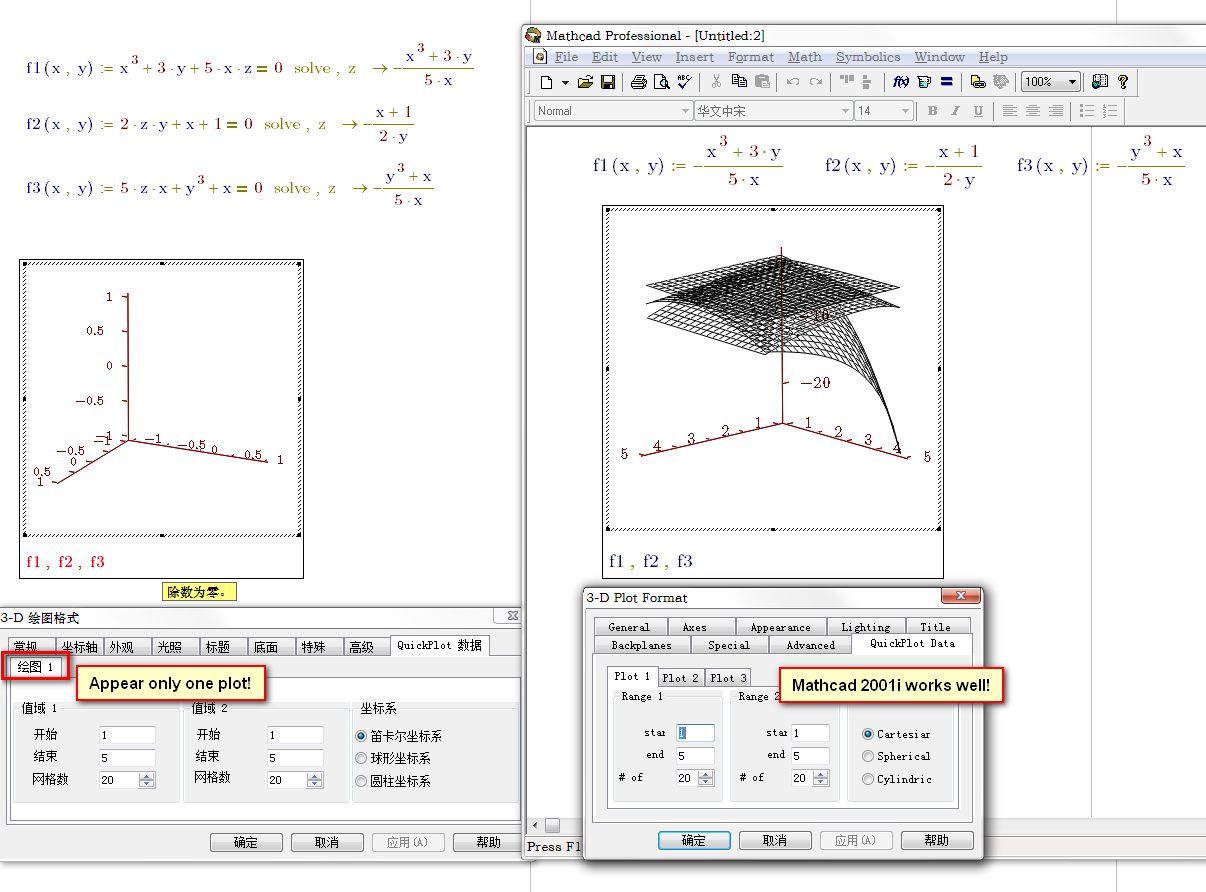
I want to draw 3 expressions in one 3D plot, and the ranges of x,y is 1~5.

When I draw it in MC15M030, only one plot setting item appeared!

And when I use the same function in MC2001i, it work well!

See the picture below:
2014-10-30_155805.png

It seems a bug in Mathcad 15 M030, is it?

3 replies

24-Ruby IV
October 30, 2014

By me no problem - Mathcad 15 and Windows 8.1 on Surface Pro 3:

test0-1.png

25-Diamond I
October 30, 2014

Valery Ochkov wrote:

By me no problem - Mathcad 15 and Windows 8.1 on Surface Pro 3:

Please try with the test0 sheet zhu has provided,

Looks like a bug to me because the error message (division by zero) is not appropriate. It may be a corrupt sheet.

1-Visitor
October 30, 2014

Werner Exinger wrote:

Looks like a bug to me because the error message (division by zero) is not appropriate. It may be a corrupt sheet.

It works in Prime also.

Clipboard01.jpg

1-Visitor
October 30, 2014

Werner seems to be correct. Works in Mathcad 15.

1-Visitor
October 30, 2014

How do you get that? Just copy the plot from the .mcd to the .xmcd? or other?

And it seems I only could copy/paste the elements from .mcd to .xmcd, but couldn't from .xmcd to .mcd.

1-Visitor
October 30, 2014

zhu laojianke wrote:

How do you get that? Just copy the plot from the .mcd to the .xmcd? or other?

Yes correct.

25-Diamond I
October 30, 2014

OK, I've played around with the phenomenon and I guess I found out what happens. basically its a bug.

The problem is not that MC15 can't show the plots (as many had already found out as it display the older file) but the we cannot create it using MC15. The reason is that MC15 will not allow to set the quickplot ranges for plot 2 and plot 3 when an error occurs and as the default range is from -5 to 5 we run into a division by zero error.

There is a simple workaround: Create a dummy function f(x,y):=1 and plot the "three" functions f,f,f.

Set the quickplot range for each of the three plots so that the division by zero s avoided (in your case 1 to 5) and then change f,f,f to f1,f2,f3.

Silly and sure am annying bug.

Another way out is using createmesh.

1-Visitor
October 30, 2014

As Prime did when I converted the file?

25-Diamond I
October 30, 2014

Mike Armstrong wrote:

As Prime did when I converted the file?

Yes. In Prime we can only set the "quickplot" ranges by awkwardly changing the values on the axis. I still scratch my head about the fact that there must be at least one person who thinks that that kind of user interface is a good idea - its so awful!

So in Prime in contrary to Mathcad you are not allowed to set different quickplot ranges for different plots and so Createmesh has to be used to simulate this.

So Prime can't suffer from that bug because it does not even offer the feature which fails in some cases in Mathcad.