
5-Regular Member
February 14, 2021
Solved

Mathcad Prime 6.0 Histogram BoxPlot Combo no longer works

  • February 14, 2021
  • 2 replies
  • 2943 views

Hi All 


We've been doing multi-element box-whisker/histogram/error-bar plots for a while in coursework and in the past it's worked well.  Recently we are no longer able to replicate the plots.  

An image of a working plot is here
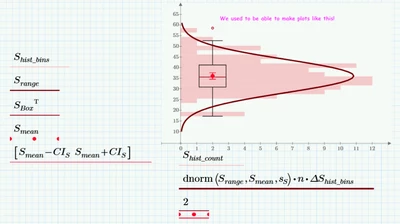
Happy Plot.png

Alas, they now look like this (note the Box of the combined histogram boxplot has collapsed to a single line (or likely one where the width of the box is simply too small to see.  
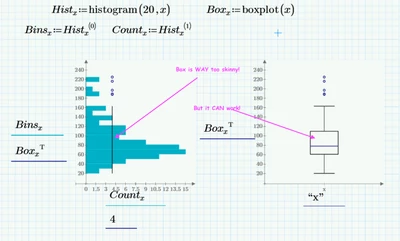
Sad Plot.png

This happens on multiple machines and neither I nor my students can being back the old [preferred] way.  This was working in September of 2020 (for people joining late it is now February 2021)


Ideas?


Bill Capehart

SD School of Mines.
Best answer by Werner_E

Addendum

Here is a work-around I just found:

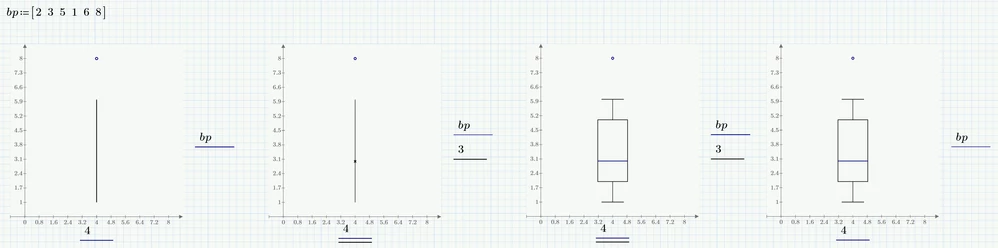
  1. create your "Box Trace" plot with the desired position at the x-axis. The plot is just a line
  2. add a second trace at the y-axis - I simply added a number (that way plotting a single point)
  3. Change the plot type of the new plot to "Column Trace" (other types may work OK, too)
    Suddenly the boxplot is drawn as it should be
  4. Delete the newly added trace, the boxplot will still show OK. But if you copy the plot region, it disappears.

Werner_E_0-1613483867631.png


I guess the Box Trace was as buggy in September 2020 as it is now in Feb 2021. It was thanks to additionally added plots that it worked as you expected.


2 replies

24-Ruby III
February 16, 2021
25-Diamond I
February 16, 2021

Are you sure that a sheet using the very same setting as the non-working example had worked in the past?

According to the help in a boxplot the x-axis should be a string or a vector of strings (silly enough if you want to combine it with other plots). It seems not to be intended to combine "Box Trace" plots with other types in one single plot .

The working example you show seems to only work OK because of the added error plot ant this still works OK these days, too.

Werner_E_0-1613480421515.png

Its a quite strange effect and I also experienced other strange effects when I test-drived the "Box Trace" feature in the past. It seems to be a buggy feature.

An example: After fiddling around with the example shown above, I tried the one given in the help:
https://support.ptc.com/help/mathcad/r6.0/en/index.html#page/PTC_Mathcad_Help%2Fto_create_a_box_plot.html%23wwID0EI1SGB

This is how it should look like according to the help:

Werner_E_3-1613481208634.png

This is what I got:

Werner_E_0-1613481855584.png


I created the whole plot from scratch and now I got this

Werner_E_1-1613481897308.png


My conclusion is that its better not to use the "Box Trace" plot at all and create boxplots if needed by other means.


If you trust that PTC will take your concerns seriously and that it will be of use, you can use the support link which VadimirN had provided - Good luck!

Werner_E25-Diamond IAnswer
25-Diamond I
February 16, 2021

Addendum

Here is a work-around I just found:

  1. create your "Box Trace" plot with the desired position at the x-axis. The plot is just a line
  2. add a second trace at the y-axis - I simply added a number (that way plotting a single point)
  3. Change the plot type of the new plot to "Column Trace" (other types may work OK, too)
    Suddenly the boxplot is drawn as it should be
  4. Delete the newly added trace, the boxplot will still show OK. But if you copy the plot region, it disappears.

Werner_E_0-1613483867631.png


I guess the Box Trace was as buggy in September 2020 as it is now in Feb 2021. It was thanks to additionally added plots that it worked as you expected.


5-Regular Member
February 19, 2021

Thanks Werner.  


This workaround indeed worked on the more complex graphics that we were working with.  


Thanks Much
Bill