
12-Amethyst
August 25, 2022
Solved

Mathcad Prime 8.0 - Excel component does not update when input changes

  • August 25, 2022
  • 1 reply
  • 5186 views

Hi there


I am using Mathcad Prime 8.0 and Excel 365 32-bit.


I have a Mathcad Prime 8.0 sheet (converted from Mathcad 15.0) that sends input e.g. NPS:=2.5 into an Excel component and extracts dependent output data. It appears that if I change the Mathcad parameter to e.g. NPS:=8, Mathcad updates the input inside Excel, but Excel does not auto-calculate. Excel apparently only auto-calculates if I force re-calculation through CTRL+F5 from Mathcad, or if I open the Excel component and force re-calculation (e.g. Calculate Now)


I have Auto Calculation and multi-threading enabled in Mathcad, and Calculation Options set to Automatic in the Excel component.


Has anyone seen this before and know how to enforce auto-calculation without using CTRL+F5? E.g. write a macro inside the Excel component that triggers auto-calculation? However, it looks like a bug.


Thanks.
Best answer by PEAH

Hi Vladimir


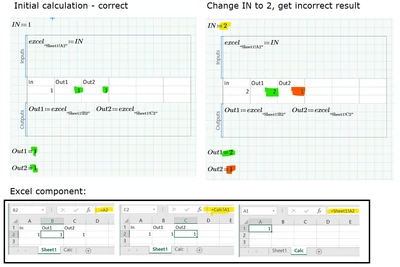
Thanks for the reply, however it was not the cause, which I appear to have found now. The issue is that the Mathcad Prime 8.0 Excel component, unlike the Mathcad 15.0 Excel component, is sensitive to the order of the Excel worksheets within the workbook.


I found out by placing VBA code inside the Excel component and use the debug window to track the events during the calculation sequence. So it appears that Mathcad Prime first inputs the values to Excel and then activates the first work sheet of the workbook and calculates it (but not resolving dependencies, see Excel performance: Improving calculation performance). Mathcad walks through the remaining sheets in this way until it reaches the last sheet within the workbook. Then calculation continues in Mathcad.


The above algorithm should work fine if you have only one Excel worksheet in the Excel workbook, or if you line up your multiple Excel work sheets and their formulas, such that everything is calculated "from left to right". My Excel component had references between worksheets, and I thus kept getting incorrect results that would only converge at, say, the third instance of a force re-calculation in Mathcad (CTRL+F5).


This really is a bug, Mathcad Prime 8 should be updated to allow Excel to handle its own calculation and thus resolve dependencies.


See figure below and attachment using a very simple example.


PEAH_0-1661456863436.png

1 reply

24-Ruby III
August 25, 2022

 Hi,


Have a look at this article - "Problem "Excel is Busy: Can't calculate..." or "Excel is Busy: can't activate Excel..." with Excel component and a specific version of Microsoft Office in Mathcad Prime": https://www.ptc.com/en/support/article/CS245917

PEAH12-AmethystAuthorAnswer
12-Amethyst
August 25, 2022

Hi Vladimir


Thanks for the reply, however it was not the cause, which I appear to have found now. The issue is that the Mathcad Prime 8.0 Excel component, unlike the Mathcad 15.0 Excel component, is sensitive to the order of the Excel worksheets within the workbook.


I found out by placing VBA code inside the Excel component and use the debug window to track the events during the calculation sequence. So it appears that Mathcad Prime first inputs the values to Excel and then activates the first work sheet of the workbook and calculates it (but not resolving dependencies, see Excel performance: Improving calculation performance). Mathcad walks through the remaining sheets in this way until it reaches the last sheet within the workbook. Then calculation continues in Mathcad.


The above algorithm should work fine if you have only one Excel worksheet in the Excel workbook, or if you line up your multiple Excel work sheets and their formulas, such that everything is calculated "from left to right". My Excel component had references between worksheets, and I thus kept getting incorrect results that would only converge at, say, the third instance of a force re-calculation in Mathcad (CTRL+F5).


This really is a bug, Mathcad Prime 8 should be updated to allow Excel to handle its own calculation and thus resolve dependencies.


See figure below and attachment using a very simple example.


PEAH_0-1661456863436.png

DJNewman
18-Opal
August 26, 2022

If you'd like to make feature requests, use the Mathcad Ideas board!

https://community.ptc.com/t5/Mathcad-Ideas/idb-p/PTCMathcadIdeas

PTC Marketer Creo and Mathcad. I run their YouTube channels, some Creo campaigns, and all Mathcad campaigns and communications.