
11-Garnet
February 15, 2025
Solved

Mathcad integrate issue

  • February 15, 2025
  • 2 replies
  • 1416 views

Dear experts,
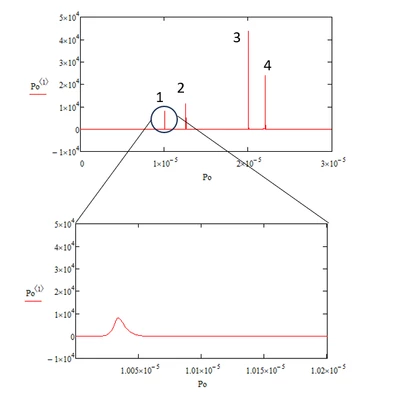
I have a dataset, and I need to calculate the areas of four regions within this dataset, as shown in the image.

I would like to use Mathcad's integration function to perform this calculation. How can I apply the integration function to the imported dataset in Mathcad?
J_power_0-1739606947857.png


Best answer by terryhendicott

Capture.JPG

2 replies

23-Emerald IV
February 15, 2025

I suppose you know, or at least have a way to determine, the range of index for each if the four regions. Then simply sum the numbers over the index range.

If you have a model that predicts the shape of the y values you could try a curve fit of the data with that model, and then use integration over your model function.


Success!

Luc

J_power11-GarnetAuthor
11-Garnet
February 15, 2025

I know the range over which I want to integrate, but I am unsure how to express the imported dataset as a function in Mathcad for integration. How can I define a function based on the imported data and then perform the integration?

J_power_0-1739609033065.png


21-Topaz II
February 15, 2025
25-Diamond I
February 15, 2025

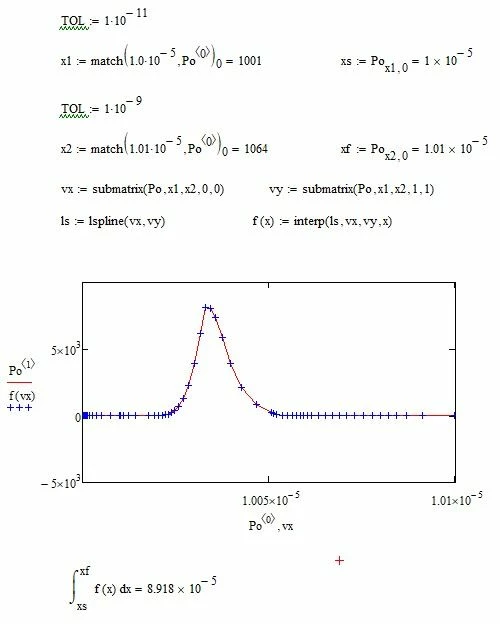
To be able to use Mathcad's numerical integration you have to turn your data into a function.

The easiest way (and I guess its as good as any as long as you don't know which function type to fit) is using linear interpolation:

Werner_E_0-1739614644864.png

Werner_E_1-1739615192256.png


Another way is to determine the position of the data in the matrix Po (the indices which relate to the desired limits of the integral) and use the trapezoid rule to calculate the integral.

Werner_E_0-1739623442832.png


MC15 sheet attached


J_power11-GarnetAuthor
11-Garnet
February 15, 2025

Thanks.


I know how to do it!