18-Opal
March 28, 2022
Solved

Never grasped how these loops work!

  • March 28, 2022
  • 3 replies
  • 1760 views

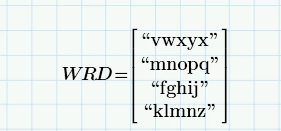
So I have some Random words:

ppal_0-1648509276086.png

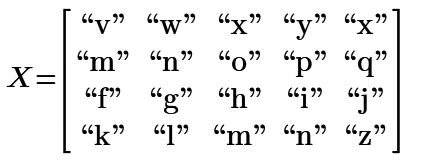
I want them as "v" "w" "x" "y" "x"

and "m" "n" "o"  etc.


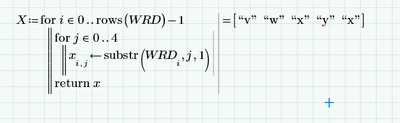
So I made
ppal_1-1648509380217.png

But I want it to go through the loops!.

I have no idea.

Best answer by ttokoro

image.pngimage.png

3 replies

18-Opal
March 28, 2022

Also can't spell.

ttokoro
21-Topaz I
ttokoro21-Topaz IAnswer
21-Topaz I
March 28, 2022

image.pngimage.png

t.t.
23-Emerald V
March 29, 2022

@ppal_255687 wrote:

So I have some Random words:

ppal_0-1648509276086.png

I want them as "v" "w" "x" "y" "x"

and "m" "n" "o"  etc.


So I made

ppal_1-1648509380217.png

But I want it to go through the loops!.

I have no idea.
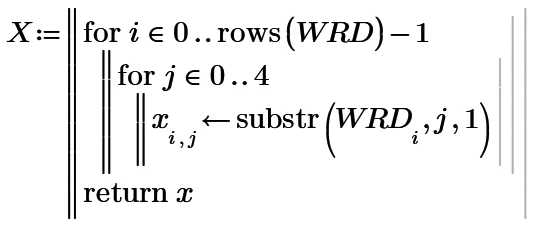

For those of you with Mathcad Express, here's one way of tackling the problem.


2022 03 29 a.png


Mathcad Express 7 worksheet attached.


Stuart

23-Emerald V
March 29, 2022

Forgot to add the "classic" Mathcad way of tackling this problem - good, old-fashioned range variables ...


2022 03 29 b.png


Stuart


(I've also corrected my typo in wrd)