1-Visitor
April 24, 2018
Solved

Old script mathcad needed help to convert to Mathcad Prime v3.1 research purpose

  • April 24, 2018
  • 3 replies
  • 9738 views

Hi,

I  recently obtained a research script based on mathcad (old version) by my colleague and i tried to follow the sequence using Mathcad Prime v3.1. But it shows error after copying the whole sequence on Prime. 

The aim is to produce several acceleration graph as seen in the file images.

The script image named after capture 1 to 4.

The error image i encountered was in Error 1.

Really appreciate if someone can rewrite it in Mathcad Prime version would be helpful for my research in earthquake seismic design.


Thank you.


Best answer by Werner_E

There are two errors:

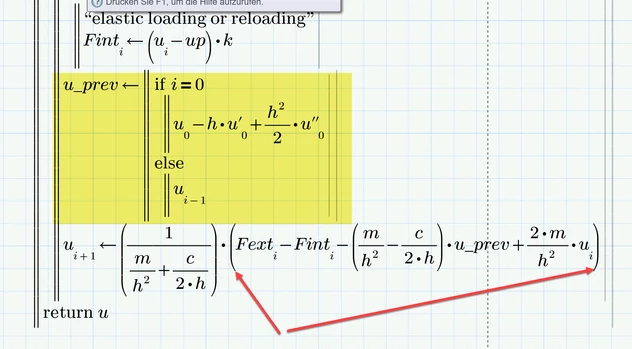
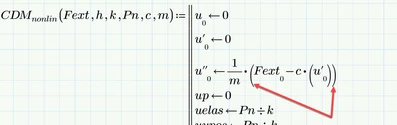
1) you have typed square brackets [ ] but you should only use normal parentheses ( ). Mathcad 15 and below will occasionally show nested parenthesis as mixed, square and round. But thats for display (and is not done in Prime). Always type ( ) in arithmetic expressions. Using [ ] in Prime means you are creating a matrix/vector.

You have used square brackets two times,

B1.png


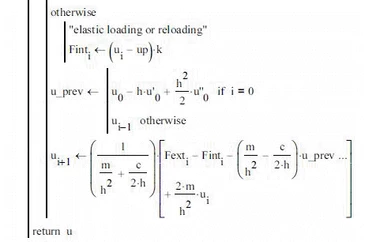
2) You got the structure for the assignment of a value to u_prev and u[i+1 completely wrong. This part of the routine is at the end of your capture1 and beginning of capture2 and should look like this:

B0.png

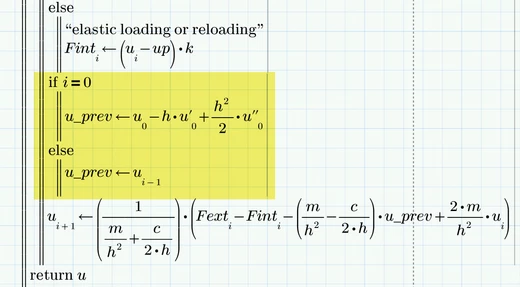
This is what that part of the routine should look like in Prime

B2.png

As an alternative you could also do it that way:

B3.png


I have not attached the corrected sheet because I am using Prime 4 and ridiculously Prime cannot save in older formats and you would not be able to use a P4 file with your P31.

Hope its clear what you will have to do.

3 replies

21-Topaz II
April 24, 2018

Hi,


Upload the original mathcad file if you have it to help the person who gets it working for you.  You can convert the sheet


experience problems when attaching a Mathcad sheet file ( .mcd, .xmcd or .mcdx) to the message then zip it first. To get the .zip file, use Windows Explorer, select the sheet file, right-mouse click and select "Send to" then "Compressed (zipped) folder". This results in a .zip file containing the worksheet that you can attach.


Cheers

Terry.

25-Diamond I
April 24, 2018

If you don't have access to the old Mathcad sheet because you only have the prints at least attach your attempt doing it in Prime (zip the file before attaching it).

You show the position of the error but not what the error message is. It may be a problem with Primes infamous auto labeling or you may have mixed up literal with matrix indices.

Jeremy1-VisitorAuthor
1-Visitor
April 24, 2018

Hi,


Thank you for the comment and advice.


Attached is the zip file for prime as requested.

25-Diamond I
April 24, 2018

OK, as far as I see all your problems come from using literal indices where you should have used matrix indices.

A literal index is what you get when you press Ctrl and - or chose "subscript" from the menu. What you then type as subscript is simply part of the variable name.

What is needed in your sheet are matrix/vector subscripts as they determine which element of a vector is meant.

You get a matrix index by typing [ or you can chose it from the operators menu in the first ribbon.


The optical difference is not that big - vector indices are a bit lower in Prime and if you click in the region you see a small square (left: literal, right: vector):

B.png

23-Emerald I
April 24, 2018

Looking at error 1.jpg  (I agree, whatever sheet you have would be better than pictures.)  your first error (the red boxes) is on I, where I goes from 1 to nstep.  But I see that you've define ORIGIN as 0 in error 1(2).jpg.  So there's one problem.


But why the box around i ?    I wrote it out:

Capture.PNG

No box!  Until I changed a label:

Capture1.PNG

Prime uses labels to differentiate between variables, constants, etc.  If i has two different labels, they are two different things.  Zip and send the file!

Jeremy1-VisitorAuthor
1-Visitor
April 24, 2018

Hi,


Thank you for the comment and advice.


Attached is the zip file for prime as requested.