Best answer by Werner_E

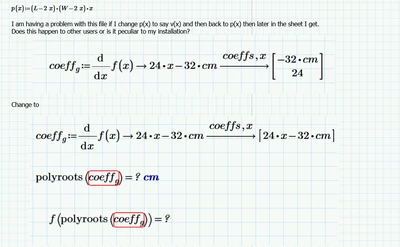
I loaded your sheet in Prime 6 and experienced the same problem.

The cause is, as so often in Prime when using the symbolics, the infamous auto-labelling "feature".

Sometimes checking the option "Units/Constants in symbolic mathematics" helps,  when using units, but most of the time it doesn't. On the other hand I think that it won't hurt to let this option enables by default.

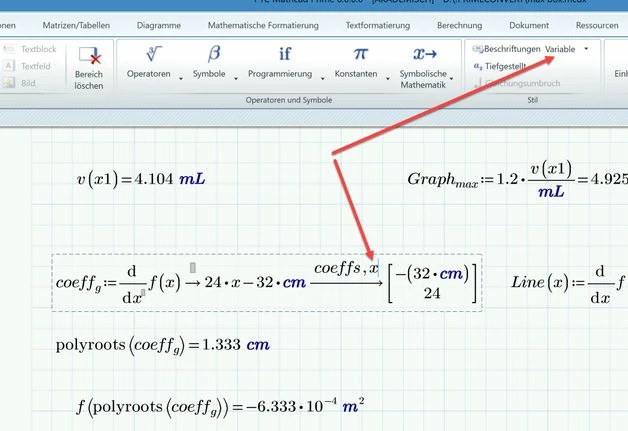
In your case the problem can be solved by manually labelling the "x" after "coeffs," to be a  "variable".
B.jpg

2 replies

ttokoro
21-Topaz I
21-Topaz I
May 6, 2022

ttokoro_0-1651799127911.png

ttokoro_1-1651799140660.png

Change above unit labels cm as unit only, not "auto".


t.t.
18-Opal
May 6, 2022

Did

ppal_0-1651799821429.png

Still get:

ppal_1-1651799848568.png


Werner_E25-Diamond IAnswer
25-Diamond I
May 6, 2022

I loaded your sheet in Prime 6 and experienced the same problem.

The cause is, as so often in Prime when using the symbolics, the infamous auto-labelling "feature".

Sometimes checking the option "Units/Constants in symbolic mathematics" helps,  when using units, but most of the time it doesn't. On the other hand I think that it won't hurt to let this option enables by default.

In your case the problem can be solved by manually labelling the "x" after "coeffs," to be a  "variable".

B.jpg