
13-Aquamarine
August 27, 2015
Question

Picture analysis

  • August 27, 2015
  • 2 replies
  • 2660 views

I would like to analyze some filters for the amount of debris present. However, I have never used Mathcad 15 for this in the past and would appreciate some help in the matter.

In picture "A" you can see a digital photograph with lower right corner some debris present (dark colored spot). However, most of the pictures are CT scanning pictures such as "B" where you can see the same debris as a light grey spot against the darker background.
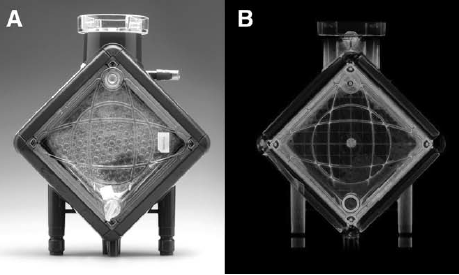
Is it possible to color the debris in some way so that I could calculate the amount of the filter surface covered with debris? I have to admit that I am a complete newbie in picture analysis. Thanks in advance for any help offered.

Filip

2 replies

23-Emerald I
August 27, 2015

Have you looked at the image processing E-book?  (under help.

24-Ruby IV
August 27, 2015

May be pictures from this article

УГАДАЙ ОБРАЗ

will be useful for You.

FDS13-AquamarineAuthor
13-Aquamarine
August 31, 2015

Dear Fred & Valery, thank you for your response. I tried based upon the image processing handbook to achieve my goals but didn't completely succeed. Probably in part because I have never done this type of analysis before. As you can see in the attached worksheet I can read in the picture and tried to color it subsequently. Unfortunately the color is not there. Positively the first picture (left) is a major improvement of the original. What I would like to achieve is to outline the whitish square and the darker spots in in to finally obtain a ratio between both. Can this be done? Would someone be so kind to help me with it?

12-Amethyst
August 31, 2015

I'm not sure if the contrast ratio is good enough for your purpose of separating the contamination of the filter.

The image processing pack has 2 functions that may be of use: quantize and binarize (Yuck).

In the attached example I have used binarize to extract the "background" at a high threshold (45) "background" image and the contaminant at a lower threshold (25).

There is then a function to remove the "background" image from the contaminant image.

The threshold levels appear to give a good (ish) removal , but its not perfect.

you can try various sets of threshold levels and perhaps the quantize function, but the fundamental problem may be that the grayscale levels for the wanted data & background data overlap.

there are a lot of other tools in the box that you could experiment with.

If you find a workable solution I would be interested in what worked.

regards

   Andy