3-Newcomer
January 11, 2023
Solved

Plot issue

  • January 11, 2023
  • 1 reply
  • 3174 views

Hello All,


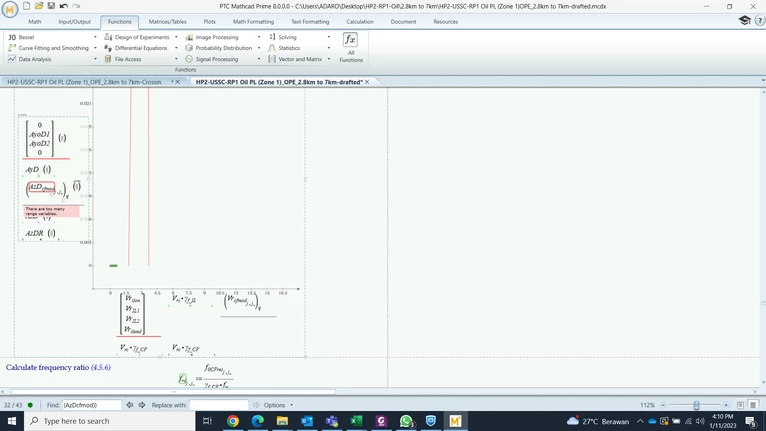
I just use Mathcad prime 8. I've got an issue where trying to plot in the graph and then get a notification (there are too many range variables) as shown in the snapshot below. Could you please help how to solve this issue.

Aries04_0-1673428484695.png


  Appreciate your help. 


Thanks,

Aries

Best answer by Werner_E

OK, the attached files are what I would call a stripped down sheet still showing the problem.

I often have to do Prime bashing here simply because Prime is so mediocre. But in this case Prime is pretty innocent. It's the fault of the author of the MC15 sheet, who made these terrible graphics. It is a paragon of all wrong and cruel abuse of ranges - really bad! In fact, one has to blame MC15 for accepting this.

Here's a little function that turns the nested matrices used in the graph into the apparently desired linear list of values. Whether the author of the file actually intended to create a list of 405 items here, many of which are identical, I cannot say. In any case, the graphic seems to show what is desired.
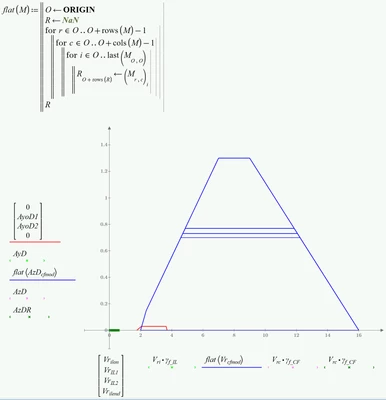

Werner_E_0-1673458526498.png


1 reply

25-Diamond I
January 11, 2023

We see the error at a variable with a lot of indices. We don't see if these are literal indices or vector/matrix indices. In case of matrix indices we also don't see what the variables used for them are - constants or ranges ...

Facit: you should attach your worksheet and not just a picture.

It might also help others debugging your sheet if you strip it down, delete all which does not deal with the erranous plot, delete the traces in the plot which do not fail, so that only a small, clear worksheet is left.

In case that two of the indices are matrix indices and ranges, Prime must throw an error (as this would mean that you are creating nested matrices) and you wold have to reason what you actually plan to plot.

Aries043-NewcomerAuthor
3-Newcomer
January 11, 2023

Hi, 


Thanks for your reply. 


Please find attached the worksheet.


Thanks,

Aries

Aries043-NewcomerAuthor
3-Newcomer
January 11, 2023

I faced the same problem. There is an area where defining a unit and conversion are made in version 15. I've tried to expand the "unit" area and delete all unit conversions. It works for me. However, a few units in the formula/result (e.g. kNm, MPa) of the worksheet need to be changed.

Hope this would reduce the work.


 Mathcad15

Aries04_0-1673449882473.png

Prime 8

Aries04_1-1673449915060.png


Example unit to be changed in the formula.

Aries04_2-1673450475116.png