
1-Visitor
October 16, 2018
Solved

Prime 4.0 Integration/Plotting Problem

  • October 16, 2018
  • 1 reply
  • 5910 views

I have defined a load function, which plots nicely:
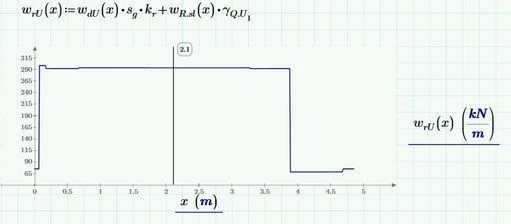
Integration 1.JPG


Then I find the shear force diagram by integrating the load function and considering reactions.  This also plots nicely:
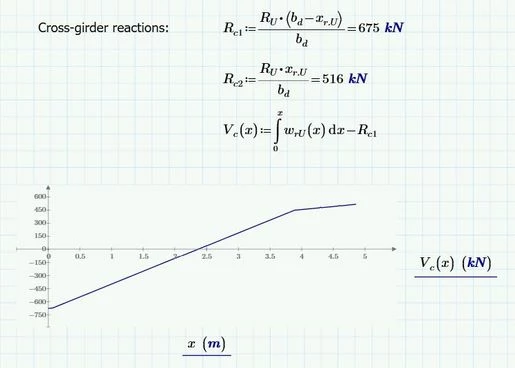
Integration 2.JPG


Finally, I want to find the moment diagram... should be just an integration of the shear force diagram... but Mathcad seems to get confused:

(100kNm is just an estimate for demonstration purposes)
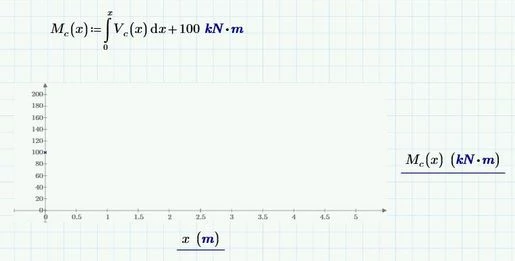
Integration 3.JPG

(Note the single point at 0, 100)


Am I doing something wrong, or is this a Mathcad problem?


The main source of my frustration is that the loading diagram 'works' and the shear force diagram which is based on it, also 'works' - why then not the bending moment?


Although I understand that posting the calculation file is preferred, I have not done so as it is over 25 pages long and almost every page feeds into these functions, eventually. 

Would anyone have any ideas of what I should check?


Best answer by Fred_Kohlhepp

You should have been able to integrate shear to get moment.  There may have been a point where you're shear equation would not evaluate; as long as you weren't calculating that exact point for the graph the graph would work but the integral would fail.


One of the useful "tricks" is to approximate the solved for moment equation with a polynomial.  Using "polyfit" you can easily find the appropriate order polynomial by plotting the error (difference in two values.)  Since polynomials integrate easily, further integrations (for slope and deflection) are much faster.  


At four minutes, and looking at your graph of shear, I'd be tempted to try for a "linterp" substitution for shear as well.

1 reply

25-Diamond I
October 16, 2018

Because of the dynamic unit check in Prime you should use "0 m" as the lower integral limit instead of just "0". This should do the job. Alternatively you may use "Zero" (note the capital 'Z').

Plotting M(x) will take a while as of the double integration done for every point. How long will depend on how "narrow" your range x is defined.


BTW - its a bad habit to use the same variable as integral limit and as variable of integration! You should rather use something like V(x):=integral_from_0m_to_x  w(xi)  d xi ( I usually use the greek xi but thats up to you).

Mathcad will usually do OK if you use the same variable (but you never know for sure) but from a math point of view its simply wrong doing so.


P.S.: I noticed that you seem to never close the threads you started (by chosing an answer as correct or setting the thread to assumed to be answered) and sometimes you never come back at all after your initial question. Not a nice habit.

https://community.ptc.com/t5/PTC-Mathcad/Output-of-function-looks-like-an-array-but-can-t-be-assigned-to/m-p/497428/highlight/true#M178013

https://community.ptc.com/t5/PTC-Mathcad/Prime-4-0-Automatic-Image-Resizing/m-p/486631/highlight/true#M173663


1-Visitor
October 16, 2018

Thank you, Werner, but neither using 0 m, nor "Zero" changed the result.


I have also tried using a different variable as described by yourself here: https://community.ptc.com/t5/PTC-Mathcad/Maximum-of-graph/td-p/220792 to no avail.

Edit: I am assuming I need to define a 'xi' range as well?  So it means I'm finding the integral from 0 to range 'x' for a function varying by the range 'xi'?


As for my bad habits - I apologise.  I have marked a solution for the first one (the other didn't really have a solution and I couldn't find how to set it to "assumed to be answered").  Will look for others.


1-Visitor
October 16, 2018

I suspect the problem is in the preceding functions which feed into the load function... I did a quick check:

Integration 4.JPG

I assume this is due to the discontinuous load functions, which Mathcad is unable to deal with properly.


An example of one of these functions is:

Integration 5.JPG