
8-Gravel
December 13, 2024
Solved

Query an excel table to see if a value exists

  • December 13, 2024
  • 1 reply
  • 1275 views

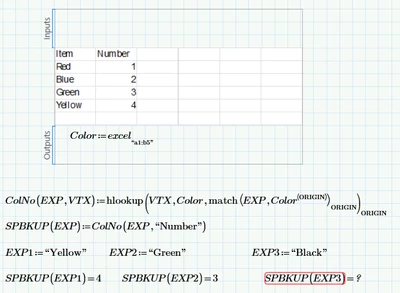
working on a table with a long list of items. need to query the table to see if an item is listed without erroring out every time.  
EP_10996709_0-1734110800243.png


how can I check to see if "Black" is on the list and return a "N/A" or something I can use?


Any help will be appreciated.  Ed.
Best answer by Werner_E

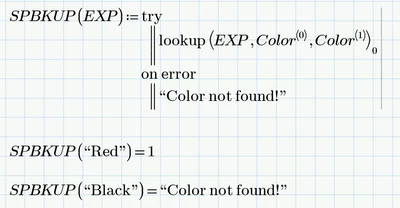
You may use "try... on error ..." in your function SPBKUP to catch the error and return an appropriate result like NaN or a text message.

You may also consider using just lookup in your function ColNo instead of that combination of hlookup and match..

Actually I see no need for the function ColNo.

You could simply use

Werner_E_0-1734113258903.png

Of course you can replace indices 0 and 1 by ORIGIN and ORIGIN+1 to make the function ORIGIN independent.


For further help and future questions pls attach your worksheet and state which version of Prime you are using.

1 reply

Werner_E25-Diamond IAnswer
25-Diamond I
December 13, 2024

You may use "try... on error ..." in your function SPBKUP to catch the error and return an appropriate result like NaN or a text message.

You may also consider using just lookup in your function ColNo instead of that combination of hlookup and match..

Actually I see no need for the function ColNo.

You could simply use

Werner_E_0-1734113258903.png

Of course you can replace indices 0 and 1 by ORIGIN and ORIGIN+1 to make the function ORIGIN independent.


For further help and future questions pls attach your worksheet and state which version of Prime you are using.

8-Gravel
December 13, 2024

Working with Prime 8.   see attachment. should be moving to 10 next week. 


23-Emerald V
December 13, 2024

As Werner says, you can use the try programming operator.  One possibility for a not-found value you can easily test and which has certain other advantages (and disadvantages) is the NaN, meaning Not a Number.   You can use the built-in function IsNaN to check whether a value is a NaN.


2024 12 13 C.png


Mathcad Prime 10 worksheet attached.


Stuart


Mathcad Prime 10 (and probably 8 ) Help on NaN.


About the NaN (Not a Number) Built-In Constant
 
The built-in PTC Mathcad constant NaN represents a missing or faulted value. It is useful for representing missing values in data sets, because it can be an array entry that you can easily distinguish from other matrix contents. It is also useful because PTC Mathcad matrices cannot have empty placeholders. The constant undefined represents missing values in symbolic calculations.
 

NaN and undefined

 
The numeric value of NaN is NaN. In other words, if you type NaN= in a worksheet, PTC Mathcad returns NaN and assigns it the Constant label.

When you evaluate NaN symbolically, the result is the undefined constant.

The numeric value of undefined is NaN. In other words, if you type undefined= in a worksheet, PTC Mathcad returns NaN and assigns it the Constant label.
 

NaN Related Function


You detect NaNs using the IsNaN function, because boolean comparison operations can only be used on numbers. If you redefine the constant name NaN to some other value, it is no longer a NaN, and the IsNaN function returns 0. A NaN can only be processed by functions specifically written to use it. Other functions may return errors or incorrect results if passed a NaN.
 
The NaN-related functions:
Work exclusively with the NaN built-in constant.
Write the NaN built-in constant to one or more specified array elements. Otherwise, the functions read one or more specified array elements and check their content for the NaN constant.
Can filter out specified rows that contain the NaN constant.
Ignore anything that is not a NaN constant — such as numbers or strings.