
8-Gravel
December 13, 2024
Solved

Query an excel table to see if a value exists

  • December 13, 2024
  • 1 reply
  • 1275 views

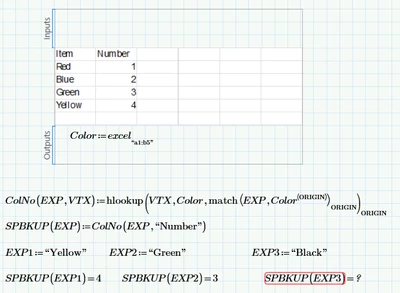
working on a table with a long list of items. need to query the table to see if an item is listed without erroring out every time.  
EP_10996709_0-1734110800243.png


how can I check to see if "Black" is on the list and return a "N/A" or something I can use?


Any help will be appreciated.  Ed.
Best answer by Werner_E

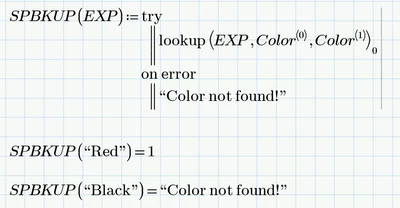
You may use "try... on error ..." in your function SPBKUP to catch the error and return an appropriate result like NaN or a text message.

You may also consider using just lookup in your function ColNo instead of that combination of hlookup and match..

Actually I see no need for the function ColNo.

You could simply use

Werner_E_0-1734113258903.png

Of course you can replace indices 0 and 1 by ORIGIN and ORIGIN+1 to make the function ORIGIN independent.


For further help and future questions pls attach your worksheet and state which version of Prime you are using.

1 reply

Werner_E25-Diamond IAnswer
25-Diamond I
December 13, 2024

You may use "try... on error ..." in your function SPBKUP to catch the error and return an appropriate result like NaN or a text message.

You may also consider using just lookup in your function ColNo instead of that combination of hlookup and match..

Actually I see no need for the function ColNo.

You could simply use

Werner_E_0-1734113258903.png

Of course you can replace indices 0 and 1 by ORIGIN and ORIGIN+1 to make the function ORIGIN independent.


For further help and future questions pls attach your worksheet and state which version of Prime you are using.

8-Gravel
December 13, 2024

Working with Prime 8.   see attachment. should be moving to 10 next week. 


25-Diamond I
December 14, 2024

So I wonder why you did not try the function I posted?

It works as expected:

Werner_E_0-1734147482235.png