
1-Visitor
June 10, 2013
Question

RLC Circuit Analysis
  • June 10, 2013
  • 2 replies
  • 39116 views

By Thomas Devaraj

RLC.png

About this worksheet:

  • Calculates the impedances across frequencies in a RLC passive crossover network 
  • Applicable in electrical engineering, electronics and high-tech industries, speaker design 
  • Performs using Excel, frequency, resistance, capacitance, inductance, angular frequency, reactance, impedance, etc.

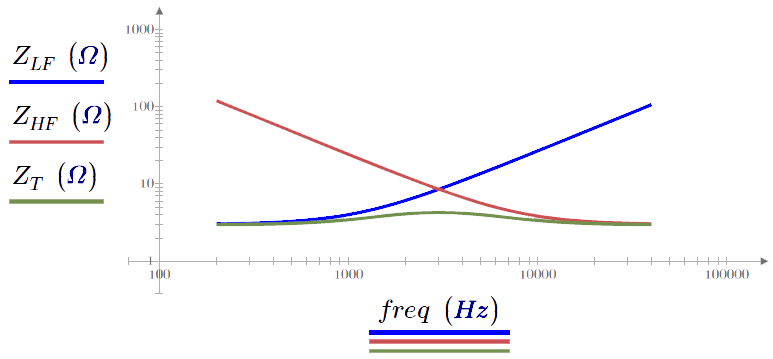
This worksheet using PTC Mathcad includes an example of an engineer designing a hi-fi speaker that must meet a certain frequency response. The horizontal trend must be over the whole spectrum of the audible range with a tolerance of +/- 1dB. Because at least two transducers are needed, you must look at the case in which there is both a low and high frequency driver. You can calculate the impedances of each to determine the overall frequency response.  This worksheet uses data from excel and plots the solutions.

Download and explore this worksheet yourself! You can download a free lifetime copy of PTC Mathcad Express and get 30 days of full functionality.

2 replies

1-Visitor
June 29, 2020

Hi


I am very new to Matchcad so these questions are very basic:

1. ORIGIN := 1 - What is it for?

2. Why there is an arrow above the absolute values of ZLF, ZHF and ZT?

3. Is "j" a reserve parameter in Matchcad for SQRT(-1)?


Thanks

Dat N

23-Emerald IV
June 29, 2020

Welcome

ORIGIN defines the starting index of vector and matrix elements. By default it is set to 0.

The arrow is to vectorize an expression.  Look that up in the help.. without vectorization,  using the |x| operator would give the length of the vector, producing a single number. With vectorization the result of that same operator is a vector with the absolute values of each of the elements.

The value i is the imaginary unit, such that i squared results in -1. You can use j for the same.


Success! 

Luc

1-Visitor
July 21, 2020

Hi Luc,


With your helps, I was able to plot the RC circuit in frequency domain. The problem is I would like to have the minor and major X-axis in log scale. How do you do that? 


I searched in this Forum and found a solution Grids_for_Prime.mcdx, unfortunately it is a mess and I do not have a clue what is going on. Is there a better solution to plot log scale on the X-axis? Y axis is linear so I do not have problems with it. 

Also from Grids_for_Prime.mcdx:

why we have this: G <--- [Nan Nan]

if axis = "y" and the following 2 lines (augment), can you explain what that means?


Thanks

Dat N


14-Alexandrite
August 23, 2020

Marin,


I know you have an RLC file on the PTC.

I have a circuit problem I have gone over for a week. Could not get the answer.

I forced the process to make the answer work but that is make fit and I know its wrong.

I started on it with the differential equation mesh (loop equation) method.

I did not get matching answers. Then moved to the simpler initial condition method this was where I got closer. Case the answer maybe wrong, not likely. 


Basically its the time constants here in the circuit there are two.

If you go by the usual RC  and RL time constants usually the simple case is either one or the other is used, here its both. Circuit reduction helps but this circuit's situation is the current in each branch.


If you got can do it easily or are interested to solve it.

I like to see the solution.


Regards,

Karl.

25-Diamond I
August 23, 2020

It looks like you are looking for a symbolic solution. Unfortunately Mathcad and also Prime can't solve an ODE or a system of ODEs symbolically. You may get a numeric solution, though, using a solve block with "odesolve".


One way to get a symbolic solution is to setup the equations in the Laplace domain and use Mathcads "invlaplace":

Werner_E_0-1598196646456.png


Don't mind the red error when transforming i2. It the annoying "the expression is too large to display" message. In this case you could solve it by using "simplify,max" instead of just "simplify".

14-Alexandrite
August 24, 2020

At least I know the answer is correct.

Setting up in ODE in the time-domain with substitutions for some variables did not do it for me.

It can be done. I may had made an error so it was lots of hours there. But you're saying its not possible and that only thru Laplace transforms could it be solved. That maybe true. The equation is so short. Paper and pencil cant do it? Meaning plain ODE. 


The other way is thru the initial conditions and creating equations for integrating and differentiating terms. Meaning circuit operation step by step. I did that and got some numbers similar, but explaining the workings of the circuit was not straight forward - robust engineering. Something like forced the solution, but how does that match the circuit operation correctly, to meet the answer. So that was really what I was looking for the manual steps. However, you showed me there are improved features in Prime 6 now that's great. I may have to leave this problem out until I can fix it, frame it up, the solution like a painting. More frustrating then anything that it has two time constant and the circuit's operation.


Thanks.